

Companies often start with a temporary email setup. Over time, this leads to missed messages, security issues, unclear ownership, and emails ending up in spam.
The fix is rarely “more tools.” It typically starts with a domain-based email setup and a reliable provider. From day one, you also need proper security settings.
Below, we explain the essentials. We also show how Makdos supports you with secure email hosting, simple management, and local infrastructure.
What Is Corporate Email?
Corporate email is a professional email address and mailbox service tied to your company’s domain name. In plain terms, it means you send and receive messages from addresses like name@yourcompany.com rather than generic inboxes.
A corporate setup typically includes:
- A custom domain for your email identity
- One or more email account mailboxes for employees and departments
- Administrative control (create, disable, reset, archive)
- Security and inbox protection features not included in free email services
That’s why it’s called domain-based email. Your domain is not just your website identity; it also represents your communication identity.
If you’re looking for a small change with big impact, start with your customer-facing email addresses. Switch addresses like info@ and sales@ to professional email accounts on your own domain. It instantly improves how professional your business looks.
Business Email vs Free Email: What’s Really Different?
Free email services are fine for personal use. But business email has different needs: ownership, tracking, policy controls, and predictable support.
Here are the practical differences:
Domain identity and trust
- Corporate email: Your brand is visible in every message (@yourcompany.com).
- free email: Your address promotes a third-party domain, not your brand.
Ownership and operational control
With a corporate setup, the company owns the mailbox. That matters when:
- Someone changes roles
- A teammate leaves
- You need to recover an email thread
- You need to reset credentials quickly
With personal inboxes, you lose that control—and it becomes a business risk.
Customization and team workflows
Business email systems are built for teams. A proper setup supports:
- Department addresses (e.g., sales@, support@)
- Routing and forwarding rules
- email aliases for shared workflows
- Group distribution and internal organization
Support and accountability
When email becomes critical infrastructure, you need real customer support. A paid solution usually comes with clear service quality standards. This is especially important for SMEs and e-commerce teams that cannot afford email downtime.
Key Benefits of Email Hosting as Your Business Grows
A well-chosen email hosting solution doesn’t just “host mail.” It reduces friction across sales, customer support, and daily operations.
1) A consistent professional image
A branded inbox functions like a digital signature. Every quote, invoice, proposal, and support message reinforces your identity.
2) Better delivery and fewer “missing emails”
You can configure email hosting systems with SPF, DKIM, and DMARC. These settings reduce spoofing and increase trust with receiving mail servers.
Email verification settings are powerful, but configuration mistakes can hurt email delivery. If you’re unsure, use a provider or support team that can validate DNS records before you go live.
3) Clear internal communication and knowledge retention
When email lives inside a managed system, you build an institutional memory. New hires can inherit shared inboxes, managers can keep communication running smoothly, and critical threads don’t disappear.
4) Storage and backup that fits real business needs
Many businesses outgrow consumer inbox limits quickly—especially with attachments, order documents, and vendor files. Corporate email hosting plans typically include larger quotas and backup options so you’re not constantly deleting messages.
5) Integrated productivity options
Many email solutions include calendar, contacts, and shared resources. Even if you don’t need full collaboration features today, the option becomes valuable as teams expand.
Security and Compliance Responsibilities
Email is one of the most targeted business systems because it’s where approvals, invoices, and sensitive conversations live.
A serious email hosting service should help you implement:
Encryption in transit and secure access
Look for SSL/TLS support and secure login processes. This reduces interception risks when employees use mobile or public networks.
Spam and phishing protection
A modern setup includes a spam filter and strong anti-spam protection. These tools block suspicious emails before they reach users. That matters for everyone—but especially finance teams, e-commerce operations, and agencies handling multiple clients.
Policy-based access and oversight
You should be able to:
- Enforce strong passwords
- Reset access fast
- Disable accounts immediately
- Limit risky behaviors where needed
Archiving and audit-readiness
Businesses often need to retain communications for business, contractual, or regulatory reasons.
Using personal inboxes for company contracts, invoices, or customer data can create serious governance and security gaps. If your business must follow data protection laws, such as KVKK in Türkiye, email management becomes critical. Treat email retention and access control as part of your compliance strategy. This section is for general information only and not legal advice.
Here’s a practical takeaway. Your email hosting provider should offer secure storage, controlled access, and reliable recovery not just basic sending and receiving.
Brand Image and Customer Confidence
Customers judge credibility fast—often before they even visit your website.
If a customer receives a payment request or a support message from a generic inbox, it can trigger doubt. With a branded address, the message reads as official communication from an established organization.
This is especially important for:
- E-commerce brands: order updates, returns, payment notices
- Agencies: client approvals, assets, invoices, coordination
- SMEs and corporate teams: supplier communication, procurement, and proposals
Quick credibility checklist
A professional setup typically includes:
- info@yourdomain.com for general inquiries
- sales@yourdomain.com for lead flow
- support@yourdomain.com for customer support tickets
- Individual employee addresses for accountability and clarity
Choosing Email Hosting Options and the Right Hosting Plan
Not all email hosting options are equal. Before you choose a hosting plan, define what matters for your daily work.
What to compare in email hosting plans
Use this checklist when comparing email hosting plans:
- Security: encryption, firewall options, spam protection
- Admin panel: how easy it is to manage users and policies
- Backups: included or optional; recovery simplicity
- Scalability: add users quickly as your team expands
- Support: response time, channels, experience
- Device compatibility: webmail, mobile, desktop (IMAP/SMTP/POP3)
Common mistakes businesses make
- Treating email like an afterthought (until a crisis happens)
- Using free inboxes for invoices or customer data
- Not setting up authentication records (reduced inbox delivery)
- Not planning for employee turnover (lost access, lost history)
The goal: Choose an email hosting solution that reduces business risk while keeping daily management simple.
Makdos Corporate E-Mail: A Reliable Email Hosting Service for Growing Teams
Once you understand the value of corporate email, the next step is choosing the right provider. That provider should match your workflow, budget, and security needs.
Makdos provides email solutions built for everyday business use. They are ideal for SMEs, e-commerce teams, and agencies that want a clean setup and reliable support.
Key advantages you can highlight in your English content:
- Local infrastructure: service designed for businesses that prefer hosting and storage aligned with Türkiye-based operations
- Robust management: create, disable, and manage users without complexity
- Robust security features: firewall protection options, encryption, and layered spam controls
- Spam protection: helps keep inboxes clean and reduces phishing exposure
- Backup support: reduces the impact of accidental deletion or data loss
- Always-on help: accessible customer support for setup and troubleshooting
Built for scale when your business grows
One of the most practical benefits of email hosting is how smoothly it scales. As your business grows, you can add users and create departmental addresses. You can also apply policies consistently without rebuilding your communication system.
Departmental workflows with aliases
Makdos makes it easy to create mailboxes and email aliases for specific use cases:
- billing@ for invoices
- returns@ for e-commerce operations
- hr@ for applications
- projects@ for agency and client coordination
Technical Box: A Clean Setup Checklist for Email Hosting
Use this checklist to set up email hosting with minimal risk and maximum clarity.
1) Secure your domain and DNS access
- Confirm you control the domain registrar/DNS panel for your custom domain.
- Decide who owns DNS access internally (avoid “one person only” access).
2) Pick the right plan and create accounts
- Choose a hosting plan based on user count, mailbox needs, and support requirements.
- Create each email account with role-based naming (e.g., name.surname@).
3) Configure DNS records (email delivery + routing)
- Add MX records for mail delivery.
- Add SPF to declare authorized senders.
- Enable DKIM to sign outgoing mail.
- Add DMARC to reduce spoofing and gain reporting visibility.
4) Turn on security basics
- Enforce strong passwords and reset policies.
- Enable spam filter settings and anti spam protections at the domain level.
5) Connect devices and apps
- Configure webmail and client access (IMAP/SMTP/POP3).
- Test login on desktop and mobile before migrating the team.
6) Run a real-world test
- Send messages to Gmail/Outlook/Yahoo recipients.
- Confirm important emails are not going to spam.
- Validate forwarding rules and email aliases.
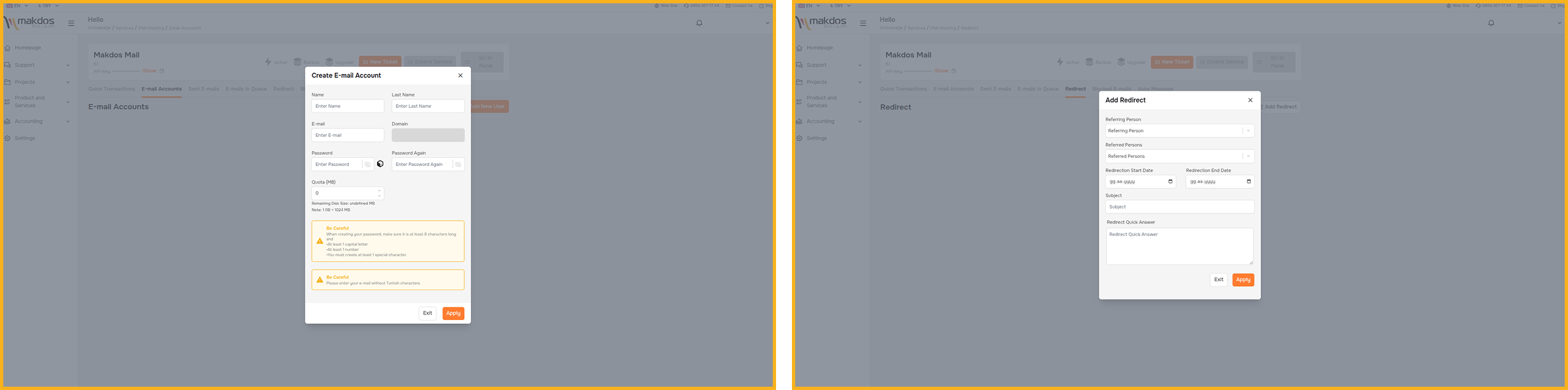
Makdos Help Center and Video Support
Switching to corporate email is straightforward—but questions happen during setup, migration, or daily management. Makdos supports teams with:
- A structured Help Center (step-by-step guides)
- Visual documentation for common actions (create users, reset passwords, forwarding)
- Video tutorials for people who prefer learning by watching
This matters because most issues aren’t “big.” They’re small day-to-day tasks that need quick resolution: adding a new teammate, changing access, or adjusting spam settings.
A quick note for marketing teams: consent management and IYS
If you send commercial messages (campaigns, announcements, promotions), email is only one part of the process. You also need permission governance.
Makdos offers an IYS (Message Management System) service to help businesses manage communication permissions in a centralized way.
Conclusion
Email hosting isn’t just an inbox choice it’s brand identity, business control, and risk management in one. With the right email hosting plan, you gain structured management and stronger security. You also deliver a more professional customer experience than free inboxes.
Start with a custom domain and a professional email address. This strengthens credibility, lowers phishing exposure, and keeps communication under your control.
Ready to upgrade from free email to business-grade communication? Explore Makdos Corporate E-Mail and choose a plan that fits your team’s size and security needs.