

Do not confuse web hosting with a domain name. Your domain is your address (like a street name). Your web hosting service is the building where everything actually exists your files, database, emails, and configurations.
This guide explains what web hosting is, how it works, the different types, and how to choose the right plan. We’ll cover the essentials of security and performance, and how Makdos helps businesses grow with reliable hosting services.
What Is Web Hosting?
Web hosting stores your website on a server so people can access it online.
A typical website includes:
- HTML/CSS/JavaScript files (the front-end)
- Images and media
- A database (common for CMS sites like WordPress)
- Server-side code (PHP, Node.js, etc. depending on your stack)
To keep a website online, it must run in a stable setup with backup power and internet connection. That’s why professional hosting services exist.
Buying web hosting means renting server space and resources for your website. Many providers host multiple websites on one server but keep each account separate.
Hosting becomes important the moment you prioritize outcomes fast page loads, secure customer data, and consistent uptime. Hosting is invisible until your site slows down or stops working.
How Does Web Hosting Work?
To understand web hosting, it helps to follow a real visit step by step:
- A user types your domain into their browser.
- DNS directs the browser to your host server’s IP address.
- The browser sends a request to the server.
- The server processes the request (and database queries, if needed).
- The server returns the response your page files to the browser.
- The browser renders the page and the user sees your website.
This happens in milliseconds when your infrastructure is healthy.
A good web hosting setup is a mix of hardware and software working together:
- Hardware: CPU, RAM, SSD/NVMe storage, network equipment
- Software: web server (like Apache or Nginx), database engine, caching layers, control panel tools
The “best” setup depends on your site’s traffic, the applications you run, and how much control you need.
Servers and Data Centers
The server that hosts your website is not a normal office computer. Hosting servers run all the time and handle high traffic. They sit in data centers where the environment is engineered for stability:
- Redundant power lines, UPS systems, and generators
- Cooling and air circulation designed for 24/7 workloads
- Physical security and access controls
- High-bandwidth internet connections
The system prevents downtime, so your site stays online.

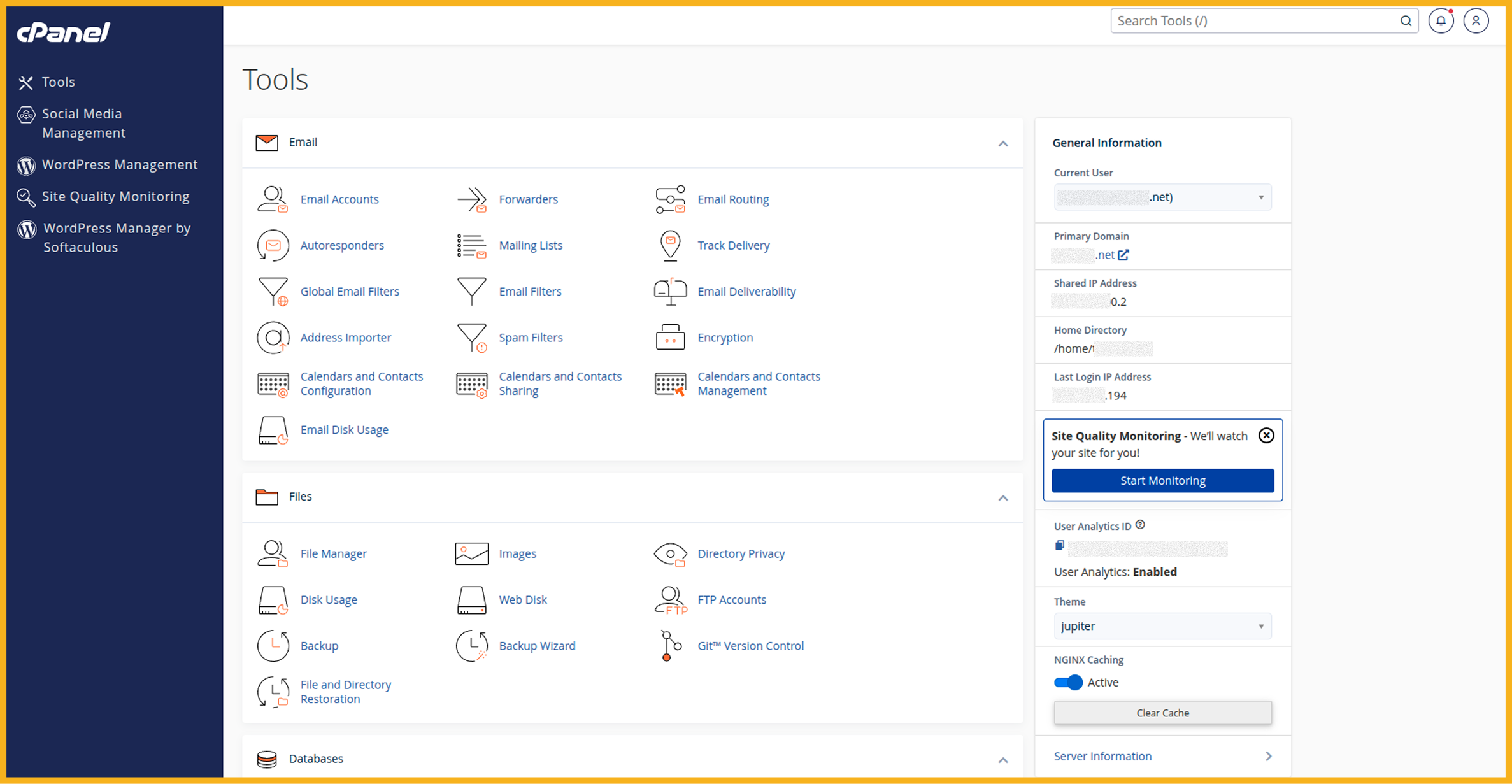
Hosting Control Panels
Most businesses want a solution that’s simple to manage. That’s where control panels come in.
A control panel lets you manage common hosting tasks without touching code or the command line:
- Upload files
- Create email accounts
- Manage databases
- Set up SSL
- Configure DNS entries
- Restore backups
cPanel is one of the most popular options on Linux hosting, while Plesk is common on Windows-based environments. The key advantage is that these tools simplify hosting for non-technical teams.
Types of Web Hosting
Choosing the right type of web hosting depends on your site’s size, traffic, and flexibility needs. Below are the most common options.
Shared Hosting
Shared hosting means many websites run on the same physical server and share its resources. This option is typically the most cost-effective entry point.
Best for:
- Small business sites
- Low-traffic blogs
- Early-stage projects
Pros:
- Affordable web hosting pricing
- Simple setup and maintenance
- Often includes a control panel like cPanel
Cons:
- Performance can fluctuate if another site on the server consumes heavy resources
- Limited control over server settings
- Not ideal for demanding apps or sudden traffic spikes
Shared web hosting can be a great start. But if your business grows, you may outgrow shared limits.
VPS Hosting (Virtual Private Server)
A VPS is a virtual private server created by splitting one physical server into multiple isolated virtual environments. Each VPS has dedicated resource allocations (CPU/RAM/storage), so neighbors are less likely to impact you.
Best for:
- Growing SMBs
- Developers needing more control
- Businesses running custom apps
Pros:
- More consistent performance than shared hosting
- Greater control and flexibility
- Scales more easily with your needs
Cons:
- You may be responsible for server management unless you choose managed hosting
- Higher cost than shared hosting
If shared hosting is no longer enough, a VPS gives you more control and better stability.
Dedicated Server (Physical Server)
Dedicated hosting means you rent an entire physical server for your own use. You get dedicated CPU, RAM, storage, and network resources.
Best for:
- High-traffic e-commerce
- Enterprise applications
- Performance-critical systems
Pros:
- Maximum performance and control
- Custom security and configuration options
- Ideal for strict compliance or special workloads
Cons:
- Usually the highest cost
- Requires deeper technical expertise (or management support)
Dedicated infrastructure is the “top tier” option when you need maximum reliability and control at scale.
Cloud Hosting
cloud hosting runs your site on a cluster of servers instead of relying on a single machine. This design supports higher availability and flexible scaling.
Best for:
- Sites with seasonal spikes
- Businesses expecting fast growth
- Projects needing high availability
Pros:
- Scales up/down with demand
- Reduces single-server downtime risk
- Often supports flexible billing models
Cons:
- Can be harder to understand
- Some plans require careful configuration to control costs
Cloud hosting is often ideal when you want resilience and scalability without committing to one fixed server forever.
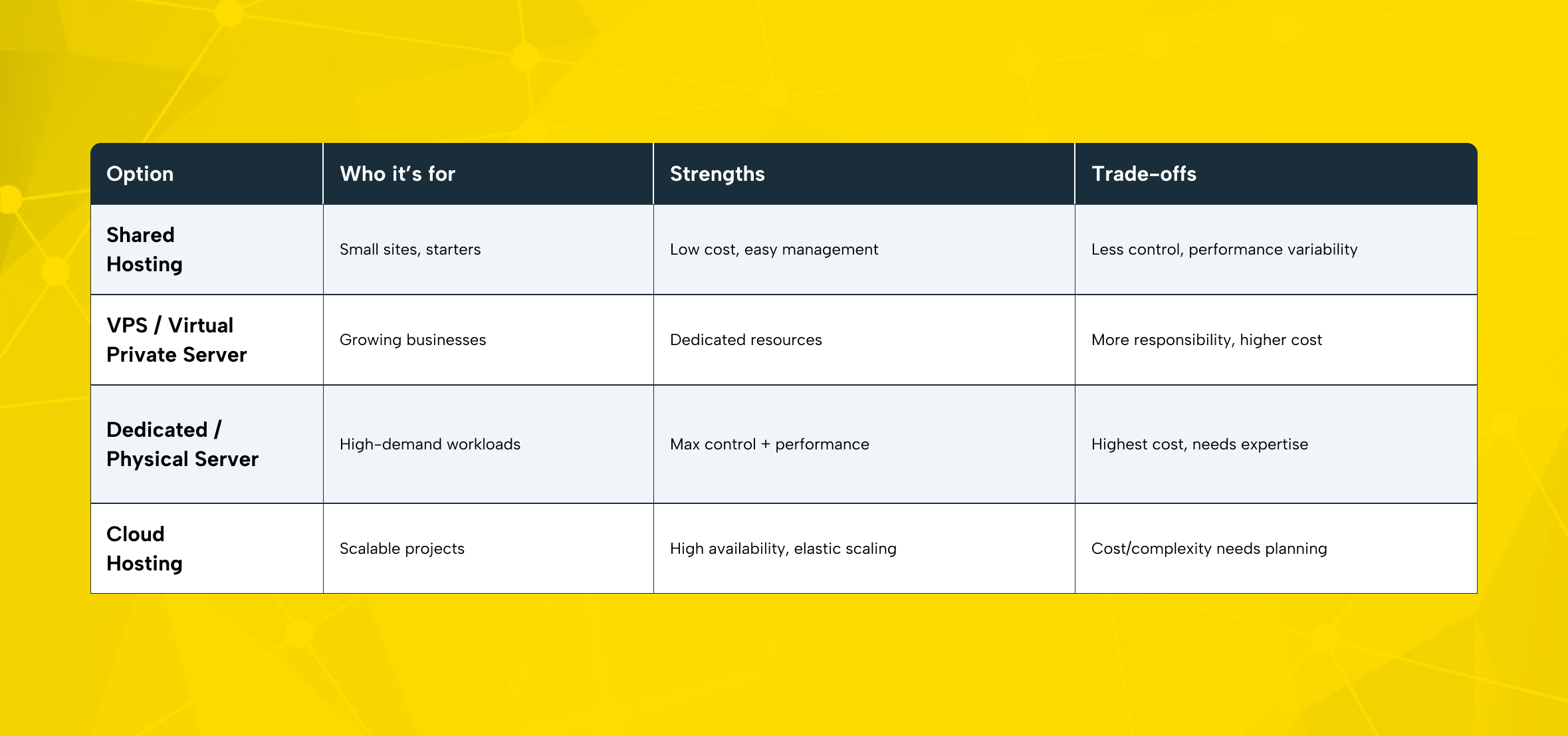
A Quick Comparison Table
Below is a practical overview to help you match your needs to the right web hosting plan:
Web Hosting Security Basics
Security isn’t optional anymore. Even a basic website can attract bots and hacking attempts. Your web hosting service plays a major role in protecting your site.
SSL and HTTPS
SSL encrypts the data moving between a visitor’s browser and your server. That matters for logins, contact forms, customer details, and payments.
Today, SSL is also a trust signal. Visitors hesitate when they see “Not secure” warnings in the browser. Search engines also favor secure sites in many contexts, so SSL supports SEO goals as well.
Many providers now include free ssl certificates, usually through Let’s Encrypt. When you compare hosting services, ensure SSL is part of your baseline either included or easy to add.
Treat HTTPS as the default. If your website collects any user data forms, accounts, payments SSL is not “extra.” It’s a baseline requirement for trust and security.
DDoS Protection, Firewall, and Malware Scanning
A DDoS attack floods your site with traffic to make it unreachable. Good hosting services include network-layer protection and filtering to block suspicious traffic before it reaches your website.
You should also evaluate:
- Firewall capabilities
- Malware scanning and cleanup options
- Patch and update practices
These features protect your uptime, your reputation, and your customer experience.
Backups: Your Last Line of Defense
Even with strong security, things can still go wrong human error, plugin conflicts, failed updates, or unexpected issues.
That’s why backups matter. Look for:
- Automated daily/weekly backups
- Easy restore points
- Off-server backup storage when possible
You can also take manual backups from your control panel for critical milestones (like before a big update).
Never run a business website without backups. If your host can’t explain their backup policy, that’s a serious risk especially for e-commerce.
Web Hosting Performance: What Really Impacts Speed
Visitors expect fast sites. Performance affects customer trust, conversion rates, and SEO. Your hosting foundation heavily influences how quickly your pages load and how stable they remain under traffic.
Hardware: SSD/NVMe, CPU, RAM
Your site’s speed depends on the resources available to it. SSD and NVMe storage reduce read/write delays. Adequate CPU and RAM prevent slowdowns during peaks.
Modern hosting should handle real traffic, not just basic requirements.
Location and Network Capacity
Latency matters. If your customers are in Türkiye, hosting your site close to that audience often improves response times.
Network capacity also matters. High-traffic moments (campaigns, launches, promotions) can stress weak infrastructure. Strong providers build network redundancy and bandwidth headroom into their platform.
Software Optimization: Caching and Modern Protocols
Even strong infrastructure needs correct configuration.
Common performance boosters include:
- Caching layers (page caching and object caching)
- HTTP/2 and HTTP/3
- Compression (gzip or Brotli)
- OPcache for PHP environments
These tools reduce server load and speed up delivery.
Use this quick list to improve performance on most website hosting setups:
- Enable caching (server-side + CMS plugin caching if applicable)
- Turn on HTTP/2 (and HTTP/3 where supported)
- Use compression (gzip/Brotli)
- Keep PHP/runtime versions updated
- Optimize images and use a CDN if your audience is broad
- Monitor CPU/RAM usage during peak times
- Upgrade your web hosting plan before major campaigns
When Your Plan Is Too Small
Performance isn’t only about tuning. Sometimes you simply outgrow your package.
If you see frequent slowdowns, timeouts, or resource caps, it may be time to upgrade. Good providers make scaling easy so you can increase resources without painful migrations.
If you have seasonal peaks (e-commerce sales, campaign traffic, TV/social media exposure), plan scaling in advance. Upgrading early is cheaper than losing customers to a slow or unreachable site.
How to Choose the Right Web Hosting Plan
The market is crowded. Many offers look similar until you read the fine print. Use the checklist below to pick a web hosting plan that fits your business goals.
1) Start with a Needs Analysis
Ask:
- What kind of site do you run (corporate, e-commerce, blog, SaaS)?
- How much traffic do you expect now and in 6–12 months?
- Do you need special software or server settings?
- Will you host one site or multiple websites?
A realistic needs analysis prevents two common mistakes:
- Buying too small and getting stuck
- Overpaying for unused capacity
2) Match the Hosting Type to Your Growth
In general:
- Shared hosting works for simple sites with stable traffic
- A VPS or virtual private server fits growing projects that need control
- A dedicated physical server fits high-demand workloads
- cloud hosting fits fast scaling and high availability needs
If you use WordPress, choose hosting made for WordPress to get easier updates and better performance.
3) Uptime and Support Channels
Look for uptime commitments and real support access. When your site is down, fast help matters.
Check if the provider offers:
- 24/7 support
- Ticket system + live chat
- Clear response expectations
- Documentation and onboarding guidance
Support should be accessible and competent especially for non-technical teams.
4) Security Features Built In
At minimum, your plan should include:
- SSL (ideally free ssl certificates)
- Backup options
- Firewall / attack filtering
- Monitoring practices
5) Control Panel and Ease of Use
A control panel like cPanel can save hours each month. It’s one of the biggest “quality of life” features in web hosting.
If you want maximum simplicity, prioritize a user friendly interface, one-click installers, and a well-designed customer portal.
If you’re a non-technical team launching fast, you may also want a website builder option. It can speed up time-to-launch when you don’t have development resources.
6) Web Hosting Pricing: Compare the Real Cost
Do not evaluate web hosting pricing solely based on the first-month promotion. Compare:
- Renewal rates
- What’s included (SSL, email, backups, migration)
- Limits hidden behind “unlimited” claims
- Extras like free domain offers
- Risk reducers like a money back guarantee
The cheapest plan is not always the most cost-effective if it causes downtime, poor performance, or slow support.
Why Choose Makdos Web Hosting?
Makdos helps businesses get stable, high-performance hosting with professional support.
Here’s what stands out in Makdos web hosting service delivery:
Infrastructure Designed for Reliability
Makdos operates across multiple data centers and invests in high-capacity infrastructure. This matters for real-world performance, consistent uptime, and resilience under traffic.
With a dedicated team and platform-level monitoring, the goal is simple: keep your website online, fast, and stable.
Security That Covers the Basics (and Beyond)
Makdos web hosting packages are designed to include the security essentials businesses expect today:
- SSL support (including free ssl certificates in standard packages)
- DDoS filtering and firewall layers
- Regular backups and restore support
- Proactive monitoring and rapid intervention workflows
Easy Management with cPanel + Customer Portal
Makdos supports cPanel-based management for day-to-day hosting tasks and simplifies operations with a centralized customer portal. This is especially valuable for small teams and agencies managing multiple websites.
You can handle:
- Billing and renewals
- Support requests
- Service details
- System activity tracking
Assisted Setup and “Managed” Support When You Need It
Not every business has an in-house sysadmin. That’s why support matters.
Makdos provides practical guidance for setup, email configuration, performance tuning, and operational issues. For many businesses, that creates a managed hosting experience in practice without turning your hosting into a black box.
24/7 Support That You Can Reach
When something breaks, you need real access. Makdos offers support channels that include phone, email, and live chat, so you can reach an expert quickly when it matters.
Flexible Upgrades as You Grow
Many businesses start with web hosting, then expand into more powerful infrastructure.
Makdos lets you move from shared hosting to VPS, cloud, or dedicated servers whenever you need more power.
Conclusion
Web hosting is the foundation that keeps your site online, secure, and fast. When you know how hosting works, you can choose the right option and avoid limiting your growth.
A strong web hosting plan improves customer experience, reduces business risk, and protects your brand reputation. No matter what type of site you manage, picking the right hosting is a smart business move.
Looking for secure and reliable hosting? Makdos provides plans that grow with your business.
Ready to put your website on a faster and safer foundation? Explore Makdos web hosting packages and choose the plan that matches your current traffic and your growth goals.
Ready to put your website on a faster and safer foundation?
Explore Makdos web hosting packages and choose the plan that matches your current traffic and your growth goals.