
Dedicated Server Definition: What It Is and What You Get
A dedicated server, also known as a physical server rental, gives one customer the entire machine.
The provider reserves all hardware and resources for that single user. No neighbors. No noisy tenants. No shared CPU cycles.
That dedicated access typically gives you:
- Consistent performance under load
- Stronger isolation for sensitive data
- Deeper configuration freedom
- Direct admin/root access for full control over the server
If your application, database, or website needs stable performance and strong isolation, a dedicated server is a good fit. It delivers consistent resources and stronger security.
Dedicated Server vs Shared Hosting and VPS: Key Differences
Most businesses start with shared hosting and later move to VPS. When performance, security, or control becomes critical, they switch to a dedicated server.
Shared hosting: cost-effective, but limited control
With shared hosting, multiple websites run on the same machine and share resources. That is why it’s affordable but it can create:
- Performance fluctuations (traffic spikes elsewhere affect you)
- Limited configuration options
- Less flexibility for advanced security policies
VPS: more isolation, still shared physical hardware
A VPS (virtual private server) splits a physical machine into virtual segments. You receive a dedicated portion of the server, but other users still share the same physical hardware.
A VPS can be excellent for many use cases, but you may still feel limits when the physical host is under pressure.
Dedicated server: one customer, one physical machine
A dedicated server removes resource contention entirely. You have full control over the entire server environment. This is especially helpful if you need custom software setups, stronger security standards, or high resource usage.
Revenue depends on speed. Dedicated servers deliver stable performance without shared server risks.
How Dedicated Hosting Works in a Data Center
A dedicated server runs in a professional data center with constant power, cooling, and reliable internet access. That’s what keeps your systems available 24/7.
In a typical setup, the facility includes:
- Redundant power (UPS/generator)
- Cooling and environmental controls
- High-capacity network uplinks
- Physical security and monitoring
This is where providers set themselves apart. Data center design, network quality, and experience directly impact uptime and reliability.
Hardware resources: CPU memory, RAM, and memory storage
The foundation of a dedicated server is hardware you do not share. Your workload consumes only your own resources.
Key capacity areas include:
- Compute: CPU cores and scheduling for consistent processing
- Memory: RAM availability for caching, databases, and application runtime
- Storage: fast memory storage options such as NVMe SSD for lower I/O latency
- Network: throughput and port options for stable traffic handling
Dedicated environments are ideal for database-heavy systems because they reduce I/O contention and make performance more predictable.
Operating system choices: options include Linux and Windows
With a dedicated server, the operating system is your decision.
Common options include:
- Windows Server (for Microsoft stack workloads)
- Linux distributions like Ubuntu, Debian, Alma/Rocky, etc.
Because you have direct administrative access, you can install, remove, and tune services based on your application needs.
Control tools: panel, API, and server management
A dedicated server gives you freedom but also responsibility.
Most providers offer control tooling such as:
- Web based control panels (reboot, monitor, reinstall OS)
- API integrations for developers and automation teams
- Low-level management options (network/security settings, and sometimes BIOS/UEFI access depending on service scope)
This also means you are responsible for updates, backups, monitoring, and security setup. Unless you choose a managed support service.
A dedicated server offers full control, but setup mistakes can lead to downtime or security risks. If you don’t have internal technical expertise, plan your server management model early. Decide whether you will manage it yourself with a system administrator or rely on provider support.
When Should You Choose a Dedicated Server?
A dedicated server is usually the right choice when performance stability, security isolation, or flexibility becomes essential.
Below are practical scenarios aligned with typical Makdos customers (SMEs, e-commerce brands, corporate teams, agencies, and developers).
SMEs: growth, stability, and predictable performance
SMEs often reach a point where shared hosting becomes a bottleneck.
Common triggers include:
- Growth-driven traffic increases
- More complex workloads (CRM/ERP integration, multi-site setups)
- Higher expectations for speed and availability
A dedicated server can help you maintain stable operations while scaling—without being impacted by other tenants.
Enterprises and high-traffic web server workloads
Large organizations and high-traffic platforms often need multiple servers to separate concerns.
Typical architectures include:
- Load balancing across multiple servers
- Dedicated database nodes
- Modular applications distributed across multiple servers.
Dedicated hosting scales by adding more servers as demand increases. This approach is often more predictable than relying only on shared virtual environments.
If you host regulated or sensitive customer data, infrastructure choices can affect your security posture and compliance responsibilities. This section is for general information only and not legal advice. Requirements vary by industry and location.
Developers and custom projects
Dedicated servers aren’t only for enterprises.
They also make sense for:
- Game communities needing low latency
- AI training and data processing workloads
- Teams building custom container platforms (Kubernetes, specialized CI/CD stacks)
- Projects that need deep system-level configuration
If your project needs stable performance and full flexibility, dedicated hosting is a good option. You can build your own setup without sharing resources.
Pros and Cons
Like any infrastructure model, a dedicated server has clear strengths—and tradeoffs you should consider before committing.
Advantages: high performance and full control over the server
Key benefits include:
- High performance: You don’t share CPU, RAM, or disk I/O with anyone else.
- Full control: Install and set up services exactly as your workload requires.
- Security and privacy: Strong isolation reduces cross-tenant risk.
- Stability: A dedicated environment delivers more predictable performance.
This is why businesses use dedicated servers for critical workloads—especially when downtime affects revenue or reputation.
Disadvantages: cost, expertise, and scaling limits
You should also account for:
- Higher cost: you’re paying for an entire physical machine.
- Technical skill requirement: patching, monitoring, and hardening are not optional.
- Scaling constraints: upgrades may require hardware changes or additional servers.
- Overprovisioning risk: unused resources still cost money.
The good news: if you size correctly and plan your management model, these risks are manageable.
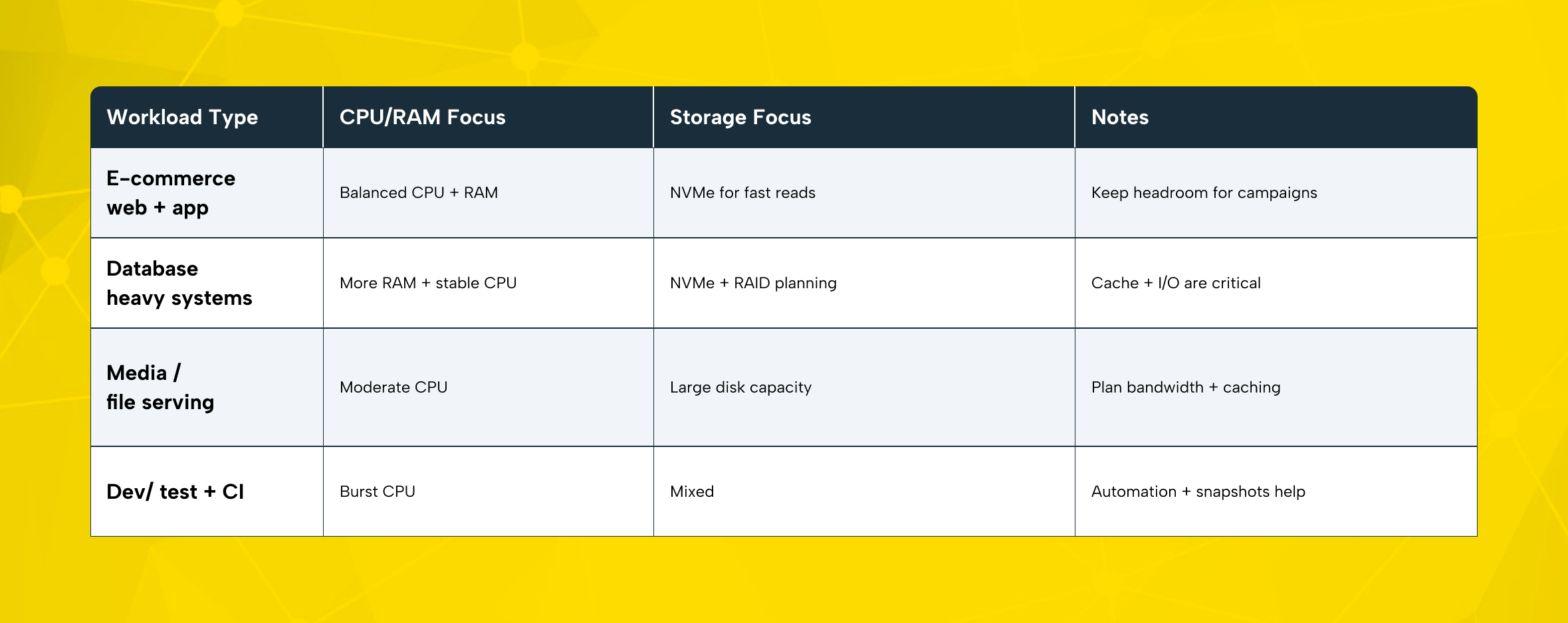
Technical Box: How to Size a Dedicated Server
Use this quick checklist to avoid buying too small (performance risk) or too large (wasted spend).
To choose the right server size, look at three things: CPU power, RAM needs, and disk and network usage. This helps you match resources to your workload. Start with your peak traffic window, not your average day.
Operational minimums (often overlooked)
- Plan backups and restore testing (not just “having backups”)
- Apply patch management and monitoring from day one
- Document firewall rules and access policies
- Decide who owns incident response in your team
Dedicated Server Security and Performance Considerations
A dedicated server is often chosen for two reasons: predictable performance and stronger isolation.
Performance under peak demand
Resources are exclusive, so performance remains stable during traffic spikes. This is especially useful for seasonal sales, product launches, or major campaigns.
Network and DDoS resilience
DDoS attacks are a practical risk for any public-facing service. Protection is not just an extra it helps keep your business running.
Makdos offers DDoS protection and security layers as optional add-ons depending on your needs.
Backup strategy and service uptime
A dedicated server is powerful, but hardware failure or human error can still happen. Backups and restore workflows are part of professional infrastructure.
“Backup exists” is not the same as “restore works.” Test restores regularly, and keep copies in a separate location when possible.
Why Makdos for Dedicated Servers
Many providers offer dedicated hosting. The difference is how reliable the operation is—and how easy it is for you to manage the service day-to-day.
Makdos stands out with a business-focused approach:
- Multi-location infrastructure: Service across three data centers, with high-capacity network links at each location.
- Integrated control experience: Infrastructure managed through a custom-built CRM and automation platform designed for faster operations.
- Mobile app management: Monitor and manage your services on the go via iOS/Android.
- Hardware and response readiness: Enterprise-grade configurations with NVMe options and fast response support when needed.
- 24/7 support and proactive monitoring: Continuous monitoring with fast escalation paths.
- Security add-ons: firewall/WAF layers and DDoS options based on risk profile.
- Customization: Flexible upgrades and network configuration options such as a private VLAN between servers.
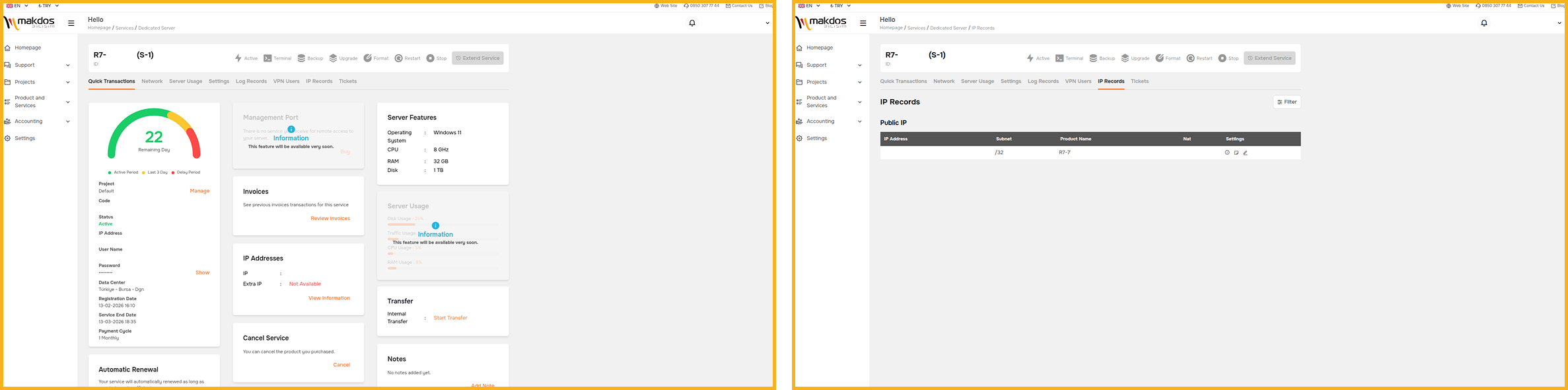
Makdos products that complement dedicated hosting
Dedicated servers become even stronger when you add the right supporting services:
- Firewall & WAF for application-layer filtering
- DDoS mitigation for availability protection
- Cloud servers or virtual servers for hybrid architectures
- Co-location if you want to host your own hardware in a secure facility
Conclusion: Choosing the Right Dedicated Server for Your Business
A dedicated server is the right choice when your workload needs predictable resources, stronger isolation, and real configuration flexibility. Compared to shared hosting or VPS, it offers higher stability, greater flexibility, and stronger security isolation.
Your best outcome comes from two decisions:
- sizing the server correctly for your workload, and
- choosing a realistic server management model (self-managed vs supported operations).
If you need predictable performance and infrastructure that supports growth, dedicated hosting is a reliable long-term option.
Ready to move to a dedicated server? Makdos helps you choose the right CPU, RAM, and storage setup. We then deploy a configuration that matches your workload and security needs.
Explore Makdos dedicated server packages and build a setup you can scale with confidence.