

What Is a Dedicated Server?
A dedicated server is a physical machine used by only one customer. You don’t share the machine’s resources with anyone else. You get predictable performance, more control over setup, and a clear security boundary compared to multi-tenant models.
For critical, high-traffic systems, a dedicated server provides control and stable performance.
How a Dedicated Server Works Inside a Data Center
A dedicated server is a powerful computer that runs all the time to host websites and applications. The difference is where it runs it operates in a data center with stable power and fast internet.
In a modern data center environment, the server is supported by:
- Redundant power systems (UPS and generators)
- Cooling and environmental monitoring
- High-speed network uplinks
- Physical security and controlled access
Operating System and Software Flexibility
One of the biggest benefits of a dedicated server is the freedom to choose and customize your stack end-to-end. You can use Windows Server or Linux systems like Ubuntu, Debian, or similar options, based on your needs.
With administrative access, you can:
- Install or remove packages freely
- Tune kernel-level parameters (where applicable)
- Configure networking and firewall rules
- Deploy containers, virtual machines, or custom runtimes.
Many teams use control panels like cPanel or Plesk to make website and email management easier.
Sizing Resources: CPU, RAM, and Storage
Dedicated server performance is tightly linked to choosing the right configuration at the start. In practical terms, you should size across three buckets:
- Compute: CPU cores and frequency
- Memory: cpu memory (RAM) for caching, concurrency, and database workloads
- Disk: How much storage you have and how fast it is (NVMe/SSD vs HDD).
If you need fast database performance, RAM and NVMe storage are as important as the CPU. For workloads like video processing or batch analytics, CPU throughput becomes more critical.
Hosting a Web Server and Multi-Server Architectures
A dedicated server can run a complete stack on one machine (web + app + database). For larger deployments, teams separate roles across machines:
- A web server tier for HTTP traffic
- An application tier for business logic
- A database tier for storage and transactions
This separation improves security boundaries, makes scaling more flexible, and simplifies troubleshooting under load.
Remote Access and Out-of-Band Management
Dedicated servers often include tools that let you control the system even if it crashes. Common technologies include IP-KVM, iDRAC, and iLO. These tools help with:
- Remote reboot and power control
- BIOS/boot troubleshooting
- OS reinstall workflows
- Console access during network outages
Out-of-Band Management (OOB) Basics: If SSH or RDP stops working, tools like IP-KVM, iDRAC, or iLO let you control the server remotely. With OOB access, you can check logs, change boot settings, reinstall the system, or restart the server remotely.
Makdos provides 24/7 access and makes daily server management easier, especially during urgent situations.
Dedicated Server vs VPS and Shared Hosting
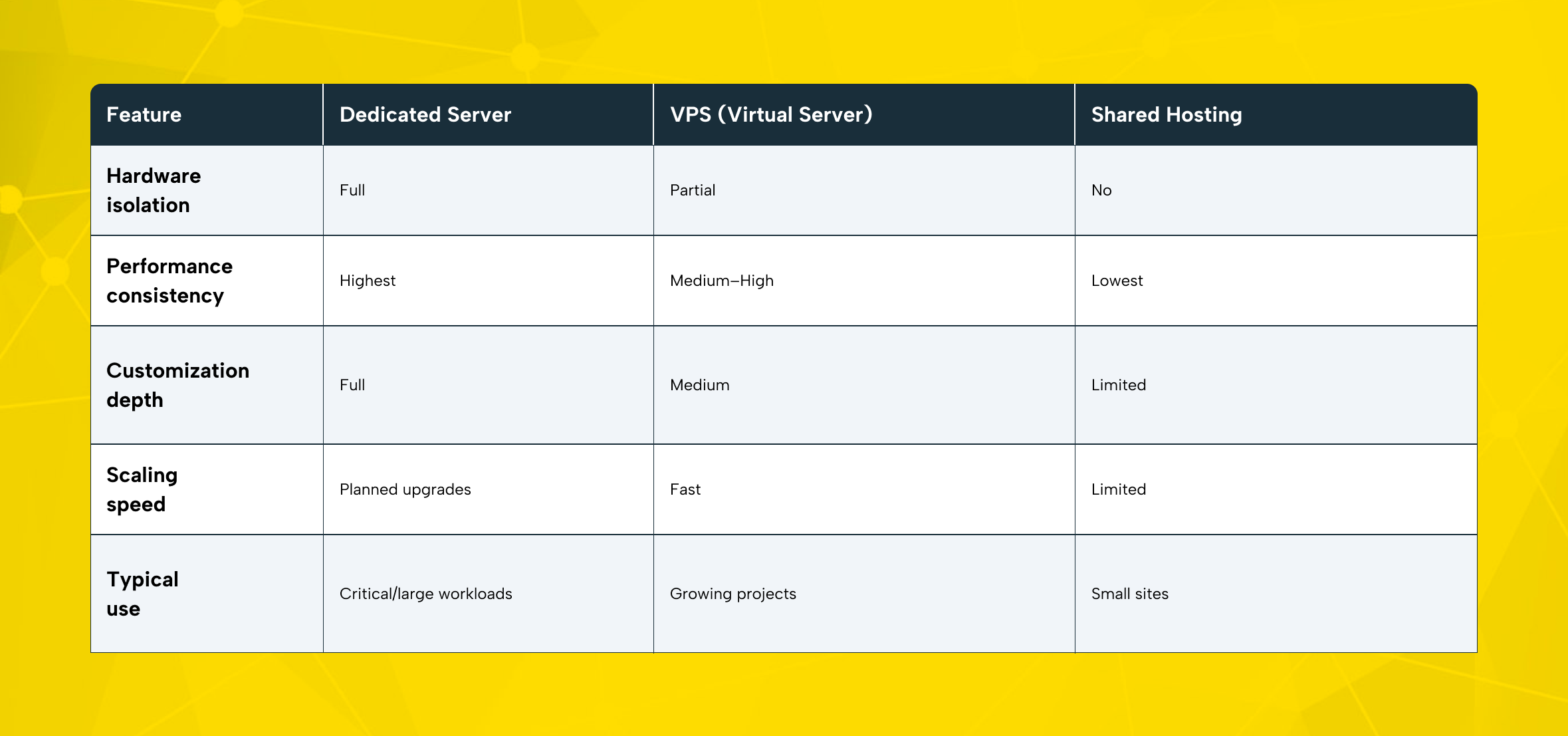
The choice between dedicated, VPS, and shared hosting comes down to control and performance stability.
Performance and Stability
A dedicated server typically delivers high performance because the full machine belongs to you. A VPS gives you set resources, but you still share the hardware with others. If the host machine is under heavy load from other tenants, performance can fluctuate.
Shared hosting is the most cost-effective model, but it’s also the most restricted. You share CPU, RAM, and many configuration limits with other accounts. For business-critical applications, that can become a serious bottleneck.
Control and Flexibility
Dedicated infrastructure gives you more room for deep tuning and specialized workloads. A VPS can be very capable, but it may have hypervisor-level limits. A shared environment often blocks advanced server-level changes entirely.
If you need advanced system settings or strict security controls, a dedicated server is often the best choice.
Scaling Considerations
VPS and cloud systems often scale quickly sometimes in minutes. With a dedicated server, you scale by upgrading hardware or adding another server. That’s not a weakness; it’s a different way of managing things. The tradeoff is stability and control versus fast scaling.
Advantages and Limitations of Dedicated Server Rental
A dedicated server is powerful, but it’s not automatically “the best choice” for every project. The value comes from matching the model to your workload and management capabilities.
Key Advantages
- Consistent performance: No resource competition with other users.
- Advanced setup control: Freedom to tune the operating system, services, and security controls.
- Security and privacy: Stronger isolation for sensitive workloads.
- Stable performance: Stable baseline performance is easier to plan around.
- Platform fit for critical workloads: Databases, payment workflows, high-traffic systems, large e-commerce catalogs.
Key Limitations
- Higher cost: You pay for the whole machine and its running costs.
- Management responsibility: Patching, monitoring, and incident response are real work.
- Scaling requires planning: Hardware upgrades or adding machines is not instant.
- Overprovisioning risk: Buying far above your needs can waste budget.
Avoid overspending by sizing your dedicated server to your measured baseline plus a growth buffer. Plan for real traffic, then upgrade when needed instead of buying top specs upfront.
Licensing and platform choices can change your total cost dramatically. Choose your licenses early and confirm they match your operating system before setup.
A dedicated server does not automatically protect you from data loss or compromise. You still need patching, access controls, monitoring, and a tested backup plan. Skipping backups and security hygiene can lead to permanent loss and serious exposure. This is general guidance, not legal advice follow your industry rules and speak to experts if needed.
Who Should Choose a Dedicated Server?
Dedicated infrastructure tends to be the right fit when performance, stability, and control have direct business impact.
SMBs and Fast-Growing E‑Commerce Brands
Many SMBs start with shared hosting or a small VPS. That’s reasonable—until growth introduces risk:
- Checkout latency increases during campaigns
- Inventory/catalog queries slow down
- Integrations and background jobs compete for resources
When performance becomes tied to revenue, moving to a dedicated server often brings stability and restores headroom. It also gives you better separation options—adding a second machine for databases or background workers as you expand.
Enterprises and High‑Traffic Platforms
Large platforms typically care about:
- Uptime and consistent response times
- Clean security boundaries
- Predictable scaling with capacity planning
Large businesses often use several dedicated servers with load balancing and separate networks. This structure supports long-term stability and clear management.
Developers and Specialized Technical Projects
Some workloads simply run better on bare metal:
- Game servers and latency-sensitive platforms
- AI/ML training jobs or batch analytics
- Container clusters that benefit from hardware-level tuning
- Systems that require strict control over networking or performance isolation
For high CPU or heavy workloads, a dedicated server is often better long term.
Dedicated Server Rental Checklist: What to Evaluate Before You Buy
Before ordering a dedicated server, align business needs with a technical checklist. This reduces surprises and prevents unnecessary spending.
1) Requirements Analysis
- Expected traffic patterns and peak loads
- Application architecture (monolith vs microservices)
- Database type and growth rate
- Security and compliance constraints (including data residency needs)
2) Hardware Configuration
- CPU model, core count, and frequency
- RAM sizing for concurrency and cache layers
- Disk type (NVMe/SSD/HDD), RAID needs, and expansion options
- Network bandwidth requirements
3) Provider and Data Center Quality
A reliable provider should clearly explain:
- Redundancy and facility standards
- Network capacity and routing quality
- Support responsiveness
- Service-level commitments
If a provider mentions Tier II or Tier III, check what that really means in practice.
4) Support and Server Management Model
Decide who owns day-to-day server management:
- Your internal team (self-managed)
- A managed service layer from your provider
- A hybrid model (you manage apps; provider handles hardware + baseline support)
If you don’t have a dedicated sysadmin, prioritize providers with strong support and tooling.
5) Security Controls
At minimum, plan for:
- Strong login verification and access logging
- Firewall policy (ingress/egress)
- DDoS protection where relevant
- Patch management and security risk response
6) Backup and Ongoing Operations
Backups should be:
- Automated
- Stored separately (ideally different location)
- Tested with restore drills
Even if you buy backup services, keep internal accountability: critical data deserves layered protection.
7) Contract Flexibility
Review:
- Billing term options
- Upgrade procedures
- Add-on pricing (IPs, backup, security)
- Migration/exit feasibility
Why Makdos for Dedicated Server Rental?
The difference isn’t the hardware it’s the speed, control, and support you get.
Makdos provides enterprise-level dedicated servers for stable and structured operations.
Infrastructure and Performance
Makdos uses multiple data centers to ensure stable performance for critical workloads.
In‑House CRM Automation and a User‑Friendly Control Experience
Makdos uses its own CRM system to manage restarts, monitoring, and support requests from one panel.
Mobile Management for Always-On Teams
For teams on the move, mobile access is essential for handling incidents. Makdos provides mobile access for easy monitoring and support.
Security and Backup Add‑Ons
For production workloads, dedicated hosting is strongest when paired with layered protection. Makdos adds firewall, DDoS protection, and backup options to keep your server secure and stable.
Quick Start: Renting a Dedicated Server with Makdos
If you’re ready to move forward, keep the process simple and systematic:
- Access your Makdos account: Log in to your customer panel (or use the mobile application) to view available server services and options.
- Select Dedicated Servers: Choose the dedicated server category and review available configurations based on CPU, RAM, disk, and bandwidth needs.
- Customize your setup: Pick your operating system, choose a control panel if needed, and add extra storage or security options.
- Complete the order: Pick the billing term and payment method, then confirm the order.
- Provisioning and first login: Once provisioning completes, you’ll receive access details inside your panel. From there, apply your baseline hardening steps:
- Update packages
- Enforce strong access policies
- Configure firewall rules
- Verify monitoring and backup schedules
A dedicated server is most valuable when it’s powerful and properly managed from day one.
Conclusion
A dedicated server gives you stable performance and full control for critical systems. Unlike VPS or shared hosting, a dedicated server offers stable performance and full control over system and security settings. Success depends on planning. Choose the right setup, plan how you will scale, and make backup and security top priorities.
Dedicated server rental is ideal when consistent performance and control directly impact revenue, security, or user experience. With the right sizing and operational plan, dedicated infrastructure delivers long-term stability for growing businesses.
If your goal is stable performance and streamlined operations, Makdos delivers configurable dedicated server solutions. With integrated support, automation tools, and security add-ons, you can accelerate deployment while minimizing operational risk.