

Building a website is only half the job. The other half is keeping it online, secure, and easy to update. A control panel simplifies daily operations. It helps teams move fast without managing technical server details.
cPanel is one of the most widely used control panels in the hosting industry. Even with limited technical knowledge, you get a simple dashboard for everyday tasks. You can create email accounts, upload files, manage DNS, install WordPress, and enable SSL in just a few clicks.
In this guide, you’ll learn what cPanel hosting is and why it’s popular. We’ll also cover its key features, how it works with Linux hosting, and how to choose the right hosting plan. We’ll also explain how Makdos combines cPanel convenience with a performance-focused infrastructure and a responsive support team.
What Is cPanel Hosting and Why Do Businesses Use It?
At the simplest level, cpanel hosting means your web hosting service includes the cPanel control panel. The server typically runs on Linux in the background, while you manage your site through cPanel’s graphical interface.
It’s also common to see cPanel offered alongside WHM (Web Host Manager):
- WHM is used by server admins, agencies, or resellers to manage multiple customer accounts centrally.
- Each customer uses cPanel to manage their website and services within their hosting account.
Why it’s so popular
Companies pick cpanel hosting for a few practical reasons:
- Easy to use: You can handle many tasks without deep technical knowledge.
- Saves time: Built-in wizards and “one-click” tools reduce setup time.
- Strong ecosystem: Because many people use it, you can easily find tutorials, documentation, and troubleshooting guides.
- All-in-one management: You manage DNS, files, databases, email, and SSL from one dashboard.
- Trusted standard: cPanel has a long track record and stays current through ongoing updates.
There are alternatives, such as DirectAdmin. However, cPanel’s familiar interface and wide adoption make it the default choice for many Linux hosting environments.
Key cPanel Features That Simplify Website Management
One reason cpanel hosting is so accessible is how it organizes tasks into clear categories. After you log in, you’ll typically see modules for files, databases, domains, email, security, metrics, and software.
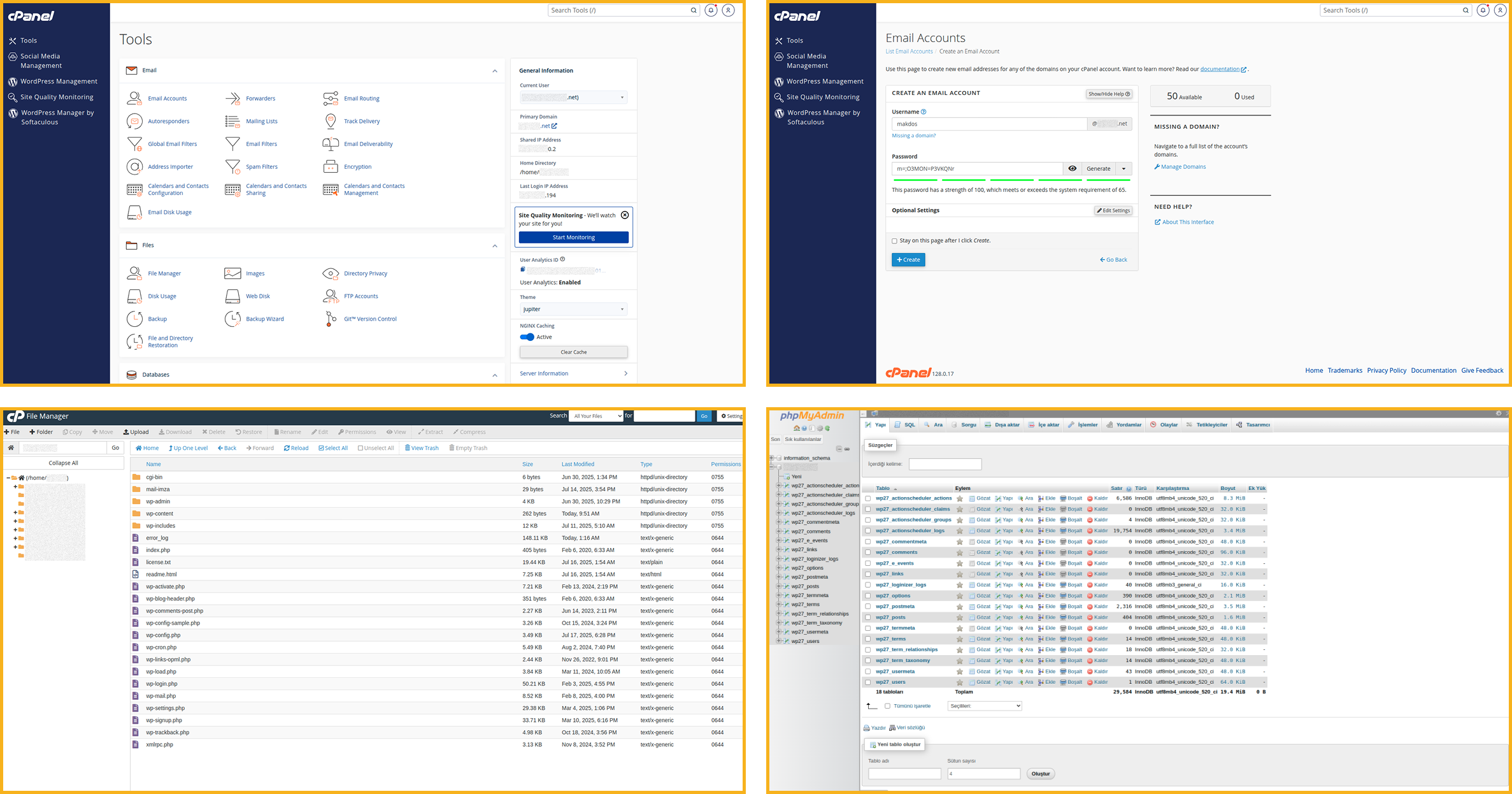
File management (File Manager and FTP)
cPanel includes a browser-based File Manager that lets you:
- Upload, move, copy, and delete files
- Edit basic files (like .htaccess or configuration files)
- Compress and extract archives
- Set file permissions
If you prefer traditional methods, you can create FTP accounts to upload files or share access with a developer.
Database tools (MySQL/MariaDB + phpMyAdmin)
Most modern websites use a database. With cPanel you can:
- Create databases and users
- Assign permissions safely
- Manage tables via tools like phpMyAdmin
This is particularly useful for WordPress, WooCommerce, Magento, and other database-driven systems.
Domain and DNS controls
You can manage domain-level settings and DNS records inside the panel:
- Add new domains or subdomains
- Create redirects
- Edit DNS records (A, CNAME, MX, and more) using a Zone Editor-style interface
For growing businesses, this makes routine changes faster—especially when you’re connecting third-party services.
Email management from one place
Email remains a core business need, and cPanel simplifies it:
- Create new mailboxes (e.g., sales@, info@)
- Change passwords and quotas
- Set up forwarding, automatic replies, and spam filters.
- Access webmail to read and send messages quickly
Corporate teams that need advanced email features can combine their hosting with a professional email service. (Makdos can support that with corporate email options as well.)
Security essentials and SSL
Most sites need HTTPS, and many providers support AutoSSL or Let’s Encrypt-style issuance. This means you can activate free SSL certificates and secure your website with HTTPS no advanced setup required.
You’ll also find useful security tools such as:
- Password-protected directories
- IP blocking
- Malware or antivirus scanning options (depending on hosting configuration)
Treat your hosting panel like a bank account. Use a strong and unique password. Enable 2FA if it’s available. Also change your login details regularly, especially when multiple people use the same hosting account.
Backups and restore (full and partial)
Backups are one of the most underrated reasons to choose cpanel hosting. Most environments provide:
- Full backups (files + databases)
- Partial backups (specific folders or databases)
- Simple restore workflows
This reduces the risk of downtime during updates, theme changes, plugin installs, or content revisions.
Metrics and logs
For basic monitoring, cPanel typically includes:
- Visitor and bandwidth statistics
- Resource usage indicators
- Error logs and raw access logs
These insights help you spot issues earlier—like broken pages, traffic spikes, or scripts that aren’t set up properly.
One-click app installs (Softaculous)
Many cPanel environments include Softaculous or similar app installers. That makes it easy to launch popular platforms in minutes.
With Softaculous in cPanel, WordPress installation takes only a few clicks. Open Softaculous, choose WordPress, select your domain, enter admin details, and install. After that, you can log in and start building immediately.
Multi-language support
cPanel often supports multiple languages, including Turkish and English. If your team is multilingual, this can reduce training time and help non-technical users complete tasks confidently.
Is cPanel Compatible with Linux Hosting?
Yes. cPanel runs on Linux servers and performs best in that environment. In most deployments, cpanel hosting runs on Linux-based distributions such as AlmaLinux, CloudLinux, Rocky Linux, or Ubuntu.
A key point to remember:
- cPanel is Linux-only.
- If you need a control panel for Windows hosting, solutions like Plesk are more common.
So if you’re choosing between Windows and Linux hosting, your control panel preference may influence your decision.
Who Should Use cPanel Hosting?
Because it makes daily tasks easier, cPanel hosting works well for many different needs. It’s especially useful when speed and self-management matter.
Individual site owners and bloggers
You don’t need server administration skills to run a website. cPanel provides a simple and secure dashboard for daily tasks like uploads, email, and SSL.
SMBs and corporate websites
For small and mid-sized businesses, time matters. cPanel helps teams manage web and email assets without constant back-and-forth with developers.
If you’re an SMB, the biggest wins usually come from:
- Simple email creation for departments and staff
- Quick DNS updates for new tools (CRM, analytics, marketing platforms)
- Straightforward backup and restore options
E-commerce brands
Online stores rely on speed, stability, and security. cPanel hosting supports these needs by making it easier to manage:
- SSL and secure checkout paths
- Database performance basics
- Ongoing updates and backups
For ecommerce teams, reducing downtime during updates is often as important as raw hosting power.
Agencies, freelancers, and resellers
If you manage multiple client sites, cPanel + WHM structures are especially helpful. You can separate accounts, delegate access, and keep environments isolated.
Reseller features become important at this stage. Many agencies start with cPanel-based hosting and later move to a more structured client management setup.
High-traffic and enterprise-style sites
Even when a project grows beyond entry-level hosting, many teams still prefer cPanel because it keeps workflows consistent. You can maintain the same management style while upgrading resources underneath.
How to Choose the Right cPanel Hosting Plan
Not all cpanel hosting is the same. The best choice depends on your traffic, future plans, and daily requirements.
Start with the right baseline: shared hosting vs. bigger options
For many businesses, shared hosting is the entry point. It’s cost-effective and typically sufficient for:
- Brand websites
- Landing pages
- Early-stage ecommerce
- Low-to-moderate traffic blogs
As your website grows, you may need a higher hosting plan. This usually means more dedicated resources such as CPU, RAM, storage, and better handling of simultaneous visitors.
What to compare across hosting plans
Here’s a practical checklist you can use before purchasing:
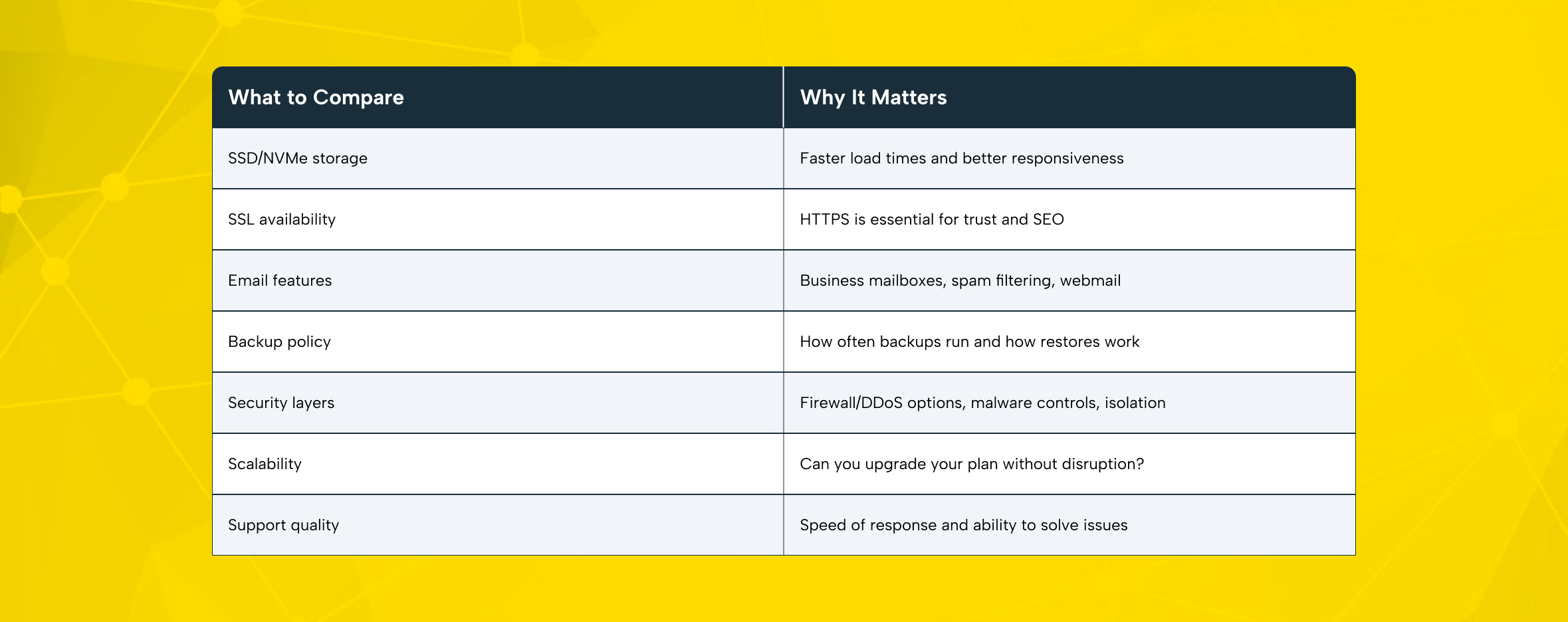
The best hosting experience prevents problems before they happen. It relies on reliable infrastructure and a support team that responds quickly when needed.
Why Choose Makdos for cPanel Hosting?
Makdos builds cPanel hosting for real-world use. You get performance, stability, and support when needed, without added complexity.
Performance-first infrastructure for modern websites
If your website runs on WordPress or another CMS, performance is not optional. Makdos supports cPanel hosting with SSD/NVMe storage and up-to-date server technology. These features help websites stay fast and stable during high traffic.
Stability, redundancy, and uptime mindset
For business sites, availability is part of brand trust. Makdos runs infrastructure across multiple data centers and plans for service stability, so your website remains online during disruptions.
SSL included and practical security layers
For most websites, HTTPS is a baseline requirement. Makdos cPanel hosting packages commonly include SSL support so you can enable free ssl certificates and secure customer traffic.
Makdos goes beyond SSL certificates. It uses layered security to protect your website from common threats and unusual traffic spikes.
Migration help and easy scaling
Moving a website can be stressful, especially if you’re migrating an ecommerce store or a production site. A guided migration process and a structured upgrade path are what separate “cheap hosting” from professional hosting.
Makdos makes it straightforward to:
- Open a new hosting account
- Move an existing website with support
- Upgrade between plans as your needs change
Control from web and mobile
For teams that manage websites on the go, Makdos also stands out with a mobile-first approach. You can monitor and manage important account actions from both web and mobile devices. This is especially useful for agencies and business owners who need flexibility.
Conclusion
cPanel hosting is popular for a clear reason: it makes website operations simpler. cPanel lets you manage files, databases, DNS, backups, email, and SSL in one place. It’s suitable for both beginners and experienced teams.
Makdos combines the simplicity of cPanel with strong infrastructure and responsive support. Your website stays fast, secure, and easy to manage.
Planning a new website or migrating an existing one? Consider Makdos cPanel hosting. It keeps management simple and supports your growth as traffic increases.