

For many companies, email is where sales conversations begin and quotes are shared. It is also where approvals move forward and support requests are resolved. That is why the quality of your email system affects more than appearance. It influences trust, response rates, internal coordination, and how safely your business data is handled.
A domain-based email setup also gives you more control over mailbox ownership. It also helps you manage access more clearly and protect messages more effectively. Instead of relying on a generic inbox, you can build a business email service around your own brand. You can also shape it around your policies and long-term growth plans.
No matter the size or model of the business, the goal is the same. You need a business email account structure that looks credible, works reliably, and remains manageable as your team grows.

What Business Email Is and Why It Matters
A business email address is an inbox connected to your own domain rather than a personal provider. In practice, that means using addresses such as info@yourbrand.com, sales@yourbrand.com, or name@yourbrand.com instead of a public mailbox from a free email platform.
That shift may seem small, but it changes how customers see your business. A branded sender identity makes your communication feel intentional and official. It also gives administrators central control over users, passwords, forwarding rules, security policies, storage, and retention.
Business email is usually delivered through email hosting rather than through a public consumer inbox. It is also worth noting that email hosting and web hosting are not the same thing. You can launch branded email without running a website. Even so, many companies prefer to manage both services through the same provider for operational simplicity.
10 Practical Benefits of Business Email
1. It makes your brand look more credible
The first advantage is simple but powerful: a professional email address immediately looks more trustworthy than a personal mailbox. When prospects see your company name after the @ sign, they are more likely to treat the message as legitimate and relevant.
That matters even more when you are emailing clients for proposals, invoices, onboarding instructions, or customer support. In competitive markets, small details shape perception. A well-structured branded inbox often becomes part of your digital first impression.
2. It strengthens trust in customer communication
Trust is easier to build when communication is consistent. A business email account reinforces the idea that the message comes from a real organization. It also signals clear ownership and accountability behind the communication.
For SMEs and e-commerce brands, this can improve reply rates and reduce hesitation during sales conversations. For agencies and enterprise teams, it helps keep communication standardized across departments and team members. This helps customers know they are dealing with the right brand at every touchpoint.
3. It keeps ownership and account control inside the company
With business email, the mailbox belongs to the business, not to an individual employee. That becomes important when roles change, a team member leaves, or departments need to share incoming communication.
Admins can reset passwords, suspend users, redirect messages, create group mailboxes, and manage permissions. They can do all of this without losing access to company history. This level of control is one of the biggest differences between a professional system and a personal inbox. A personal inbox created outside corporate oversight simply does not offer the same structure.
4. It improves deliverability and reduces spam risk
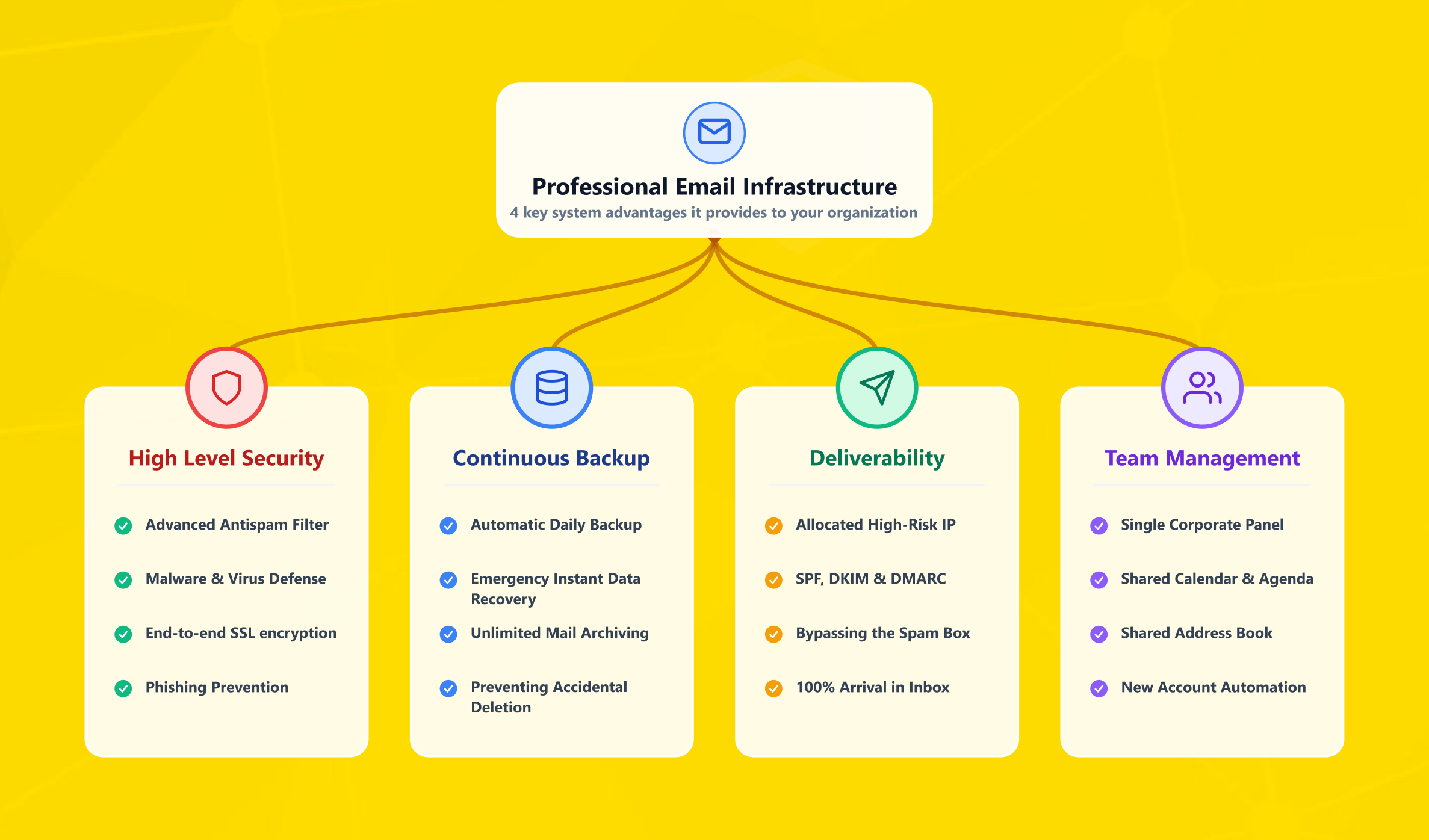
A serious business email service gives you the technical foundation needed for cleaner delivery. Correct DNS configuration, including MX, SPF, DKIM, and DMARC records, helps mailbox providers verify that your messages are legitimate.
When that foundation is in place, your important mail is less likely to be filtered as suspicious. This is especially valuable for quotes, order updates, password resets, support replies, and similar messages. These are the kinds of emails that need to reach the inbox, not the spam folder.
5. It adds stronger security layers
Security is one of the main reasons companies move away from free email. A proper business email account can support spam filtering and malware scanning. It can also provide login alerts, IP restrictions, policy-based access, and two-factor or broader authentication controls.
At the infrastructure level, providers may also protect traffic with firewall layers and backup policies. They may also use filtering systems designed for business use. In practical terms, that reduces the risk of account compromise, phishing exposure, and accidental data loss.
6. It supports backup, archiving, and recovery
Business communication often includes contracts, approvals, invoices, order records, and long customer threads. Losing that history creates operational and legal risk.
That is why backup and archiving matter. A strong email hosting platform should help you recover deleted messages. It should also retain correspondence for audits or internal reviews and preserve corporate memory over time. This is especially useful for regulated sectors and for businesses with longer sales cycles.
7. It improves collaboration and email management
Email is rarely used alone. Most companies need calendars, shared inboxes, aliases, mobile sync, Outlook support, and consistent admin controls across multiple users. Good email management helps all of that stay organized.
A scalable setup allows team members to use role-based addresses such as sales@, support@, billing@, or hr@. At the same time, it keeps ownership visible and manageable. You can also create email aliases for campaigns, department routing, or brand variations. This lets you avoid opening a separate mailbox for every address.
8. It works across devices and business tools
Modern teams need the same inbox on desktop, mobile, and webmail. Most business email platforms support IMAP, SMTP, and POP3. This makes it easier to work across Outlook, Apple Mail, Android, iPhone, and browser-based interfaces.
This flexibility matters for remote work, travel, field teams, and fast-moving support operations. It also makes it easier to connect your inbox with CRM tools, ticket systems, and other workflows. These are the kinds of processes that depend on reliable communication.
9. It gives you more reliable support and continuity
When email is business-critical, downtime is never just an inconvenience. It affects sales, service, operations, and reputation. That is why support quality and infrastructure reliability matter.
When comparing providers, many companies review SLA terms, escalation paths, backup policies, and email plans before buying. Some teams even use 99.9% uptime as a practical benchmark when evaluating business communication services. This matters even more when email is tied to order flows or customer support.
10. It supports professional and formal communication
A business email address is not only about branding. It also helps formal communication feel consistent and documented. When contracts, invoices, vendor coordination, or official notices are sent from a custom domain, the message feels more professional. It also carries more institutional weight.
In some industries, retained records and controlled business communication processes are also important for compliance. Even when it is not strictly required by law, a structured mailbox environment still adds value. It helps companies work in a more organized and auditable way.
Why SMEs, E-Commerce Teams, and Agencies Gain the Most
For SMEs, business email creates immediate credibility without requiring a large IT team. You can start with a few mailboxes, define clear roles, and expand as needed. This makes it easier to look established even in the early stages of growth.
For e-commerce teams, the main benefit is operational trust. Order confirmations, refund notices, support replies, and shipping updates work better when they come from custom business email addresses. This is especially true when those addresses are tied to your store domain. A cleaner email system also helps keep customer communication, internal routing, and vendor coordination under control.
For agencies, the advantage is structure. Client-facing mailboxes, internal role addresses, project-based forwarding, and controlled permissions reduce confusion as more accounts are added. Domain ownership, delivery controls, and email aliases become especially useful when handling multiple brands or service lines.
For larger corporate brands, the conversation shifts toward governance, continuity, and consistency. A business email service helps standardize naming rules, access policies, retention logic, and recovery workflows across departments and regions.
How Makdos Helps You Launch and Manage Business Email
Makdos positions its corporate email offering around branded mailboxes, centralized administration, webmail access, daily backup, device compatibility, and security-focused mail hosting. Its English service pages present business email as a managed custom-domain solution. They also highlight admin control, spam protection, and reliable day-to-day communication.
In practical terms, that means you can create a business email address on your own domain and manage users from a panel. You can also forward mail when needed and use standard protocols such as IMAP, SMTP, and POP3. Makdos also highlights daily backup and advanced spam protection on its corporate mail hosting pages. It also emphasizes 24/7 support and a 99.8% uptime guarantee.
For businesses that are just getting started, the first step is usually securing the right domain. Makdos also offers a Domain Name Search tool and related services.
This helps you align your email identity with your brand from the start. If you also need a website, remember that web hosting and email hosting can be purchased separately. Even so, many businesses choose to manage them together for convenience.
How to Create a Business Email Address Step by Step
- Register or confirm your custom domain.
- Your domain is the identity behind every professional email address you send.
- Choose a business email service or email hosting provider.
- Compare storage, admin features, security, migration tools, support quality, and available email plans.
- Configure DNS records correctly.
- Set the required MX records first, then add SPF, DKIM, and DMARC so your mail can be authenticated.
- Create the first mailboxes.
- Start with role-based addresses such as info@, sales@, support@, or billing@, then add named inboxes for relevant team members.
- Apply security policies.
- Use strong passwords, enable 2FA, review forwarding, and verify email encryption in transit and storage.
- Connect devices and clients.
- Add the account to Outlook, webmail, or mobile apps with the correct IMAP/SMTP settings.
- Plan migration carefully if you are switching providers.
- Check whether assisted transfer or migration tools are available, test a pilot group first, and keep rollback options ready.
Choosing the Right Setup Before You Buy
Before buying, define how your team actually uses email. Do you only need a few branded inboxes, or do you need a broader setup as well? That could include shared mailboxes, retention rules, department aliases, and admin-level reporting. The answer affects mailbox count, storage, and the right service tier.
It also helps to separate three decisions: your domain, your mail system, and your website stack. Some companies only need branded communication, while others want both a website and business email under the same vendor. In that case, combining email hosting with web hosting may simplify administration, billing, and support.
Finally, review continuity. Ask how backups work and how quickly accounts are activated. You should also ask whether mobile and desktop clients are supported and what happens during provider changes. A reliable setup should make day-to-day work easier, not create more hidden maintenance.
Conclusion
Business email helps companies look more credible, communicate more safely, and manage internal operations with greater control. It supports branding and improves delivery. It also provides stronger security, clearer ownership, and more organized collaboration than a free email setup usually can.
If your company is ready for more professional communication, Makdos is a practical option. It can support domain-based mailboxes, day-to-day admin control, and managed email hosting.
Start by choosing the right domain and comparing your operational needs. Then select a setup that your team can scale with confidence.