

For many SMEs, e-commerce companies, agencies, and enterprise teams, the real challenge is not whether to upgrade. It is knowing when to move beyond entry-level hosting and how to choose the right infrastructure without overspending.
That is why this guide focuses on practical decision-making. You will learn how a virtual server works and how it compares with shared hosting and a physical server. You will also see what to evaluate before buying and where Makdos fits if you need a more reliable path for growth.
If your website, store, application, or internal platform depends on speed, availability, and flexibility, the hosting layer matters more. In that case, it becomes a business decision, not just a technical one. The right setup supports business continuity today and leaves room for tomorrow’s traffic, integrations, and security requirements.
What Is a Virtual Server and How Does It Work?
A virtual server is an isolated server environment created on top of a physical machine through virtualization. Instead of assigning an entire physical server to one customer, the provider uses a hypervisor.
This lets the provider create and manage multiple virtual machines on the same host. It makes more efficient use of the physical server. Each instance receives its own share of CPU, RAM, storage, and network capacity.
To understand virtual server work in modern hosting, start with the hypervisor layer. It abstracts the physical hardware and turns it into separate environments that act like standalone servers. Each one can run its own operating system and keep its own configuration. Depending on the deployment, it can also use its own public or private IP address settings.
In practice, businesses usually see these environments offered as VPS or VDS plans. The term virtual private servers is common when the provider emphasizes isolated resources inside a shared host.
VDS is often used when there is a stronger focus on guaranteed allocations. Either way, you are still working with virtual machines. They run on top of a shared but professionally managed infrastructure layer.
When teams compare the types of virtual environments on the market, they should focus less on labels and more on workload fit. Some plans are optimized for general web traffic. Others are designed for databases, development stacks, or more demanding application workloads. The best choice depends on what the server needs to do every day.
Virtual Server vs Shared Hosting: Where the Difference Starts
Shared hosting works well when a site is simple and traffic is low. It is also a good fit when setup changes are minimal. It is affordable, fast to launch, and usually enough for a brochure site or a very small business presence.
A virtual server sits one level above that model. Instead of sharing a common hosting environment with many unrelated websites, you get a more isolated system. It comes with defined limits and gives you much more control. You can install the software you need, adjust server settings, and choose the operating system that fits your stack.
That difference matters when your business starts to host multiple sites, client projects, APIs, or custom applications. In shared hosting, one account’s behavior can affect another. In a virtual server environment, your allocated compute resources stay assigned to your own instance. This helps improve stability when the system is under load.
It also changes how you plan growth. A shared plan is mostly about convenience. A virtual server is about control, predictable performance, and the ability to shape the environment around your workload.
Virtual Server vs Dedicated Server: When Should You Move Further?
A dedicated server gives one customer the entire physical machine. There is no shared tenant model at the hardware layer. That makes a dedicated server or bare metal setup an attractive option when performance demands are very high. It is also a strong fit when you need strict isolation or more advanced setup options.
A virtual server is different. It still runs on shared infrastructure, but it does so with much stronger isolation than shared hosting.
For many business workloads, that is the better balance. You avoid the complexity and hardware costs of renting a full physical server. At the same time, you still gain flexibility and control.
This is why many companies move in stages. They often start with shared hosting and then move to a virtual server as their needs grow. They only switch to a dedicated server when the workload truly requires a single-tenant environment.
If your application does not need maximum resources or strict compliance, a virtual server is often the better choice. It gives you the control and resources you need without the added burden of a full physical server. It gives you the resources you need without the extra cost of a full physical server.
Think of it this way: a physical server is ideal when you need the whole box. A virtual server is ideal when you need strong performance. It gives you that performance without paying for all physical hardware up front.
What to Check Before Renting a Virtual Server
Choosing the right plan is less about buying “more server” and more about matching the infrastructure to the workload. Before you rent, evaluate the points below carefully.
1) Resource sizing and workload fit
Start with the applications you plan to run. A content site, an e-commerce storefront, a CRM, and a custom backend all stress infrastructure differently. Some need more CPU, some need more RAM, and some are limited by storage performance. Your first goal is to align plan size with real compute resources usage, not assumptions.
2) Operating system and software compatibility
Your operating system decision affects licensing, maintenance, tooling, and team workflows. Linux is often preferred for PHP, Python, Node.js, and container-based deployments. Windows can make more sense for Microsoft-centered stacks. Make sure the server supports the services, control tools, libraries, and management model your team will actually use.
3) Storage type and day-to-day performance
Fast storage has a direct effect on user experience. Database queries, application response times, admin panels, and backups all depend on disk performance. If your workload is sensitive to latency, review the storage layer carefully. Also ask how the platform performs under sustained use, not just during light testing.
4) Network quality, IP planning, and scaling design
A plan is not complete unless the network fits the project. Review bandwidth, latency expectations, and firewall options first. Then check whether you need a dedicated IP address, private networking, or additional IP assignments.
If the project may later grow across multiple instances, check whether you can use a load balancer in front of them. This should be possible without rebuilding the environment from scratch.
5) Backup, monitoring, and data protection
Performance alone is not enough. Ask what backup approach is in place and how the restore process works. Also ask how often snapshots are taken and who is responsible for patching and monitoring.
Good virtual server design is not only about uptime. It is also about data protection, fast recovery, and operational clarity when something goes wrong.
6) Provider operations and data center quality
Professional data centers matter because they determine power stability, cooling, physical security, and network resilience. Even a well-sized virtual server can become a business risk if the provider’s operational layer is weak. Ask about support responsiveness, management tooling, and the overall service model rather than focusing only on raw pricing.
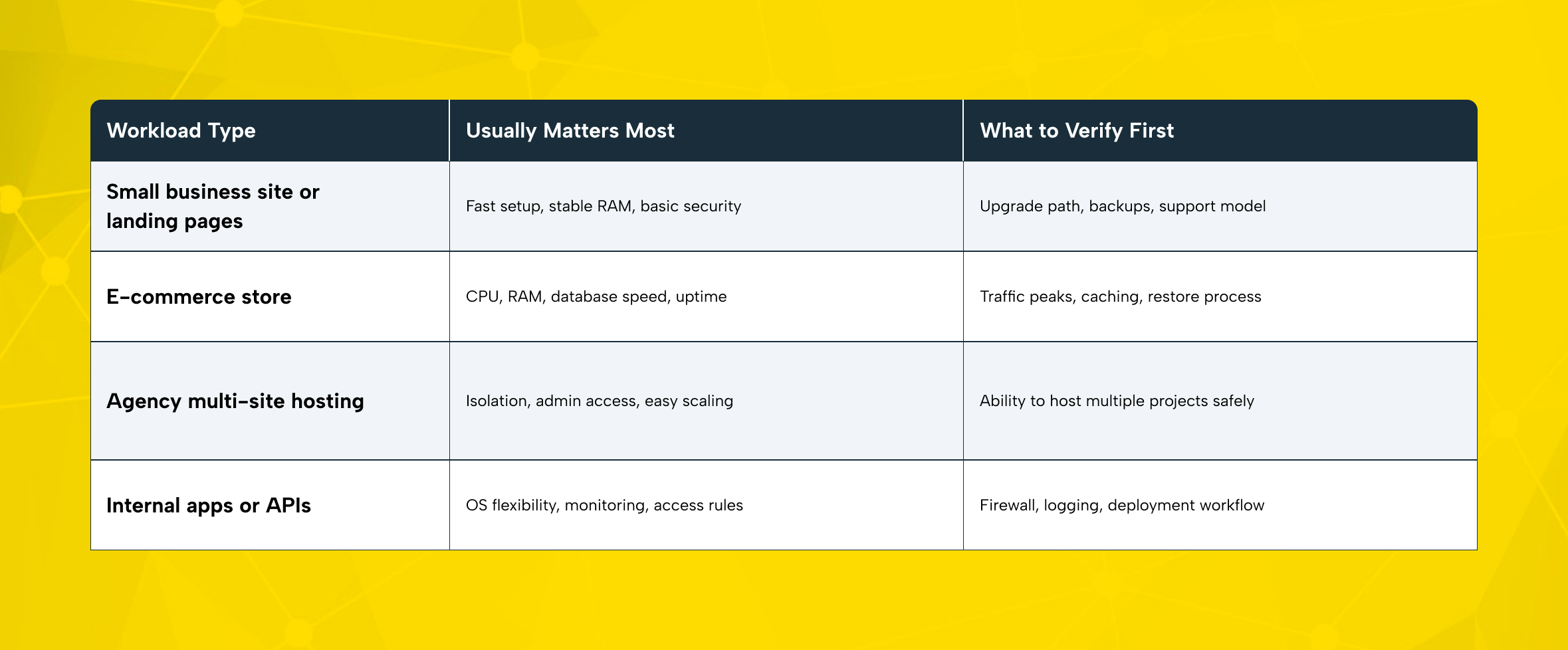
A practical rule: buy for today’s stable usage plus realistic short-term growth. Do not pay for more capacity than you need. But do not choose a plan that leaves no room for a campaign, migration, or seasonal traffic spike.
Where Virtual Servers Make the Most Sense
Virtual servers are a strong fit when your business has moved beyond entry-level hosting. They are especially useful when you need more capability without moving all the way to a dedicated environment.
For SMEs, they provide room to grow without large capital spending. You gain a cleaner hosting layer for websites, internal tools, customer portals, and operational systems. At the same time, monthly costs remain easier to manage.
For e-commerce teams, a virtual server can handle storefront traffic more reliably than shared hosting. It can also better support ERP or marketplace integrations and background jobs. If peaks become more aggressive later, you can scale up or distribute workloads more intelligently.
For agencies, the model is especially practical. You can host multiple client environments with clearer isolation, separate configurations, and stronger control over updates and deployments. That reduces the blast radius when one project has an issue.
For corporate brands, virtual servers are useful for staging, regional services, and private tools. They also work well for application layers that do not yet need a full physical server strategy. They also help teams validate architecture choices before committing to more expensive infrastructure.
Common Mistakes to Avoid Before You Buy
One of the most common mistakes is choosing only by price. A very cheap plan can become expensive if it lacks backups, support, monitoring, or a clean growth path.
Another mistake is sizing only for average traffic. Businesses often underestimate campaigns, seasonal demand, and integration growth. If you may need to scale later, check whether the provider can expand resources quickly. Also make sure the architecture can grow into multiple nodes when needed.
Security mistakes are just as costly. If you leave update planning, access control, and backup policy undefined, even a high performance server can become fragile. The right virtual server is not only fast. It is manageable, recoverable, and aligned with your team’s operational maturity.
How Makdos Supports a Better Virtual Server Setup
Makdos is a practical fit when you want more than a single product from one provider. It can support your full infrastructure journey as your needs grow. Its English pages position virtual servers as a flexible middle layer between simpler hosting and more advanced server models. They also connect that choice to related options such as cloud servers, dedicated servers, and server-focused educational content.
That broader service path matters because not every team needs the same architecture at the same time. Some projects need a virtual server with room to scale. Others may need cloud-style flexibility, a more traditional dedicated server, or a simpler hosting layer for smaller sites. Makdos supports that broader decision process with solution categories that line up with common business growth stages.
Start with a virtual server that fits your real needs. This gives you a stronger base without adding unnecessary complexity. Then monitor real usage and add supporting services where needed.
That may include backup workflows, security rules, and traffic distribution through a load balancer. If the workload later becomes constant and demanding, it may also mean moving to a stronger physical server model.
For growing teams, this approach reduces unnecessary spending while keeping the infrastructure professional. You are not locked into entry-level hosting. At the same time, you do not have to commit to a full dedicated setup before the business case is clear.
For SMEs, E-Commerce Brands, and Agencies: How to Decide Faster
If you are an SME, choose a plan that lets you launch cleanly, keep core services stable, and upgrade without a painful migration. Your priority is operational simplicity with enough headroom for growth.
If you run e-commerce, start by mapping where revenue risk lives. Product pages, checkout, integrations, and database performance matter more than theoretical maximum capacity. Build around reliability first, then add scale layers as your traffic pattern becomes clearer.
If you are an agency, isolate projects early. Keeping clients on separated environments makes maintenance cleaner and reduces operational risk. This is often where a virtual server becomes more strategic than generic hosting.
If you are a larger corporate team, think in tiers. Public web layers, internal systems, staging environments, and regional services do not all need the same infrastructure profile. A virtual server can be the most efficient option for some of those workloads. Others may later need to move to a physical server as demands grow.
Conclusion: Choose the Server Model That Matches Real Work
The best virtual server decision is rarely the biggest plan. It is the one that matches your application, traffic pattern, and security needs. It should also fit your team’s ability to manage the environment well.
If you need more control than shared hosting can offer, a virtual server is often the next logical step. It is especially suitable when you do not want the cost and complexity of a full dedicated server. It offers stronger isolation, better performance planning, and a cleaner path to growth.
When you are ready to compare options, start with the workload. Then evaluate operating system fit, backup logic, networking, support quality, and scaling flexibility. If you want a provider that can support that journey, review Makdos solutions. It offers virtual servers and related hosting options to match the way your business runs.