
Today’s businesses whether SMBs, e-commerce brands, agencies, or corporate IT teams usually begin with flexible infrastructure. As their needs grow, they move toward more specialized capacity. That’s why it’s important to understand the practical differences between a virtual server and a dedicated server. They impact flexibility, workload, and control during traffic spikes.
When selecting infrastructure for web hosting, APIs, databases, or production servers, the right choice depends on your workload pattern. The best option is the one that matches how your system actually runs. Some projects need elastic resources inside a virtual environment. Others need predictable performance on physical hardware with full control over the server.
Virtual Server and Dedicated Server Basics
What Is a Virtual Server?
A virtual server or cloud server, runs on a physical server. The system divides that physical machine into multiple isolated instances. The system uses virtualization software called a hypervisor. It assigns CPU, RAM, storage, and network resources to each virtual machine.
Even though multiple users share the same underlying machine, each virtual server behaves like its own independent server. Each virtual server can run its own operating system and use its own settings. Depending on the plan, it may also receive a dedicated IP address or multiple IPs.
Why businesses like a virtual server:
- Fast provisioning (often minutes)
- Flexible scaling (increase/decrease resources when needed)
- Typically more cost effective than renting a full physical machine
- Great fit for hosting apps that don’t require maximum “always-on” capacity
In practice, a virtual server sits between shared hosting and a full physical server. It works especially well when your workload is stable, moderate, or increases gradually.
What Is a Dedicated Server (Physical Server)?
A dedicated server is a physical server reserved for one customer. In other words, you get the entire machine CPU, RAM, storage, and networking without a shared tenant model. You’re not sharing CPU cycles or disk I/O with other customers. Professionals often refer to this as bare metal server infrastructure or dedicated hosting.
Providers typically host dedicated servers in professional data centers and design them to run 7/24. For many businesses, the biggest advantage is stability. When you need high performance, the server behaves consistently under load because no other users share the same host.
Common dedicated server capabilities (depending on provider and service scope):
- Full root/admin access
- Deep server configuration options
- Low-level management tools (e.g., KVM/IPMI class access) for OS install and remote console
- Ability to customize storage layouts (e.g., RAID) and network segmentation
A dedicated server also increases responsibility. You may need stronger in-house server management skills. Or you can rely on provider support to reduce system risk.
Virtual Server vs Shared Hosting: Where Each Option Fits
Before a virtual server, many teams start with shared hosting. Shared hosting is a web hosting model where multiple websites run on the same system. In this setup, resources are limited and configuration options are more restricted.
- Shared hosting is usually the cheapest starting point, but it’s limited.
- A virtual server gives more control, clearer resource allocation, and better isolation.
- A dedicated server gives the deepest configuration flexibility, strongest isolation, and maximum performance headroom.
Performance and Resource Management
Resource Allocation: Dedicated Capacity vs Shared Resource Models
The main technical difference is how resources are allocated.
With a dedicated server, all resources belong to you. You use the full CPU, RAM, and storage without sharing them with others. This is ideal for workloads where latency and consistency matter, especially under pressure.
With a virtual server, you run on a shared physical machine. The system divides that machine into multiple virtual server instances. A well-designed platform isolates each virtual server strongly, but it still follows a shared resource model at the hardware layer.
Your virtual server comes with fixed resource limits. For example, if your plan includes 8 GB of RAM, you can use up to 8 GB. You cannot exceed that limit. To go beyond that, you must scale up your plan.
This matters when you:
- Run a database-heavy application,
- Process large files,
- Rely on predictable disk throughput or need stable CPU time for real-time workloads.
You can also host multiple services on either option. For example, you can host a web app, a background worker, and a reverse proxy on the same machine. The difference is whether you want to share the physical platform with other tenants or not.
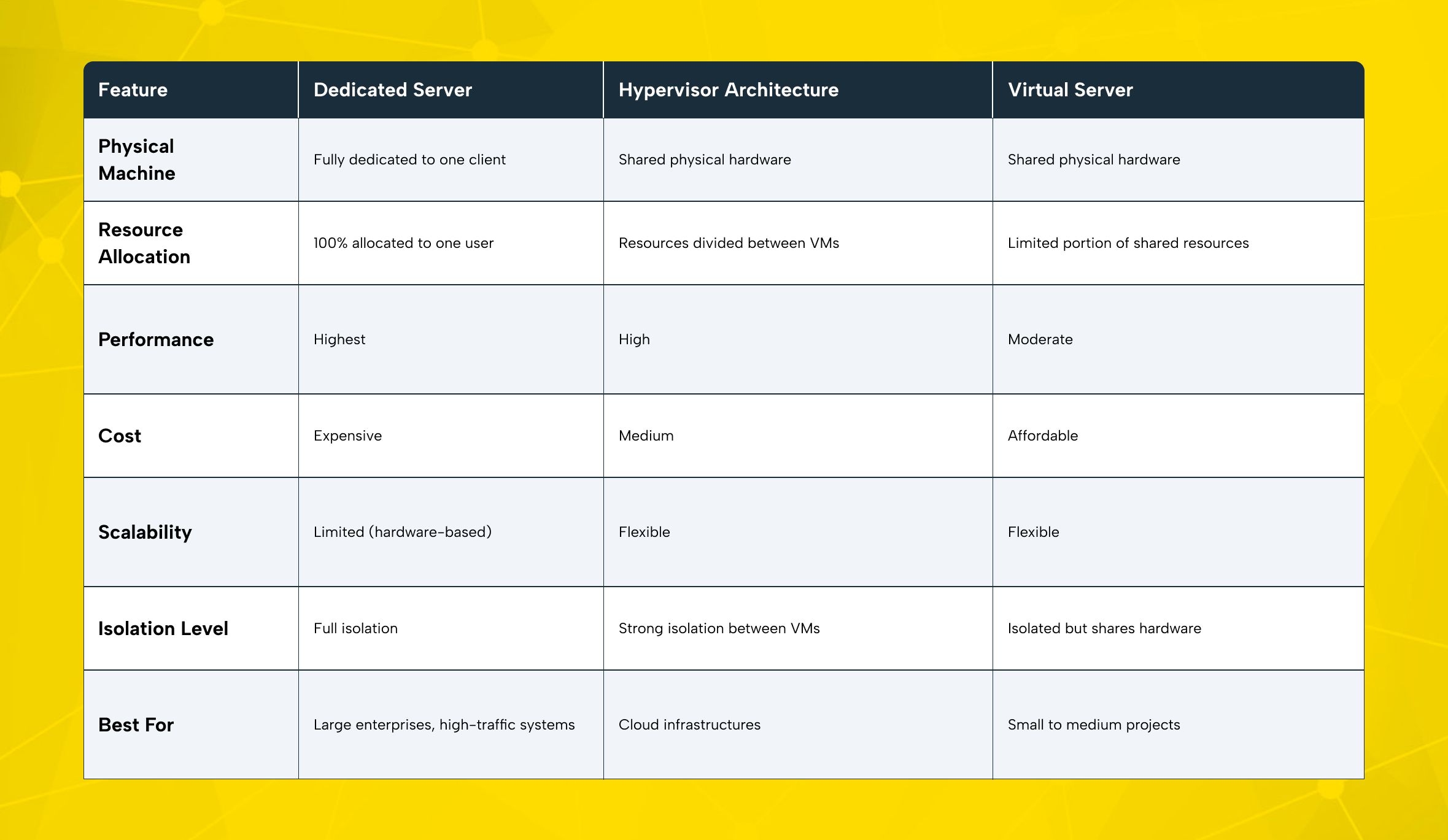
Server Performance Comparison: Where “High Performance” Really Shows Up
For many typical business workloads, a modern virtual server performs extremely well. A virtual server is cost-effective when your application does not constantly use maximum CPU, memory, and disk performance. In these cases, it can deliver strong performance at a lower cost.
A dedicated server usually wins in “worst-day performance” scenarios, such as:
- Peak traffic events,
- Heavy database writes,
- Consistent high IOPS storage needs,
- Intensive background processing,
- Streaming or real-time services that are sensitive to latency.
Virtualization overhead is often small, but it exists. In most cases, it is not the bottleneck. The real question is what limits your workload. Is it the fixed resource limit of your virtual server, or competition for resources on the host machine?
Quick Comparison Table: Virtual Server vs Dedicated Server
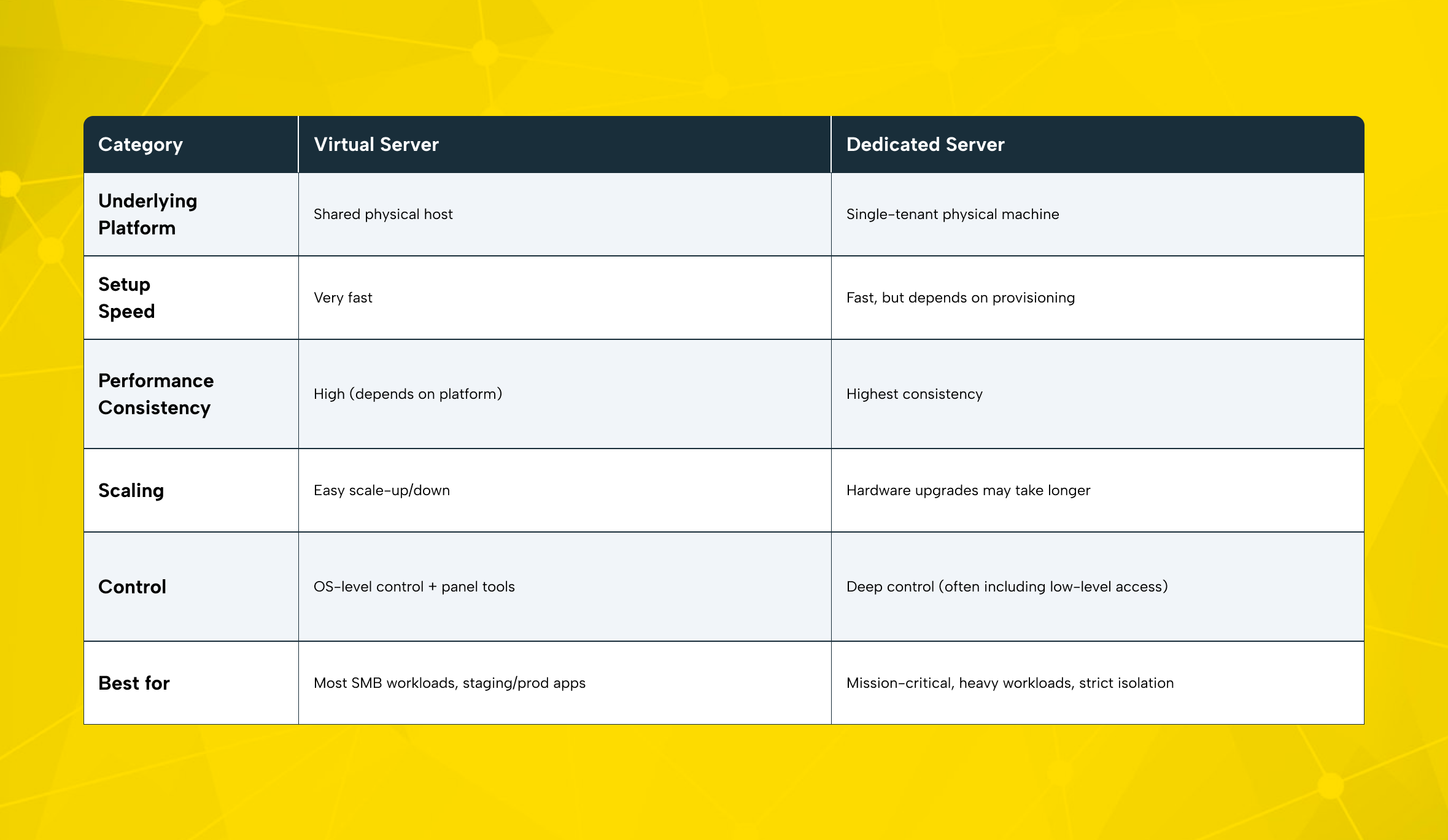
Use this checklist before you rent a server. It prevents overpaying and reduces future migration pain.
- Choose a virtual server when you need to scale quickly and keep monthly costs predictable. Choose it if hardware changes aren’t necessary.
- For high performance and full control, choose dedicated.
- If you don’t have a dedicated sysadmin, plan your server management model early (self-managed vs supported).
Security, Access, and Level of Control
Security and Isolation: Single-Tenant vs Virtual Isolation
A dedicated server is inherently “single-tenant.” No other customer runs on your hardware. That reduces a class of shared-neighbor risks and makes isolation easier to reason about.
A virtual server can still be highly secure. Strong platforms isolate tenants well. But security also depends on how you manage the server.
Regardless of server type, core basics remain the same:
- Keep your operating system patched,
- Apply firewall rules correctly,
- Enforce strong passwords and MFA where possible,
- Limit open ports to only what your web server and services truly need.
If you implement good security hygiene, a virtual server can be very safe for business workloads. For strict policies, sensitive workloads, or certain compliance environments, many teams still prefer a dedicated server for maximum isolation.
DDoS Attacks and Network Security: What Really Protects You
Ddos attacks are a reality for public-facing services. In most cases, the provider’s network quality plays a bigger role than the server type. Their filtering capabilities often matter more than whether you use a virtual server or a dedicated server.
What to look for in a provider:
- Upstream filtering and traffic scrubbing,
- Network monitoring and anomaly detection,
- Optional protected IP services,
- A security team that can respond quickly.
With a dedicated server, you can design your own network structure. This may include private VLANs, custom routing, and even separate hardware security devices, depending on your architecture.
A dedicated server can improve isolation, but it does not automatically make you “secure.” The biggest risks come from wrong settings: open ports, weak passwords, and no updates.
If your firewall rules, SSH/RDP access controls, or patch management are weak, your system becomes vulnerable. Even the most powerful server cannot prevent data loss or downtime in that case. Treat backups, access control, and incident response as part of your production baseline.
Management and Control: What You Can Do
A dedicated server typically offers the most control. Depending on the service scope, you may have access from BIOS/UEFI-level options all the way up to kernel tuning. Many providers support remote management interfaces that allow OS installation and console access without being physically present.
A virtual server usually provides OS-level control and platform tooling via a control panel. That panel may let you reboot, use a virtual console, and create snapshots. But you do not control the underlying host or hypervisor settings.
In daily operations, both server types are managed similarly:
- SSH for Linux,
- RDP for Windows,
- Monitoring, logging, and deployment pipelines.
The key difference is how deep you can go when you need to troubleshoot hardware-level issues or build custom platform designs.
Cost, Pricing, and Scalability
Cost Structure: Which Option Is More Cost Effective?
A virtual server is often more affordable at the beginning. This is because the provider shares the cost of the physical infrastructure across multiple customers. You typically pay for the resources you allocate (CPU/RAM/storage), and you can often adjust the plan as your needs change.
A dedicated server costs more because you rent an entire machine. Your price includes:
- The full server,
- Data center power/cooling,
- Internet connection,
- Day-to-day support at the infrastructure layer.
However, a dedicated server can become economically rational when your workload is heavy and constant. If your application constantly uses high resources, you should review your infrastructure choice. In many cases, renting a full physical server is simpler than combining multiple large virtual server plans.
Scaling: Cloud Computing Flexibility vs Hardware Upgrade Reality
In cloud computing, scaling is often the strongest argument for virtual infrastructure. With a virtual server, you can usually:
- Scale up (more CPU/RAM) quickly,
- Scale down when demand drops,
- Deploy multiple instances to distribute load.
With a dedicated server, scaling often means:
- Planning hardware upgrades,
- Scheduling maintenance,
- Adding additional servers when you reach capacity.
You can still design flexible systems with dedicated infrastructure. For example, you can deploy virtualization on your own dedicated host and run multiple internal workloads. But then the responsibility for that architecture and ongoing server management shifts to your team.
Which One Is Right for Your Business?
SMBs and New Projects: Why Virtual Servers Are Often the Best Start
If you are an SMB, a new e-commerce brand, or an agency launching client projects, you need a practical and flexible start. In most cases, a virtual server is the right first step.
Typical reasons:
- Lower entry cost,
- Faster launch,
- Easier scaling,
- Less daily friction
If you don’t have a full-time ops team, a well-set-up a server with good tools can ease the workload and give you more control than shared hosting.
E-commerce and Growth-Stage Brands: When Dedicated Starts to Make Sense
E-commerce businesses often hit infrastructure limits when:
- Traffic becomes spiky (campaigns, marketplaces, influencer-driven peaks),
- Database write volume increases,
- Performance directly impacts conversion rate.
At that stage, a dedicated server can stabilize performance. It removes performance fluctuations caused by shared neighbors and enables more accurate capacity planning.
A common and effective path is:
- Start on a virtual server,
- Optimize the app, caching, and database,
- Move to a dedicated server when growth demands stable compute and I/O.
Corporate, Enterprise, and Specialized Workloads: When Dedicated Is the Safer Choice
Larger organizations often choose dedicated server infrastructure for:
- Strict isolation requirements,
- Highly predictable performance demands,
- Specialized hardware,
- Deeper network segmentation needs.
Some organizations prefer a hybrid approach. They keep sensitive systems on a physical server and run front-end or seasonal workloads in virtual environments. This helps balance cost and day-to-day speed.
Makdos Server Hosting Options
Choosing the right server type is only half the decision. The other half is the provider’s infrastructure quality and support model.
Makdos offers both virtual and dedicated server solutions with a focus on stable performance, reliable network, and practical manageability. For many teams, the key question is speed. How quickly can they deploy, monitor, and adjust their infrastructure without hitting process bottlenecks?
Makdos Virtual Server Rental: Flexible Infrastructure for Real Growth
Makdos virtual server plans are built for teams that want fast deployment and easy scaling. This is ideal when you need to move quickly, test changes, or adapt capacity to demand.
What you typically get with a Makdos virtual server approach:
- Scalable resources for your workload,
- Fast activation,
- Management tooling via a customer panel,
- Security options to help mitigate common threats.
This model works well for production workloads that require reliability. It allows you to avoid committing to a full physical server from the start.
Makdos Dedicated Server Hosting: Predictable Power and Deep Control
Makdos dedicated servers support workloads that require steady performance, strict isolation, and flexible setup options.
A dedicated setup is especially useful when you:
- Run heavy databases,
- Need consistent disk performance,
- Require advanced network design or want maximum flexibility for custom stacks and tuning.
Depending on your plan, you can tailor your server setup. This includes choosing the right CPU and RAM, defining your storage structure, and aligning with your growth roadmap.
Add-On Security: Firewall, WAF, and Protection Layers
For production systems, security should be a defined architecture component not an afterthought. Makdos provides security services that can support both virtual and dedicated deployments, including firewall and application-layer protection.
This becomes critical when your infrastructure is internet-facing. In such cases, you need stronger protection against DDoS attacks, unauthorized access attempts, and web-layer threats.
Final Recommendation
If you want a simple way to decide:
- Choose a virtual server if you want speed, flexibility, and an easier cost curve.
- Choose a dedicated server if you need stable high performance, stricter isolation, or deeper control and advanced configuration.
The most common best-practice strategy is to start lean, measure real usage, and scale strategically. That avoids paying for unused capacity while keeping a clear path for growth.
If you’re unsure which environment suits your workload, Makdos can help you assess your needs. This way, you can choose a practical server plan, deploy with confidence, and scale without unexpected issues.