

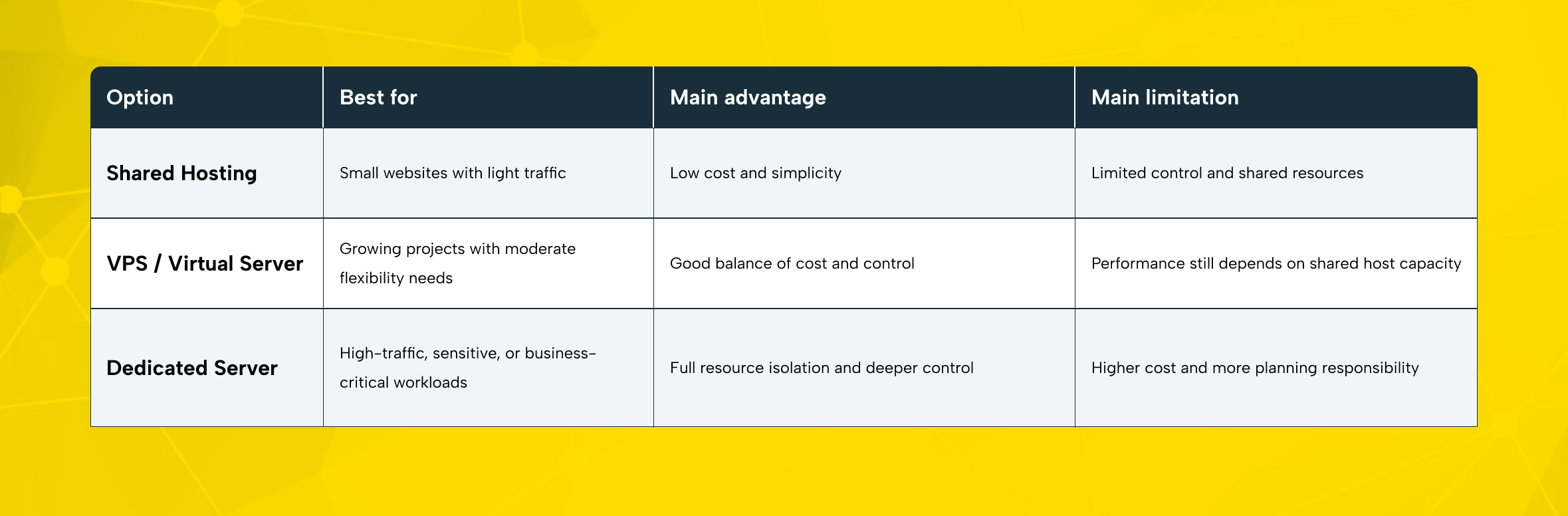
For many growing teams, server decisions start simple and then become more complex. A small brochure website may run well on shared hosting. A lightweight application may fit comfortably on a VPS.
But as traffic grows, databases become heavier and integrations increase. Uptime also turns into a business priority rather than just a technical preference. At that point, the limits of shared infrastructure become much more visible.
That is where dedicated server hosting becomes relevant. Instead of sharing compute resources with other tenants, your business uses an entire physical server on its own. That makes performance more consistent, tuning more flexible, and security policies easier to enforce.
For always-on workloads, a dedicated server can be a strong long-term foundation. This is especially true when stability and control matter over time.
Before you sign a contract, though, it is worth slowing down. The right dedicated server is not just about buying more CPU or more RAM. It is about matching infrastructure to workload and growth plans. It should also match your support expectations and your team’s ability to manage the environment.
What Is a Dedicated Server and Who Is It Best For?
A dedicated server is a physical machine reserved for a single customer. No other tenant uses your CPU, memory, storage, or network allocation. That matters because it removes the “noisy neighbor” effect that can appear in multi-tenant environments. It also gives you a clearer performance baseline.
Compared with shared hosting, dedicated hosting gives you much more control. That includes the operating system, installed software, access rules, and performance tuning.
Compared with a VPS, a bare metal server usually offers stronger isolation, more predictable throughput, and broader hardware flexibility. You are not just renting a software-defined slice of a host. You are renting the machine itself.
That does not mean every company needs one. A dedicated server is usually the right move when one or more of these conditions apply:
- Your website or application handles high and steady traffic.
- You run a large database or storage-heavy workload.
- You need stricter access control for compliance or internal policy reasons.
- Your team needs a custom OS, firewall, or server setup.
- You run latency-sensitive or resource-intensive workloads.
- Your growth plan makes shared or virtual infrastructure feel temporary.
For e-commerce teams, a dedicated server can handle peak campaign periods and larger product catalogs more reliably. It can also support the stability needed for payment-related processes. This is especially important for systems that need to run reliably.
For agencies, it can create cleaner client isolation and more predictable capacity for managed projects.
For corporate brands, it can simplify workload segregation and performance planning. For technical teams, it can serve as a base layer for virtual machine and container platforms. This gives teams more flexibility when building their environment. It can also support dedicated hosting clusters or internal business systems.
In short, a dedicated server becomes valuable when performance, security, and control stop being optional.
Start With the Right Dedicated Server Resource Plan
The most common mistake first-time buyers make is choosing hardware based on assumptions instead of workload data. Bigger is not always better. Smaller is often more expensive later. The goal is to buy the right baseline and leave room for scale.
CPU and RAM sizing
CPU and RAM sizing should reflect how your applications behave, not just how many visitors you expect.
If your workload runs many concurrent requests, background jobs, virtual machines, or containerized services, higher core counts matter. If your application relies more on single-thread performance, clock speed may matter more than raw core volume. Databases, search systems, caching layers, and API-heavy environments often need both balanced compute and healthy memory allocation.
RAM planning is just as important. Insufficient memory creates swapping, slow response times, and unstable application behavior. Web applications, databases, cache engines, and analytics processes can all compete for memory.
That is why you should evaluate CPU and RAM together. You should not treat them as separate decisions. You need to evaluate them together. Looking at them separately can lead to the wrong sizing choice.
Leave growth headroom in your first configuration. A server that runs at 70–75% average capacity is easier to scale and troubleshoot than one that starts near its limits.
Storage type, capacity, and RAID
Storage is not just about “how many gigabytes.” It affects application speed, backup windows, restore expectations, and database behavior.
For most modern business workloads, SSD or NVMe storage is the practical baseline. NVMe storage is especially useful for databases and high-I/O web applications. It also works well for API platforms and other workloads that benefit from faster read and write performance. Capacity planning should include not only live data, but also logs, snapshots, temporary files, deployment artifacts, and future growth.
RAID configuration matters too. RAID can improve redundancy and availability, but the right level depends on your workload and tolerance for risk. RAID 1 may be enough for smaller setups. RAID 10 is often attractive when you want both speed and resilience.
More capacity-efficient RAID levels can make sense in certain storage scenarios. But you should weigh them carefully against write performance and recovery needs. The right choice depends on how much speed and resilience you need.
Bandwidth, uplink speed, and traffic planning
A powerful server can still feel slow if the network plan is weak. That is why bandwidth and uplink speed matter just as much as hardware.
If your workloads serve media, process large files, or handle sudden traffic spikes, network capacity directly affects performance. It also becomes a key part of performance planning when you support users across multiple regions. Think about average traffic, burst traffic, CDN use, backup traffic, replication traffic, and remote administration. Even the best dedicated server hosting plan can feel constrained when the network model is too narrow.
Data center location matters here as well. A server closer to your core audience usually improves latency. If your customer base is regional, choose infrastructure that supports that geography.
If your audience is distributed, the right server location improves performance. The right choice can improve speed and consistency. You should also support it with a CDN or edge delivery strategy.
Operating system and software stack
Your operating system choice should match your application needs. It should also fit what your team can manage comfortably. A Linux server is often a natural fit for web stacks and open-source tools. It also works well for automation pipelines and many database-driven applications.
Windows Server can be a better fit when your applications rely on Microsoft technologies or specific enterprise software. Also a strong option for teams that rely on Windows-based workflows in their daily work.
Decide on your control panel needs early. This helps avoid changes later. Some teams want full command-line access and custom automation. Others need a control panel for faster provisioning, easier delegation, and day-to-day convenience.
First-Day Dedicated Server Validation
When your dedicated server is delivered, validate the basics before moving production traffic:
- Confirm CPU details and core count.
- Verify installed RAM matches your order.
- Check storage type, usable capacity, and RAID layout.
- Review network settings, uplink allocation, and remote access rules.
- Change all initial passwords immediately.
- Apply OS updates and security patches.
- Restrict SSH or RDP access to approved IP ranges.
- Enable firewall rules before exposing public services.
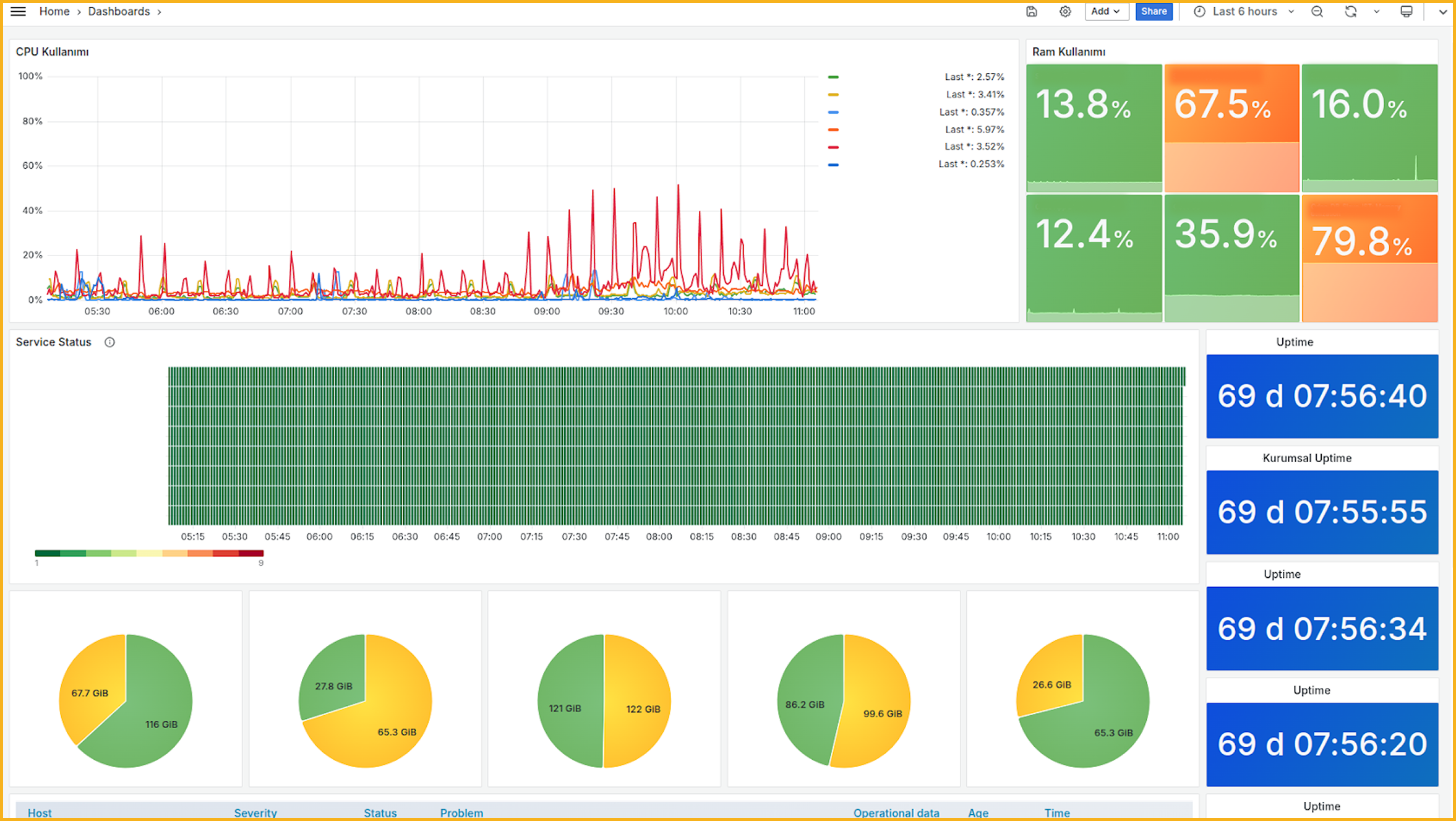
- Test monitoring and alerting before go-live.
- Confirm backup jobs and restore paths, not just backup existence.
How to Evaluate a Dedicated Server Provider
Choosing the hardware is only half the decision. The provider behind the hardware will shape your real experience.
Data center quality and location
Infrastructure quality matters because your dedicated server is only as strong as the facility that hosts it. Power redundancy, cooling design, network resilience, physical security, and operational discipline all influence uptime and recovery outcomes.
Location also affects user experience. Lower latency usually starts with physical proximity. If most of your customers are in one region, hosting closer to them is often the cleaner choice.
Hardware flexibility and upgrade options
A good provider should not lock you into rigid templates that do not match your workload. Hardware flexibility matters because businesses rarely stay static. You may start with one CPU profile at first. Later, you may need more RAM, faster storage, larger disks, additional IPs, or a different network setup.
Ask practical questions:
- Can you customize CPU, RAM, storage, and RAID?
- Are NVMe and SSD options available?
- Can the server be upgraded later without a painful migration?
- Are operating system choices broad enough for your stack?
- Can you add security and backup services without rebuilding the environment?
Support quality, SLA, and response culture
Support is easy to ignore when everything is fine. It becomes the only thing that matters when something breaks at 02:00.
Look beyond marketing language and evaluate response culture. Is support available 24/7? What channels exist? How are urgent incidents prioritized? Is the SLA clear? Do you get fast escalation on infrastructure events?
First-time buyers often underestimate how much confidence comes from knowing expert help is within reach. That support can make day-to-day management feel far more manageable.
Security, backups, and stability
Security should be part of the server decision from day one, not a patch after go-live. Ask what is available around firewall policy, DDoS protection, monitoring, access controls, update responsibility, and backup options. For remote administration, secure SSH or RDP access is essential. Limit exposure, enforce strong authentication, and treat remote access as a protected management plane rather than an open door.
The cheapest physical server rental offer is not always the most economical choice. Weak support, poor monitoring, and limited security controls can create more cost than they save.
Backups deserve their own discussion. Ask how backups run, where they are stored, and how restores are tested. A backup policy that has never been validated is not a recovery strategy.
RAID is not backup. RAID helps keep services running after a disk issue. But it does not protect your data from deletion, corruption, ransomware, or human error. You still need tested backups and a recovery plan.
Pricing and contract review
Pricing should be judged as total operating cost, not just monthly rent. Review setup fees and extra IP charges first. Then check overage policies, contract length, support scope, security add-ons, control panel licensing, and upgrade costs. Transparency matters more than a headline discount.
A reliable provider makes the full cost model clear and easy to follow. That is a sign of a more structured and well-managed approach.
Dedicated Server Rental Process, Step by Step
Once you know your resource profile and provider criteria, the rental process becomes much easier to manage.
1. Define the workload clearly
Start with the business case. Are you hosting a transactional website, a database cluster, an internal platform, a client portfolio, or a virtualization stack? Clarify expected traffic, storage needs, remote access requirements, compliance expectations, and internal ownership.
2. Compare providers with a checklist
Do not compare offers only by price. Compare them by location, support, security options, hardware flexibility, backup model, and clarity of SLA. A smaller but well-run shortlist is better than a long list with no structure.
3. Configure the server and place the order
At this stage, you choose the main server resources, including CPU, RAM, storage, RAID, bandwidth, and the operating system. You can also add optional services such as a firewall, DDoS protection, backup, or a control panel. This is where a provider with flexible dedicated server hosting becomes valuable.
4. Review provisioning and access delivery
After payment and order approval, the provider prepares the machine and installs the operating system. Then the network is configured and the access details are sent to you.
For Linux, that usually means SSH credentials or key-based access. For Windows, that often means RDP and administrator credentials. Treat this handoff as a sensitive event and store credentials securely.
5. Validate, harden, and test
Before moving live traffic, verify the hardware and apply the latest operating system updates. Then review firewall rules, change credentials, confirm remote access limits, and test how the application behaves. If you are moving an existing workload, plan rollback and maintenance windows.
6. Monitor, back up, and scale
A dedicated server is not “set and forget.” It needs monitoring, updates, backup checks, performance reviews, and capacity planning. As workloads grow, revisit CPU and RAM sizing, storage pressure, and bandwidth usage. That is how dedicated hosting stays stable over time.
How Makdos Supports Dedicated Server Projects
For businesses that want dedicated server infrastructure, Makdos can offer more than the server itself. It can be positioned as a practical infrastructure partner rather than just a server vendor. The value is not limited to the physical machine. It extends into configuration flexibility, support access, security options, and day-to-day management.
Makdos dedicated server offering is suitable for teams that want to configure hardware more deliberately. It also suits businesses that want to choose the right operating system for their environment. Instead of using generic bundles, they can build infrastructure around real workload needs. That is especially useful for e-commerce companies, agencies, corporate platforms, and technical teams with specific performance expectations.
Security services also matter in this positioning. Firewall and DDoS options help teams build a stronger protection layer around internet-facing services. Monitoring and support also help teams spot issues more easily.
For businesses with limited in-house infrastructure capacity, that support layer can provide needed operational structure. It can make the difference between simply reacting to issues and running infrastructure in a more organized way.
Makdos Firewall and Security Service
Makdos is also a relevant choice for teams that are still deciding between virtual and physical infrastructure. Some workloads are well suited to a virtual server in the early stage. Others clearly benefit from moving directly to a dedicated server. A provider that can support both paths makes future transitions easier.
Another practical advantage is management simplicity. When server operations, support processes, monitoring points, and account actions are easier to follow, teams work with more clarity. This also helps non-technical departments use technical resources with greater confidence. That matters for SMBs and agencies, where decision-makers often need visibility without getting buried in low-level administration.
Final Takeaways Before You Rent a Dedicated Server
A dedicated server is not the right fit for every project. But for more serious and demanding projects, it is often the better choice. When your workload needs stable performance and stronger resource isolation, a dedicated server often becomes the next logical step. It is also a better fit when you need more configuration control and clearer long-term planning.
The best decision usually comes from five things:
- Clear workload definition,
- Realistic CPU and RAM sizing,
- Fast storage and sensible RAID planning,
- Strong provider evaluation,
- Security and backup discipline from day one.
If you are comparing physical server rental options, do not focus only on the machine. Focus on the full operating environment around it. Hardware matters. So do support, monitoring, backup maturity, and security services.
If your team is preparing for a higher-performance hosting model, review Makdos’ dedicated server solutions.