
Businesses of every size rely on Windows Server for core infrastructure, internal applications, file services, authentication, and remote operations. The licensing part becomes difficult because the server software itself is only one layer of the decision.
What you need to buy or rent depends on the edition, core count, user access, remote desktop needs, and hosting model. Microsoft bases its licensing terms on these factors. The original Turkish source article follows the same logic closely.
That is why teams should approach Windows Server licensing as part of infrastructure planning. Teams should not leave it to last-minute procurement. If you under-license, you create compliance risk. If you over-license, you lock budget into the wrong model.
For SMEs, e-commerce teams, agencies, and enterprise brands alike, the goal is the same. The licensing model should match the way the workload actually runs.
Choose the Right Version and Edition
Which Windows Server version should you choose?
If you are planning a new environment today, Windows Server 2025 should usually be your starting point. Microsoft positions Windows Server 2025 as its current server platform. It highlights improvements in security, hybrid cloud, scalability, networking, storage, and performance.
Windows Server 2022 still makes sense in some cases. It can be the lower-risk option when internal standards, vendor certification, or migration timing make upgrading less practical.
Many companies still rely on older Windows Server environments because business applications often move more slowly than vendors prefer. For greenfield planning, it is usually better to start by comparing Windows Server 2025 with 2022. Older versions should remain in scope only when compatibility needs or change-related risks clearly justify them.
The practical selection rule is simple: choose the version based on application compatibility, upgrade horizon, and operational maturity. When a critical business application is certified only for an older release, stability matters more than novelty. If you are building a fresh stack, the current release usually gives you the stronger long-term runway.
Standard vs Datacenter: which edition fits your environment?
Microsoft positions Standard for physical or lightly virtualized environments, and Datacenter for highly virtualized datacenters and cloud-heavy workloads. That is the first filter to apply before you look at price.
Standard is usually the right fit for physical servers or environments with only a small number of virtual machines. Microsoft’s current pricing page describes Standard in clear terms. Once the required host cores are licensed, it covers up to two virtual machines and one Hyper-V host.
Datacenter becomes a stronger option when virtualization density increases or when hosts are part of a broader virtualization design. It is also the better fit when you need features that are only available in Datacenter. These include Shielded VMs, software-defined networking, and software-defined storage. Microsoft lists Datacenter with unlimited virtualization rights on a properly licensed host.
The real question is not “Which edition is better?” but “How many Windows Server workloads will this host or cluster run over its life?” If you expect to keep stacking Standard licenses on the same host as VM count grows, run a fresh cost model before you commit. That is the point where Datacenter often becomes the cleaner commercial and operational choice.
Common Ways to License Windows Server
There are three common commercial paths: hardware-bundled licensing, direct business licensing, and provider-hosted monthly consumption. Each one fits a different infrastructure strategy.
OEM or hardware-bundled licensing
If you obtain Windows Server from a device manufacturer or installer, the license is assigned to that specific server. Under Microsoft’s OEM terms, it stays with the hardware it was purchased with. Unless additional rights are purchased, OEM licenses have limited reassignment rights, making them simple upfront but less flexible later.
Direct business licensing
If the licenses are obtained directly from Microsoft rather than a device manufacturer, they can be reassigned. In most cases, however, Microsoft does not allow reassignment within 90 days unless there is a permanent hardware failure. That makes direct licensing more flexible than hardware-tied licensing, but it still requires governance and asset tracking.
Provider-hosted monthly licensing
For hosted service delivery, Microsoft’s SPLA model is built for service providers. Microsoft describes SPLA as a non-perpetual, monthly licensing framework for providers that host software services for customers. With this model, you pay each month only for what you make available. Microsoft also notes that pricing for hosted Windows Server services is set by the service provider.
For the customer, the decision becomes practical rather than theoretical. Do you want to buy and manage licenses as assets, or use Windows Server as part of an ongoing service? If the environment changes often, the monthly model can be easier to manage. It can also be a better fit if you want to avoid a large upfront cost.
CALs, RDS, and Access Planning
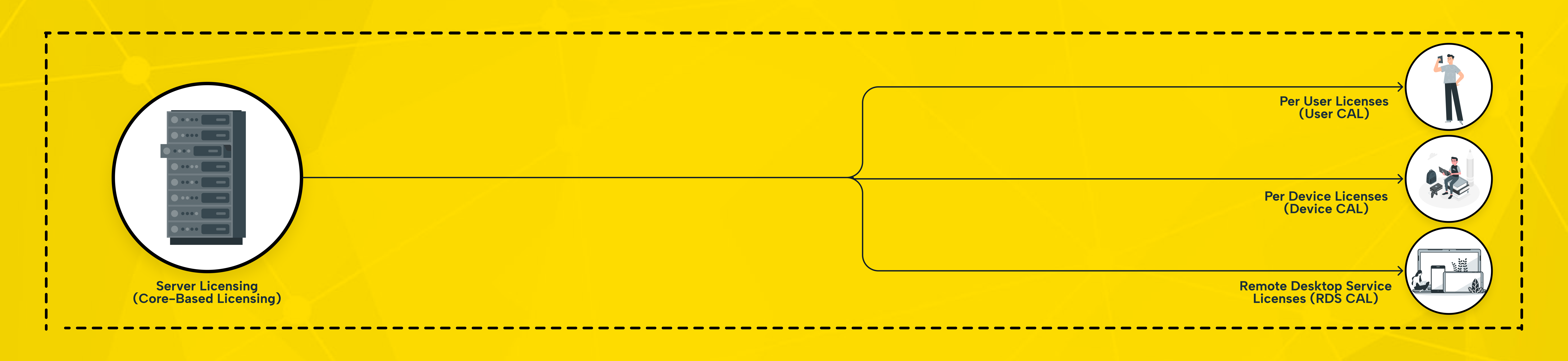
CAL planning is where many licensing projects become expensive. A Windows Server license covers the server software itself. It does not automatically include access rights for every user or device that uses server services.
Microsoft defines a CAL as the right for a user or device to access server services. Windows Server Standard and Datacenter still require CALs for server access, except where the Product Terms state otherwise.
User CALs make more sense when one employee works across several devices. Device CALs make more sense when multiple employees share the same workstation or terminal. Microsoft also offers External Connector licensing as an alternative in certain external-user scenarios.
Remote Desktop Services is separate again. Microsoft states that RDS CALs must match the Windows Server version the user or device connects to. Newer RDS CALs can be used with older Windows Server versions, but older RDS CALs cannot be used with newer ones. In plain terms, do not assume remote desktop is “already included” just because the host itself is licensed.
A complete licensing model usually has four layers. These include the Windows Server edition, licensed physical cores, required CALs, and any additional access licensing such as RDS. If even one of those layers is skipped, the budget model is incomplete.
Core-Based Licensing, Simplified
Core-based licensing is the math underneath the whole decision. Microsoft states that all physical cores in the server must be licensed. This includes a minimum of 8 core licenses per physical processor and 16 core licenses per physical server. Microsoft also states that core licenses are sold in packs of two and sixteen.
Core-Based Licensing in 4 Steps
- Count every physical core in the host.
- Apply Microsoft’s minimums: 8 cores per processor and 16 cores per server.
- Decide whether your virtualization plan fits Standard or Datacenter.
- Add Windows Server CALs, and add RDS CALs if users need remote desktop access.
On a lightly virtualized single host, this math is usually manageable. In clustered environments or on servers with a high core count, it becomes much easier to miscalculate licensing needs. It also becomes easier to miss the point where Datacenter becomes the more cost-effective option. That is why licensing should be modeled against the host design, not guessed from VM count alone.
If the hardware will grow later, remember that licensing grows with it. Adding more physical cores can increase the total licensing requirement. That is why infrastructure growth and licensing planning should be handled together, not in separate budget cycles.
Licensing terms, exceptions, and commercial pricing can change. Validate final quantities, access rights, and regional pricing with Microsoft or your reseller before making a purchase decision.
What Shapes the Real Cost?
Windows Server cost is never just the OS line item. In practice, the real budget depends on several factors. These include the edition, core count, access needs, remote desktop requirements, and whether Windows Server is licensed perpetually or used monthly through a provider.
Microsoft’s current reference pricing lists Windows Server 2025 Standard at $1,176 and Datacenter at $6,771 for 16-core licenses. Microsoft also states that prices are shown in USD and may vary by country and reseller. Those figures are useful as directional benchmarks, not as final quote values.
This is why many businesses misjudge licensing. They compare only Standard and Datacenter. In practice, however, the total cost rises when CALs, RDS requirements, additional hosts, and migration timing are also included.
For stable, long-lived infrastructure, ownership can be more economical over time. For short-term, seasonal, or fast-changing demand, monthly consumption can preserve cash and reduce stranded licensing spend.
The commercial tradeoff is usually CapEx versus OpEx. If you need predictable monthly spending, monthly provider-hosted licensing can be easier to manage. It is also a practical option when you need rapid scaling or temporary capacity. If the environment is stable, internal, and unlikely to change for years, outright licensing may be the cheaper long-term choice.
What SMEs, E-Commerce Brands, Agencies, and Enterprise Teams Should Prioritize
For SMEs, the biggest mistake is overbuying. Many smaller businesses do not need Datacenter on day one. They need a Windows Server plan that covers current workloads, leaves room for growth, and avoids unnecessary upfront cost. Monthly infrastructure is often attractive when cash flow matters more than asset ownership.
For e-commerce teams, seasonality matters as much as licensing. Campaigns, holiday peaks, or sudden catalog growth can create sudden bursts in demand. In those cases, a flexible hosting model is often easier to manage. It can be more practical than buying permanent capacity for the busiest month of the year.
Makdos presents flexible resources, scalable infrastructure, and lower hardware investment as key benefits for growing online businesses.
For agencies, the real risk is fragmentation. Multiple client environments, mixed remote access needs, and varied software stacks make licensing discipline more important, not less. A consistent hosting model is often easier to operate than a collection of one-off server purchases.
For enterprise teams and corporate brands, the focus shifts to architecture. Key questions include host density, cluster design, security boundaries, and remote access governance. They also include how infrastructure, procurement, and compliance teams work together. At that scale, licensing should be reviewed as part of platform architecture—not after deployment.
How Makdos Can Simplify the Windows Server Decision
If the goal is to reduce licensing friction, Makdos should be positioned as more than a place to rent compute. The stronger message is operational simplicity. Choose the right server model and align Windows Server licensing with actual workload needs.
Then manage support, scaling, and infrastructure decisions within a single operating framework. The original Turkish source article consistently frames Makdos around that idea.
For businesses that need fast deployment and Windows-based remote administration, Makdos already has a dedicated Windows cloud server offering. Its English service page highlights RDP access, scalability, affordability, and 24/7 support. That makes it a practical option for lightly to moderately virtualized business workloads.
If the priority is flexible resource allocation, Makdos virtual server solutions are a natural next step. They also provide room to scale as needs grow. Makdos positions these services around user-friendly management, Windows and Linux operating system options, DDoS protection, and flexible infrastructure for growing projects.
When workloads are heavier, more isolated, or more sensitive to performance consistency, dedicated server rental is the better fit. Makdos’s English dedicated server page emphasizes Windows support, customizable hardware, full control, and physical isolation for security or performance-sensitive systems.
And when the question goes beyond licensing to overall infrastructure fit, Makdos already offers a related English blog resource. It compares virtual servers and dedicated servers for modern hosting needs. That supporting article is useful for readers who need to decide not just how to license Windows Server, but where that workload should run.
In practice, Makdos fits this article best as a decision partner: helping readers compare Standard vs Datacenter, assess CAL and RDS needs, and choose the right operating model without making the article feel overly sales-driven.
Conclusion: Build the Right Windows Server Plan First
The right Windows Server plan starts with the host, not the product key. First choose the version that fits your application roadmap. Then choose Standard or Datacenter based on virtualization density.
After that, calculate physical cores, CALs, and RDS needs. Only then should you decide whether ownership or monthly consumption gives you the better commercial outcome.
If you want a simpler path, start by reviewing your current server inventory and identifying who actually needs access. Then compare your long-term ownership model with a monthly hosted alternative. If your goal is to reduce licensing complexity while keeping Windows workloads flexible, Makdos can help. It helps you move from asking, “What should we buy?” to deciding, “What should we actually run, and under which model?”