

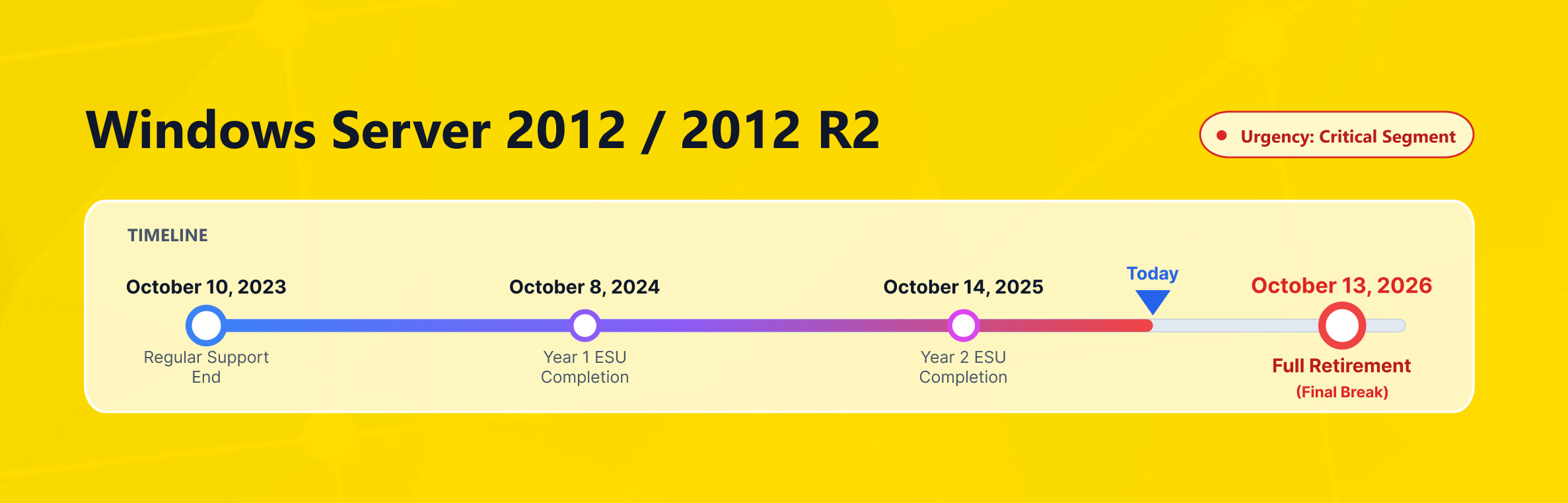
Microsoft ended support for Windows Server 2012 and Windows Server 2012 R2 on October 10, 2023. After that date, these products no longer receive security updates, non-security updates, bug fixes, or standard technical support. That is the real issue behind this topic: the server may still be running, but the vendor no longer maintains the platform underneath it.
Many businesses still run Windows Server 2012 because legacy systems are not easy to migrate at once. That is understandable. But “still functioning” is not the same as “still supportable,” and that distinction becomes more expensive over time.
The longer a legacy operating system stays in production, the harder it becomes to control risk. It also becomes more difficult to plan maintenance windows and keep changes predictable.
The right question is no longer whether you should leave Windows Server 2012 behind. The right question is how to migrate with the lowest possible disruption. For some teams, that means a short bridge period.
For others, it means building a clean replacement environment and moving workloads in phases. The goal is the same: move to a supported platform before a known weakness becomes an operational problem.
What End of Support Actually Means for Windows Server 2012
End of support is not just a licensing milestone. It means Microsoft has stopped the normal lifecycle of fixes and support for the product. For Windows Server 2012 and Windows Server 2012 R2, this means there are no regular security updates. It also means standard bug fixes and normal support escalation are no longer available.
That matters because security does not stop evolving when support ends. Attack methods evolve, and new vulnerabilities keep appearing. At the same time, business systems continue to connect with newer tools, APIs, browsers, and management layers.
Once an unsupported operating system becomes part of daily server management, patching decisions become more reactive. At that point, it becomes harder to take a strategic approach. You are no longer improving the platform. You are only trying to contain the downside.
Why Staying on Windows Server 2012 Raises Business Risk
The most obvious risk is security exposure. Unsupported systems no longer receive the normal stream of protective fixes. As a result, a weakness can remain open for too long.
For SMEs, e-commerce companies, and enterprise brands alike, this can affect customer trust. It can also weaken internal controls and make incident recovery planning more difficult.
The second risk is operational drag. Legacy workloads often depend on old drivers, old management habits, and old assumptions about how infrastructure should work. Over time, backup tools, monitoring expectations, authentication policies, and hosting standards continue to evolve.
Meanwhile, the legacy server remains where it is. That gap creates friction in maintenance, testing, and change control. In other words, Windows Server 2012 becomes not just a security issue, but a broader server management problem.
The third risk is decision paralysis. Some businesses delay because they think migration must be a single, painful cutover.
In reality, the bigger mistake is allowing an unsupported system to remain “temporary” for too long. As a result, a weakness can remain open for too long. An unowned legacy platform usually cannot.
If you must keep Windows Server 2012 online temporarily, set an exit date, assign an owner, and plan the rollback. Unsupported infrastructure is an exception, not business as usual.
Where Extended Security Updates Help and Where They Do Not
Microsoft’s Extended Security Updates program provides short-term protection after support ends. Microsoft says ESUs can remain available for up to three years. They are free on eligible Azure VMs and purchasable for non-Azure and Azure Arc-enabled servers. Current Microsoft guidance also points to the final ESU date in October 2026.
That bridge helps, but it is not a fresh lifecycle. Extended Security Updates help address security issues for a limited period. However, they do not make Windows Server 2012 a fully supported platform again. ESUs extend protection, but they do not remove technical debt, modernize the OS, or restore full lifecycle support.
That is why ESU makes the most sense as a transition tool. It can buy time for testing, dependency mapping, procurement, or a staged application rewrite. It is useful when the business cannot move immediately, but it is weak as a final destination. A bridge is only valuable if you use it to move to the other side.
A low-risk migration sequence
- Inventory server roles, applications, integrations, and login dependencies.
- Validate backups and perform at least one restore test before any change.
- Build the target environment in parallel instead of touching production first.
- Test application behavior, authentication, scheduled tasks, and file permissions.
- Define cutover, rollback, and post-migration monitoring steps in advance.
Choosing the Right Upgrade Path
Put simply, Windows Server 2016 is usually no longer the right long-term destination. Microsoft’s lifecycle pages show extended support for Windows Server 2016 ending on January 12, 2027. Windows Server 2019 is supported until January 9, 2029; Windows Server 2022 until October 14, 2031.
When Windows Server 2019 Is the Pragmatic Step
Windows Server 2019 can be the right move when application compatibility is the main constraint. If a full jump is too risky, Windows Server 2019 can serve as a more stable interim platform. It still gives you a supported platform and more breathing room than Windows Server 2012.
When Windows Server 2022 Is the Better Strategic Move
Windows Server 2022 is usually the stronger long-term choice. It offers a better security posture and a longer support runway. Microsoft describes Windows Server 2022 as a release with advanced multi-layer security and hybrid capabilities with Azure.
Its secured-core features are available in Windows Server 2022 and later. For businesses that want to reduce repeated migration cycles, that longer horizon matters.
The right version of Windows is not simply the newest name in a list. It is the version of Windows that your business can realistically support. Your applications, licensing model, operational habits, backup process, and support expectations all need to align with it.
A rushed upgrade that breaks critical software is not a success. A planned move that restores support, reduces exposure, and simplifies future maintenance is.
What Different Business Teams Should Prioritize First
If You Are an SME
Keep it simple: decide which workloads still need Windows and which do not. Many smaller businesses overcomplicate migration because they try to modernize everything at once. A better approach is to identify the essential roles first, move them to a supported platform, and then clean up the rest in stages.
If You Run E-commerce Operations
Your migration plan should revolve around business continuity. That means checking payment-related integrations and ERP or inventory sync tools. It also includes mail delivery, SSL/TLS dependencies, scheduled jobs, and traffic peaks.
Even a technically successful migration can still fail from a business point of view. That can happen if order flow, customer notifications, or campaign landing systems are not tested under real conditions.
If You Manage Agency or Multi-Client Environments
Do not let one legacy server quietly become the single point of failure for multiple customer projects. Use the migration window to separate workloads and tighten access controls. This is also the time to review admin practices and choose the right server model for each environment. Better isolation usually pays for itself in fewer support incidents and cleaner accountability.
If You Work in a Larger Corporate Environment
Treat migration as a governance exercise, not only a systems task. Document dependencies, align change windows with stakeholders, define rollback criteria, and decide who signs off on testing. Legacy server retirement tends to go more smoothly when ownership is explicit and cross-team assumptions are removed early.
How Makdos Helps You Move Off Windows Server 2012 Safely
Makdos is well positioned for teams that need infrastructure flexibility during migration. Its English pages already present Windows cloud server, virtual server, and dedicated server options. Its cloud and virtual server services include an easy-to-use control panel for setup and daily management. That makes Makdos relevant not only for a brand-new deployment, but also for phased transition planning.
The source article also makes Makdos’s position clear. Legacy compatibility still matters in real-world environments. As a result, some customers may need temporary support for older versions such as Windows Server 2012 R2.
But the recommendation is still to move forward to supported releases as soon as practical. That is the right message. Temporary compatibility support is useful; staying on an obsolete operating system is not.
Makdos also strengthens the migration story with complementary services. Its English pages highlight firewall and security services, plus backup options on cloud infrastructure. That combination matters because replacing the OS alone is not enough. Secure alternatives also require restore planning, traffic protection, and a cleaner operational baseline around the server itself.
For businesses that want a practical migration path, Makdos can support a staged approach. This can include building the target environment and validating application behavior. It can also involve aligning access and security rules.
Data can also be moved step by step and switched over during a planned maintenance window. That is a much better way to leave Windows Server 2012 behind than waiting for the next forced emergency.
Conclusion: Move Before Risk Turns Into Cost
Windows Server 2012 is already past end of support, and Windows Server 2012 R2 is in the same position. Extended Security Updates can help in the short term, but they are a bridge, not a destination. The real objective should be to return to a supported platform. That move restores security, reduces operational burden, and creates a more stable foundation for the future.
If you still have Windows Server 2012 in production, now is the time to review your dependencies. You should also choose the right target environment and plan the migration with backup and rollback in mind.
For Windows workload migrations, Makdos offers a practical next step. Its infrastructure already provides provisioning flexibility, security layers, and operational control. It helps you move forward without adding unnecessary downtime to the project. It helps you move forward without turning the project into unnecessary downtime.