
Businesses communicate with customers every day campaign announcements, promotions, reminders, and service updates. In Türkiye, these communications must comply with the rules for commercial electronic messages. IYS (Message Management System) serves as the central platform for managing permissions (opt-in) and rejections (opt-out).
We provide this article for general information only. It does not replace professional advice. It does not constitute legal advice. For case-specific compliance decisions, consult qualified legal counsel.
What is IYS (Message Management System)
Why IYS Registration Matters
IYS was created to centralize commercial messaging permissions. It also makes the consent and opt-out process transparent for both service providers and recipients. It strengthens legal certainty for businesses by supporting their proof obligations. It also gives recipients a single platform to view, manage, and withdraw their permissions.
For SMEs, e-commerce brands, corporate marketers, and agencies, iys registration is not just “signing up.” It’s the foundation of a repeatable compliance workflow:
- Collect consent in a valid format
- Record and store consent proofs consistently
- Keep permission lists synchronized across tools (CRM, ESP, SMS vendor, call center, etc.)
- Process opt-outs fast and reliably
How to Register for IYS
You can register online via the official portal, and in some cases via physical submission. In practice, businesses typically use one of the three paths below.
Before IYS registration, update company records, confirm an authorized signatory, and verify active business contact details.
Option 1: Online Application via e-Devlet (Best if you have MERSIS)
If your company has a MERSIS record, the fastest route is usually an online application using e-Devlet login. e-Devlet supports multiple identity verification methods (password, mobile signature, e-signature, national ID card, and internet banking).
Typical flow:
- Go to the IYS application entry point and choose e-Devlet login
- Verify identity (authorized person)
- Confirm company details pulled from official records
- Fill in required contact and brand details
- Accept the terms/undertaking and complete approval (often with e-signature)

Option 2: Online Application with a Digital Signature
If you cannot use the e-Devlet method or choose not to you can proceed online. In most cases, you can complete the process using the company’s authorized signatory’s e-signature.
In this model:
- Identity verification is completed via e-signature
- The form steps are similar (company info, authorized person info, brand details)
- You sign the contract digitally.
This is a practical option for many service providers that already operate with e-signature workflows.
Option 3: Physical Application (Manual Submission)
If you do not have an e-signature, you may not be able to complete the process online. In some cases, required registrations may be missing. In these situations, IYS may request a physical application with wet-signed documents.
This route usually involves:
- Printing and signing required forms/undertakings
- Preparing corporate documents (tax, signature circular, trade registry records, trademark documents if needed)
- Sending the file package to the designated address for review
Because it includes manual review and shipping timelines, it typically takes longer than online paths.
If you choose physical submission, approach it like a structured project. Make sure your documents are complete, signatures are in place, and brand-related paperwork is accurate. Incomplete or inconsistent files commonly lead to delays.
After Approval: Save Your Service Provider Number
Once your application is approved, you will receive a service provider membership/registration number (your identifier in the system). Save it internally because you may need it for integrations, agency coordination, and support workflows.
Documents and Information to Prepare Before Applying
Going into iys registration with everything ready makes the process smoother and reduces back-and-forth.
Here’s what businesses commonly need to prepare.
1) Authorized Person Information
- National ID number (for the authorized signatory)
- Corporate email address
- Mobile phone number (for verification and notifications)
2) Company Information
- Company trade name
- MERSIS number (if applicable)
- Corporate communication details
3) Brand / Trademark Documentation (If you message under brand names)
If you send messages under a brand name that differs from your legal company name, IYS may request additional proof. This usually means documents that confirm brand ownership. It may also include proof that you have permission to use the brand.
You may need to provide documents that prove brand ownership. You might also need proof that you have permission to use the brand., such as trademark registration certificates.
If two authorized people must sign on behalf of your company, your IYS contract may need to follow the same rule. Align the signing process with your signature circular and governance procedures.
4) Undertaking / Contract Approval
You must review and accept the IYS undertaking and terms. Your signature method depends on how you apply. For online applications, you will sign digitally.
If you choose physical submission, you must sign the documents by hand. You need to sign the document by hand.
After Registration: Uploading Consents and Keeping Them Synced
Completing iys registration is step one. Step two is moving your existing permissions into IYS and setting up an ongoing process so permissions stay current.
Method A: Bulk Upload (CSV)
If you have a large permission database, bulk upload via CSV is often the quickest first migration approach.
Practical guidance:
- Export your permission list from your CRM/ESP/SMS tool
- Normalize the dataset (clean phone/email formats, remove duplicates, correct channels)
- Upload via the IYS panel in the accepted CSV structure
- Validate results (spot-check random records)
Method B: Manual Entry
If your list is small (very low volume), manual entry can work. But it becomes error-prone as volume grows.
Use it only when:
- Your consent volume is limited
- Updates are infrequent
- You can enforce strict internal checks
Method C: Technical Integration (API / Excel / XML)
For e-commerce brands, agencies managing multiple clients, and companies with frequent consent updates, manual processes can become difficult. In these cases, technical integration is usually the most sustainable solution. It helps you:
- Sync permissions automatically
- Reduce manual workload
- Process opt-outs reliably
- Improve audit readiness
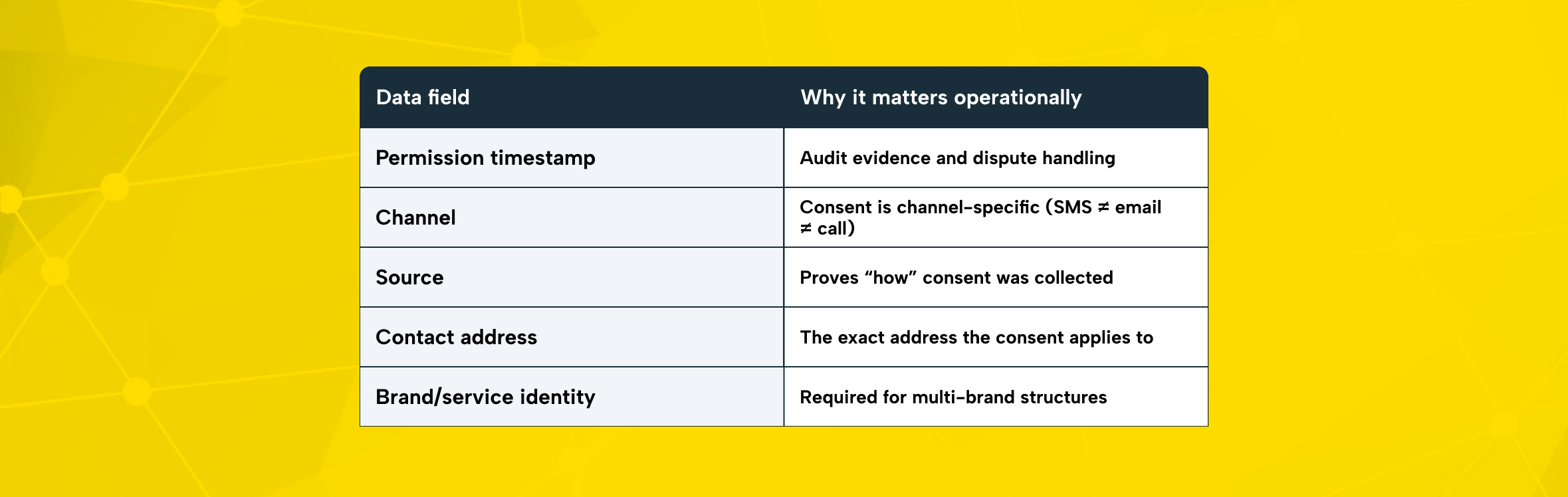
When you upload or sync consents, you should be able to store and reproduce the “proof package” for each permission record.
Common minimum fields include:
- Permission date (timestamp)
- Channel (SMS / email / call)
- Consent source (web form, physical form, e-Devlet, call center, etc.)
- Recipient contact address (phone/email)
- Brand (if messaging under multiple brands)
Opt-Out Tracking: The 3 Business Day Rule
Recipients can revoke consent. When a recipient submits an opt-out request, you must act immediately. Stop sending commercial electronic messages within 3 business days.
This is important for daily operations. Opt-out requests can come through multiple channels:
- From the recipient directly (to your support/call center)
- Through platform flows (IYS / e-Devlet)
- Via your own unsubscribe link or mechanism
A strong compliance posture means you treat opt-outs like an SLA, not an occasional cleanup task.
Key Things to Watch Out for During the IYS Application Process
Even if the registration process feels simple, problems usually arise later. The real risk comes from gaps in daily processes after registration.
1) Don’t Treat IYS as Optional
The system is part of Türkiye’s compliance framework for commercial electronic communications and consent/opt-out management.
2) Data Accuracy (During Application + Permission Upload)
Common issues that delay approval or create downstream compliance problems:
- Incorrect company identifiers (e.g., mismatched company name vs official record)
- Wrong authorized person details
- Duplicate or inconsistent permission entries
- Channel mix-ups (recording email consent as SMS, etc.)
3) Never Send Marketing Messages Without Proper Permission Controls
If you send commercial messages without valid consent controls, you create legal exposure. Failing to manage opt-outs properly can also lead to complaints and administrative risk.
Complete IYS registration first. Then honor opt-outs and stop messages within three business days.
4) KVKK and Data Security Responsibilities Still Apply
IYS enables centralized permission management, but your organization still needs internal controls:
- Restrict access to permission datasets
- Apply access control and logging
- Avoid unauthorized sharing with third parties
- Secure transfers and storage
The Role of Agencies and Third-Party Message Providers
Many brands send campaigns via agencies, SMS providers, or marketing platforms. That can make delivery easier but it does not remove the brand’s responsibility to manage permissions correctly.
Best practice for daily processes:
- Align your agency and messaging vendor with your IYS workflow
- Share necessary identifiers (e.g., your service provider number)
- Ensure permission syncing and opt-out processing is consistent across systems
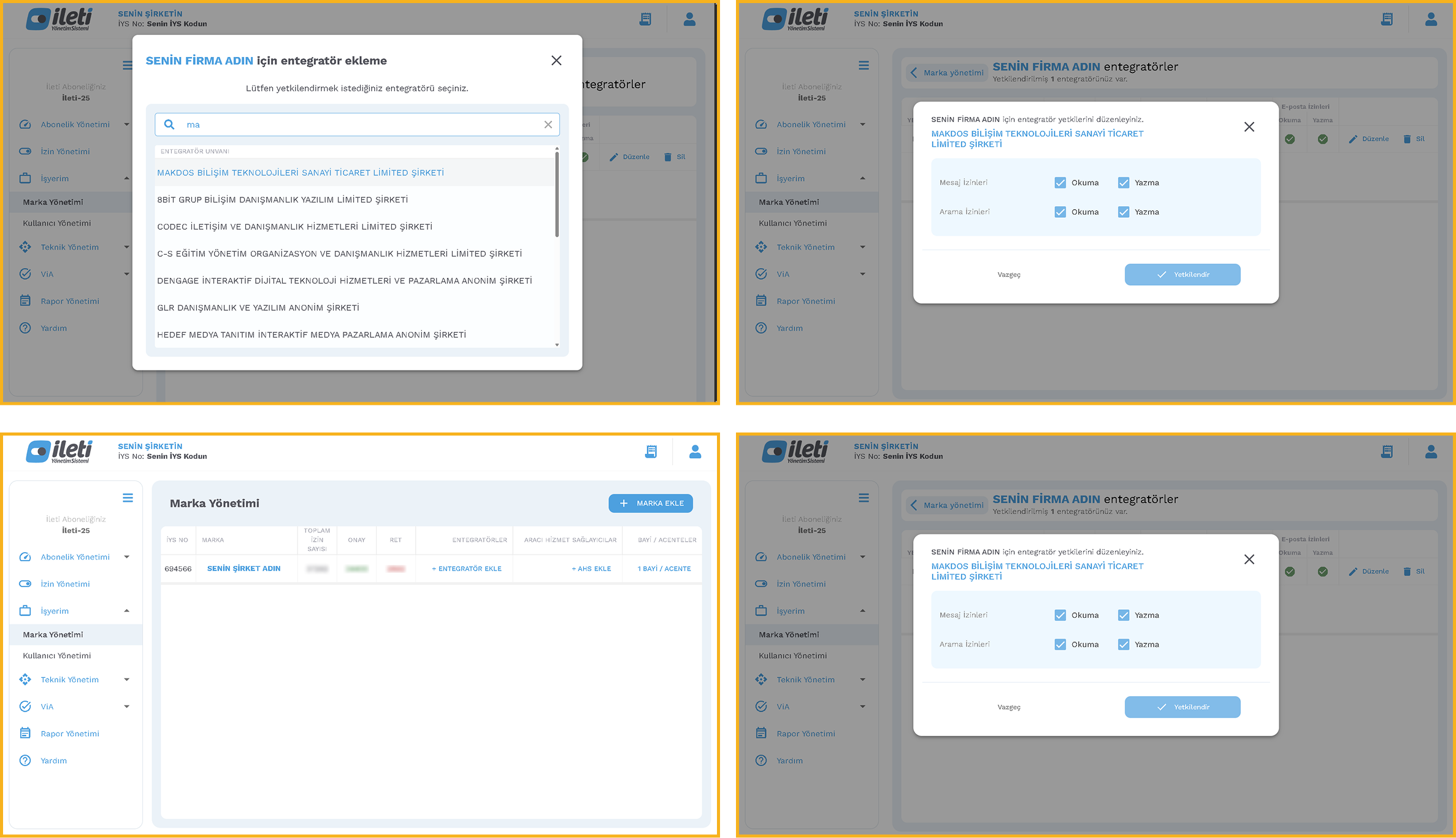
IYS Integration with Makdos: Practical Support and Advantages
If you want IYS registration and integration to run as a predictable workflow, you should avoid handling it manually. Working with an authorized solution provider can simplify and structure the process.
Makdos operates as an authorized IYS provider and business partner. It delivers IYS solutions that help businesses simplify and manage ongoing permission processes more efficiently.
What you get with Makdos IYS solutions
- Guided onboarding and practical support: Step-by-step assistance so your setup is not guesswork
- Faster, smoother integration: Options to manage permission uploads and keep records aligned across systems more efficiently.
- Secure handling of data: Makdos places strong emphasis on security controls. Within its information security policy framework, it states that it has established an ISO 27001:2013 system.
- 24/7 technical support: Help when issues arise especially valuable when your messaging operations are high-volume or time-sensitive
Conclusion
IYS registration is the beginning of a compliance workflow not the end. Plan your application method carefully and prepare the required documents in advance. Then choose the right permission import strategy CSV, manual entry, or use API integration to lower process-related risks. This also helps maintain consistent and reliable customer communication.
If you want to complete your IYS registration, start by structuring the process correctly. A clear setup prevents delays and errors. A clear setup is essential to automate permission and opt-out management effectively. Makdos can help you establish and manage this workflow through a structured integration approach.
If you want to reduce manual workload and operational risk, consider a more structured solution. Explore Makdos IYS Integration to get support with registration and consent migration. It also helps you keep your permission data aligned across systems.