
For man businesses, the real issue is not whether to modernize their infrastructure. It is how to do it without creating extra cost or complexity. For these types of platforms, infrastructure directly affects performance, uptime, security, and cost. That is why cloud computing has become central to modern IT planning.
In simple terms, cloud services let businesses get the resources they need when they need them, rather than buying hardware upfront. This gives businesses more flexibility than physical or other traditional servers. It becomes especially useful when traffic shifts, new workloads appear, or teams need to deploy faster. For SMEs, e-commerce companies, enterprise brands, and agencies, that flexibility can create a real operational advantage.
In the sections below, we explain what a cloud server is and how it works. We also look at how it compares with VPS and shared hosting, and what to review before choosing a provider. We will also show how Makdos approaches cloud solutions for businesses that want stronger continuity. The goal is to make management easier and leave room for growth.
What Is a Cloud Server?
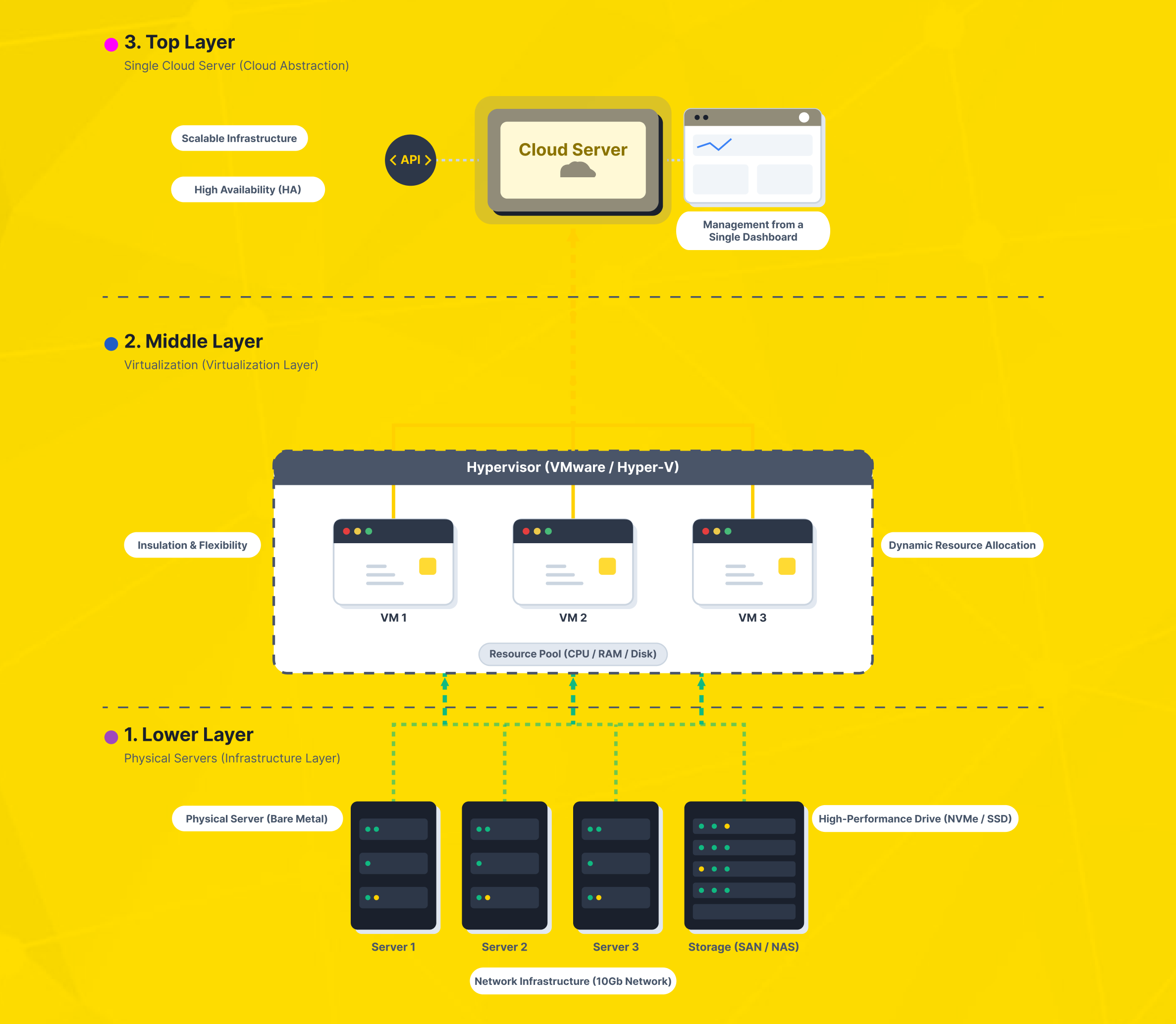
A cloud server is a virtual server that runs on shared infrastructure, not a single machine. The phrase cloud server is a virtual server is technically correct. But it does not tell the full story unless you also understand the architecture behind it. A business-grade cloud environment draws shared data center resources and assigns them to isolated workloads as needed.
That difference matters. With a single-host setup, your workload is tied more directly to one machine and its limitations. In a true cloud model, virtualization, orchestration, and shared infrastructure pools make it easier to allocate resources, redistribute capacity, and design for continuity. This is one reason cloud services are often associated with rapid provisioning and operational flexibility.
You can think of a cloud server as a software-defined operating space. It runs on top of multiple infrastructure components working together. Instead of buying hardware upfront, you use compute capacity from a platform built for changing demand.
For technical teams, that means faster rollout. For business teams, it means less friction between an idea and a production-ready environment.
How Cloud Servers Work
A cloud server works by abstracting physical infrastructure into virtual resources. Hypervisors and management layers separate workloads from the underlying hardware. Orchestration systems then decide how CPU, memory, storage, and network resources are assigned. This is why cloud computing is fundamentally different from treating one machine as the whole service model.
In practical terms, the underlying servers create a shared pool of resources. Even so, each workload can still run in its own isolated environment. That lets businesses run web applications, databases, APIs, back-office platforms, and development environments.
They can do this without building every layer manually from the ground up. If the environment is designed well, the servers can be more resilient and flexible. They also give fast-moving teams a better way to operate.
The commercial benefit is just as important as the technical one. When infrastructure is provisioned in smaller units and adjusted over time, costs stay closer to actual need. You only pay for the capacity and level of service your business really uses. That improves cost control, especially for businesses that would otherwise overbuy hardware to prepare for occasional peaks.
What usually separates a real cloud platform from a branded VPS?
A stronger cloud architecture typically combines four layers:
- Virtualization to isolate workloads
- Clustered hosts instead of a single dependency point
- Replicated or protected storage for continuity
- Central management for scaling, backups, and recovery
Some providers label a service as cloud even when it runs on a single host without clustering or replication. In practice, that setup may behave much more like a standard VPS than a resilient cloud platform.
Why Businesses Choose Cloud Servers
Elastic scale for variable workloads
One of the clearest reasons to choose a cloud server is elasticity. Businesses rarely operate at the same level of demand every hour, every week, or every season. Campaign traffic, checkout spikes, API bursts, reporting jobs, and product launches all create variable workloads.
In that context, cloud servers make it easier to adjust resources as needed. This helps teams stay responsive without rebuilding the infrastructure every time demand changes.
This is especially important for e-commerce operations and growth-stage companies. Teams do not have to size the environment for the highest possible peak and leave expensive spare capacity unused for most of the year. Instead, they can expand and optimize as demand changes. That makes resource planning more realistic and reduces waste.
Predictable performance and isolated resources
Shared platforms are attractive at the beginning because they are simple and inexpensive. But once an application becomes more important, performance predictability matters more than the lowest possible entry price. A properly designed cloud environment can isolate and manage resources more consistently than shared hosting. That is one of the main reasons many businesses move on once they outgrow starter plans.
That matters for web performance, application responsiveness, background processing, and database activity. If your platform handles customer sessions, payment flows, dashboards, or internal tools, stable compute power is not a luxury. It directly affects user experience and operational efficiency.
Security, redundancy, and business continuity
Security in the cloud is not a single feature. It is the result of architecture, operational controls, backup policy, access management, and network protection working together. A well-managed cloud environment can support workload isolation, controlled access, monitoring, and structured recovery planning.
Redundancy helps prevent hardware issues from becoming business outages when clustering and storage protection are in place. This is where cloud solutions become more than a hosting upgrade and start to play a role in business continuity planning.
Cost effectiveness and operating flexibility
Cloud adoption is often driven by cost effectiveness, but the real gain is not simply “cheap infrastructure.” The better benefit is financial alignment. Teams can avoid large hardware commitments and move to a service-based model with clearer operating budgets.
That financial model is especially useful when growth is uncertain or uneven. Start smaller, validate demand, then scale when the business case is proven. For many organizations, that is far more practical than treating infrastructure like a fixed asset from day one.
Cloud Server vs VPS vs Shared Hosting
The biggest mistake in this category is assuming every virtual product is the same. It is not. The labels may sound similar, but the architecture underneath changes the result.
A VPS usually means one physical host is divided into multiple isolated virtual machines. That can be a strong option for many workloads. It is especially useful when you need more control than shared hosting, but are not ready for a broader cloud layer.
However, if the service relies heavily on a single host, availability becomes more vulnerable. Maintenance events and hardware issues can have a more direct impact.
A cloud server is still virtualized. But the stronger models run on clustered infrastructure, protected storage, and broader orchestration. That is why the cloud server vs VPS discussion is really an architecture question, not just a pricing question. If resilience, live flexibility, and continuity matter, the cloud model is often the better fit.
Shared hosting sits at the lighter end of the spectrum. It is useful for simple websites, early-stage projects, and low-complexity publishing needs. But it offers less isolation, fewer customization options, and less predictable behavior under load. Shared hosting can become limiting when a business needs more speed, security, customization, or traffic capacity.
There is also a place for dedicated hardware. If your workloads require strict isolation or close hardware control, physical servers may still be the right choice. The same applies when you have specific compliance or performance requirements.
In some cases, a hybrid cloud strategy offers the right middle ground. Sensitive or specialized systems stay on physical servers, while elastic workloads run in the cloud.
Where Cloud Servers Make the Most Sense
For SMEs and growing e-commerce teams
If you are running an SME, you typically need balance more than extremes. You need enough performance to support growth. You need control to avoid bottlenecks and flexibility to avoid oversized infrastructure too early. A cloud server makes sense when key business systems outgrow entry-level hosting.
For e-commerce teams, the case is even clearer. Promotions, seasonal demand, launch periods, and ad-driven spikes can change traffic patterns quickly. A cloud based infrastructure makes it easier to react without migrating the whole business every time the storefront grows.
For agencies managing multiple client workloads
Agencies often handle multiple websites, landing pages, applications, and reporting tools at once. That means the challenge is not just raw performance. It is also deployment speed, environment separation, and day-to-day management. Cloud services can help agencies structure staging, production, backups, and client-specific workloads more cleanly.
The value here is operational discipline. Agencies can tailor resources to each account or stack instead of forcing unrelated projects into one narrow hosting model. That lowers risk and makes maintenance windows easier to plan.
For enterprise brands with mixed infrastructure needs
Larger organizations do not always move everything to the cloud at once. In many cases, they combine cloud services with internal systems, edge locations, or dedicated environments. That is where hybrid cloud becomes especially relevant.
A business can keep latency-sensitive, regulated, or legacy systems in one layer. At the same time, it can use cloud capacity for digital channels, test environments, analytics, or customer-facing services.
This approach reduces migration pressure and makes modernization more practical. The goal is not to force every workload into one model. The goal is to place each workload where it performs best and is managed most effectively.
What to Check Before You Choose a Provider
Not every service labeled “cloud” delivers the same operational value. Before you buy, validate the architecture rather than relying on marketing language alone.
First, ask whether the platform is built on clustered infrastructure or mostly on single-host virtualization. The difference affects resilience and maintenance behavior. Second, review the backup model, restore process, and storage protection strategy.
Third, check how the provider handles firewall policy, DDoS mitigation, monitoring, and access control. Fourth, make sure the management layer is practical enough for your team’s real skill level and response expectations.
If you are comparing multiple vendors, do not focus only on entry price. Evaluate how the provider handles scaling, recovery, security, visibility, and support. Low initial pricing can become expensive if the platform cannot support your workload when demand rises.
You should also verify how the provider positions add-on services. Some businesses need only the server itself. Others need backup planning, firewall policy, managed support, or migration guidance as part of the package. The right decision depends on workload criticality, not just on catalog pricing.
How Makdos Supports Businesses with Cloud Infrastructure
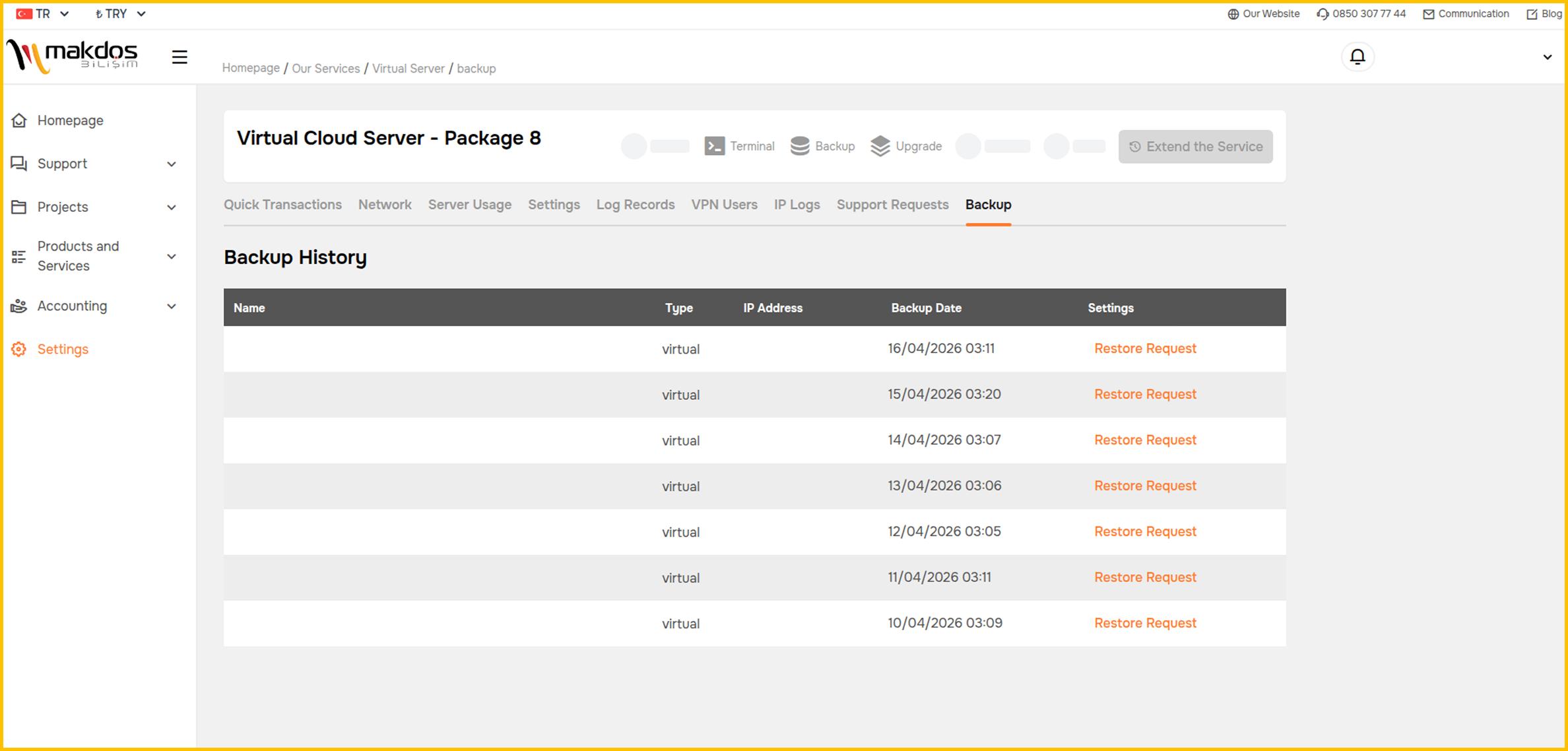
Makdos positions its cloud offering around scalability, operational control, and business continuity. On its English cloud server service pages, Makdos presents cloud server packages with configurable CPU, RAM, and storage options. The pages also highlight Windows and Linux support, along with panel-based management and backup and restore controls.
They also include security add-ons such as firewall and DDoS protection. For businesses that want a practical management layer instead of a fragmented toolset, that combination is useful.
What makes the Makdos positioning stronger is that it does not stop at simple rental language. Makdos also frames its cloud infrastructure around replication, clustered design, and data center level redundancy. That is the right discussion for businesses that care about uptime and recovery, not just fast provisioning.
This matters when you are moving beyond basic hosting. A business may need more than a server: backup, security, simpler management, and a provider that supports growth. Makdos supports growing teams by combining cloud capacity with virtual servers, dedicated server options, and security layers.
For example, a growing brand may start with cloud capacity for customer-facing applications. Later, it can add dedicated infrastructure for a specific workload. Another team may start with a smaller environment, then expand resource allocation and protection layers as the platform matures.
The point is not to force one template for every company. It is to match the infrastructure path to the business context.
Conclusion: Choose the Infrastructure That Matches the Workload
A cloud server gives businesses a flexible way to run applications, websites, and business systems. It does this without the limitations and upfront hardware burden that often come with traditional servers. It combines virtualization with scalable resource allocation, and in stronger architectures it also supports redundancy, continuity, and cleaner operations.
If your workloads are changing, your traffic is growing, or your current hosting model is becoming restrictive, it may be time to move on. In many cases, a cloud server is the most balanced next step. Review your performance needs, backup expectations, security requirements, and support model first. Then choose a provider whose architecture matches the way your business actually operates.
Makdos offers practical, scalable cloud infrastructure for teams that need a clearer and more manageable path forward. Review the workload, define the control and protection you need, and build the right cloud environment around it.