

A business email address does more than send messages. It puts your company's name in front of every customer, bank and partner you deal with, for example sales@yourcompany.com instead of a free email inbox at a generic consumer provider.
That domain-based email lets an administrator create a business email account for a new hire on day one. The administrator can shut it off the moment someone leaves, something no shared personal inbox can offer.
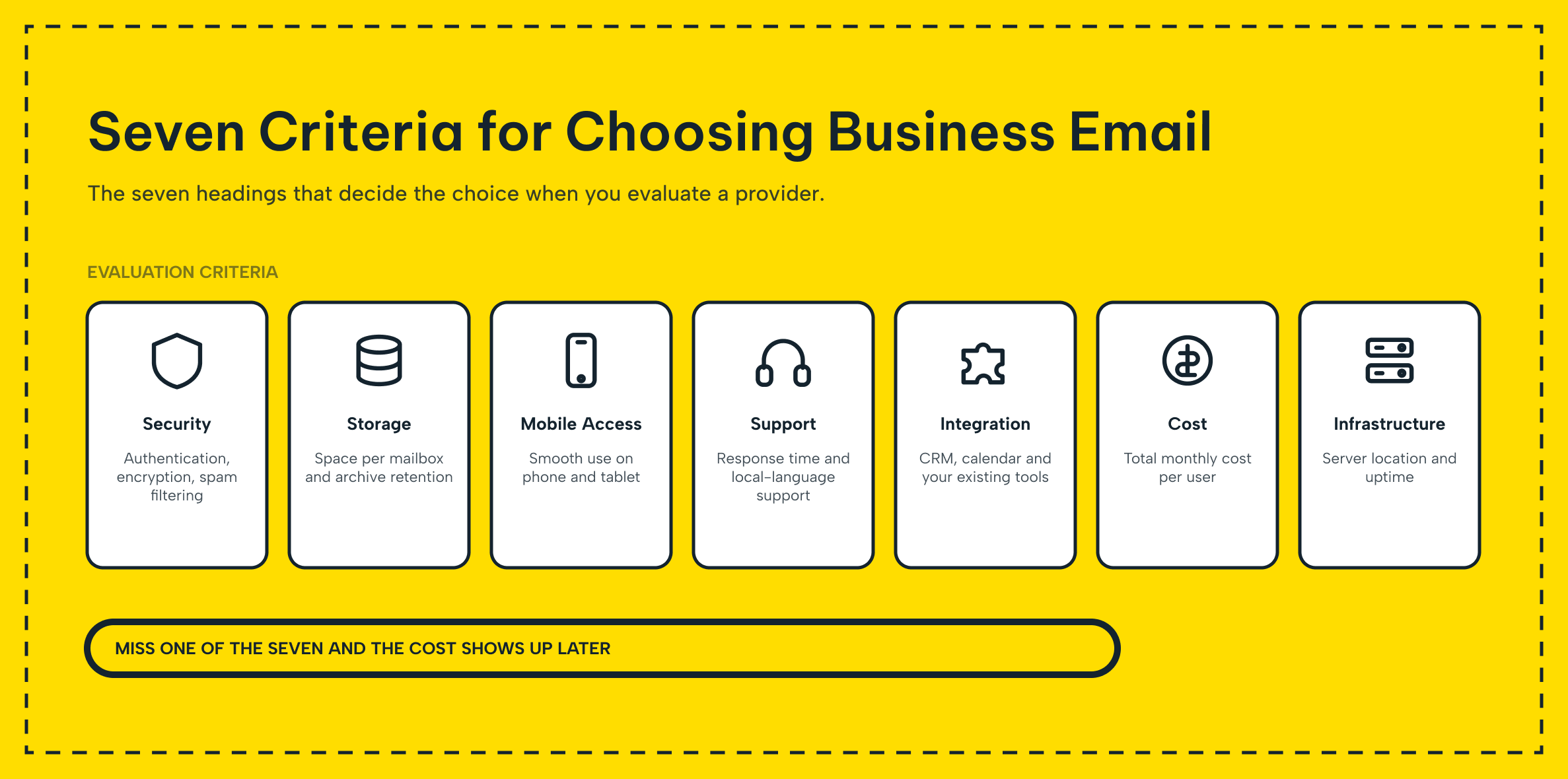
This guide breaks the decision into seven factors worth checking before you commit. The key factors are security, storage, accessibility, support, features, cost and infrastructure. Work through them in order and you will end up with a business email service. It fits your team instead of one you outgrow within a year.
1. Security and Data Privacy
Security should be the first filter you apply, not an afterthought. Company email carries customer records, contracts and internal decisions, so a business email account needs strong protection.
That means built-in spam filtering, virus scanning, and TLS/SSL encryption in transit. Ideally, two-factor authentication protects every login. Providers that only ship these as a paid add-on are telling you something about their priorities.
Data privacy runs alongside technical security. Ask where your provider stores mailbox data and whether they keep it redundantly across servers. Ask whether messages stay encrypted end to end rather than only while moving between servers.
Turkiye's KVKK (personal data protection law) requires secure storage for business email and protection against unauthorized access. Confirm your provider's setup actually meets that bar rather than assuming that it does.
Keeping every account under company control means every conversation stays part of the organization's own record. They do not scatter across employees' free email accounts. Look for archiving. You can recover a deleted message or a departing employee's mailbox rather than lose it for good.
2. Storage and Backup
Email accumulates fast, and a plan that looked generous on day one can feel cramped within a year. Check exactly how much storage each mailbox gets before you sign up, not just the headline number for the whole account.
Cut-rate providers often cap storage per user at a level that forces constant inbox cleanup. A quota closer to 10 GB per mailbox removes that chore for years. This matters more than it sounds once you involve dozens of email accounts.
Backup is the other half of this factor. Regular, automatic backups, daily or weekly, protect against accidental deletion, a compromised account or a provider-side failure. Some services keep deleted messages in a recoverable state for a window after removal. So a user can restore what they need without opening a support ticket.
Archiving policy matters just as much once a company grows. Invoices, signed contracts, and other records often live in your business email. You may need to pull one up months or years later, sometimes as evidence in a dispute. It all depends on the service you picked: archiving must be a real feature, not an afterthought.
3. Accessibility and Device Support
Nobody works from one device anymore, so business email must follow people. It cannot just sit at a single desk. A browser-based webmail client is table stakes.
Mobile access for iOS and Android matters just as much. Most quick replies now happen from a phone rather than a laptop.
Desktop client support matters too. Plenty of teams still run Outlook or Thunderbird day to day, so the service needs solid IMAP, POP3 and SMTP support underneath. Makdos Business Mail, for example, supports all three protocols.
A business email account drops into Outlook using nothing more than the standard setup wizard. Connecting a custom domain to any of these clients should take minutes. It should not require a support ticket and a week of back-and-forth over DNS syntax.
Device support only matters if the service is actually up. Look for an uptime guarantee of at least 99%, ideally higher. Check this in any of the email hosts you are seriously considering. Frequent outages or slow mail delivery cost real productivity, however good the app support looks on paper.
4. Technical Support and Ease of Management
Sooner or later something goes wrong: a locked account, a bounced message, or a misconfigured filter. How fast you get a real answer matters as much as any feature list. Favor providers who offer 24/7 support reachable by phone, email, or live chat. A stalled mail queue during business hours cannot wait until the next morning.
Day-to-day admin work matters just as much as emergency support. A clear management panel should let an administrator create email accounts. It should also allow resetting passwords, adding email aliases, and setting up auto-replies. Routine changes take a couple of clicks, without a support ticket.
At scale, look further: bulk account creation, department-based distribution lists, and per-user permission controls. Together they turn email management from a recurring chore into a five-minute task. A panel can block outbound mail for one account or trigger welcome messages for new hires. That is a strong sign the tool supports real IT workflows, not just individual users.
5. Features and Integrations
What comes bundled beyond sending and receiving messages often decides how much daily friction a team feels. Shared calendars, task management, and contact syncing turn a mailbox into a genuine collaboration tool. It is not just a message queue; some providers bundle cloud storage with mail. This way, a team's communication and files stay together in one place.
Integration with what you already run matters just as much. If your website's contact forms need to land in the right inbox, check the provider. If your CRM, helpdesk, or project management tool needs to talk to mail, check it too. The provider should expose an API or standard SMTP so connections are simple to build, not a workaround.
Smaller conveniences add up too: distribution lists, auto-responders, forwarding rules and signature management all save time. You notice these savings once you have several email domains or departments to manage.
These features can look like they belong only to expensive enterprise tiers. Providers like Makdos bundle a broad set into standard business email plans. So check what these plans actually include before assuming you need to pay more.
6. Cost and Scalability
Budget matters for every company, from small startups to large global corporations. But comparing business email service pricing by sticker number alone misses the real picture. A cheap plan with tight storage limits can cost more in wasted time. A slightly pricier plan that includes what your team needs is worth it.
Currency also matters: international providers billed in dollars or euros get pricier as exchange rates move. A local provider that bills in Turkish lira keeps your costs predictable. That predictability alone is worth weighing against a marginally lower headline price abroad.
Scalability is what happens after month one. A service starting with 10 email accounts should scale to 100 without painful migration as your business grows. On many providers, the per-seat cost also drops as usage climbs.
Read the fine print for hidden charges, first-year discounts that expire, and extra storage fees or backup add-ons. Then the number you budgeted for is the number you actually pay. Consider the professionalism, security, and time a solid business email account buys back. When weighed against the cost, it tends to pay for itself.
7. Infrastructure and Data Location: Cloud vs. On-Premise
Where your business email service actually runs is the last, and often overlooked, decision. Cloud providers like Google Workspace or Microsoft 365 handle all server maintenance and updates. They also deliver strong uptime with fast setup for you.
Running your own server gives full control and customization, but it brings hardware costs and ongoing maintenance. Most small businesses would rather not staff for the continuous monitoring it needs. For most SMEs, a cloud-based business email service is the more practical, more economical route.
Server location deserves its own look, independent of the cloud-versus-on-premise choice. Where your data physically sits affects both access speed and legal compliance. A local provider keeps data inside Turkiye and typically offers Turkish-language support.
A foreign service may offer strong features, but it stores your data abroad. It also gives a slower response when something needs attention. Makdos runs on its own domestic infrastructure, so business email data remains in Turkey. It stays under Turkish data protection standards instead of crossing international borders.
For most companies, a reliable local provider's cloud business email service is the most balanced choice. It keeps data in-country, cuts setup and maintenance work, and gives growing teams the flexibility they need. Whichever route you pick, remember that activating the service has an important step.
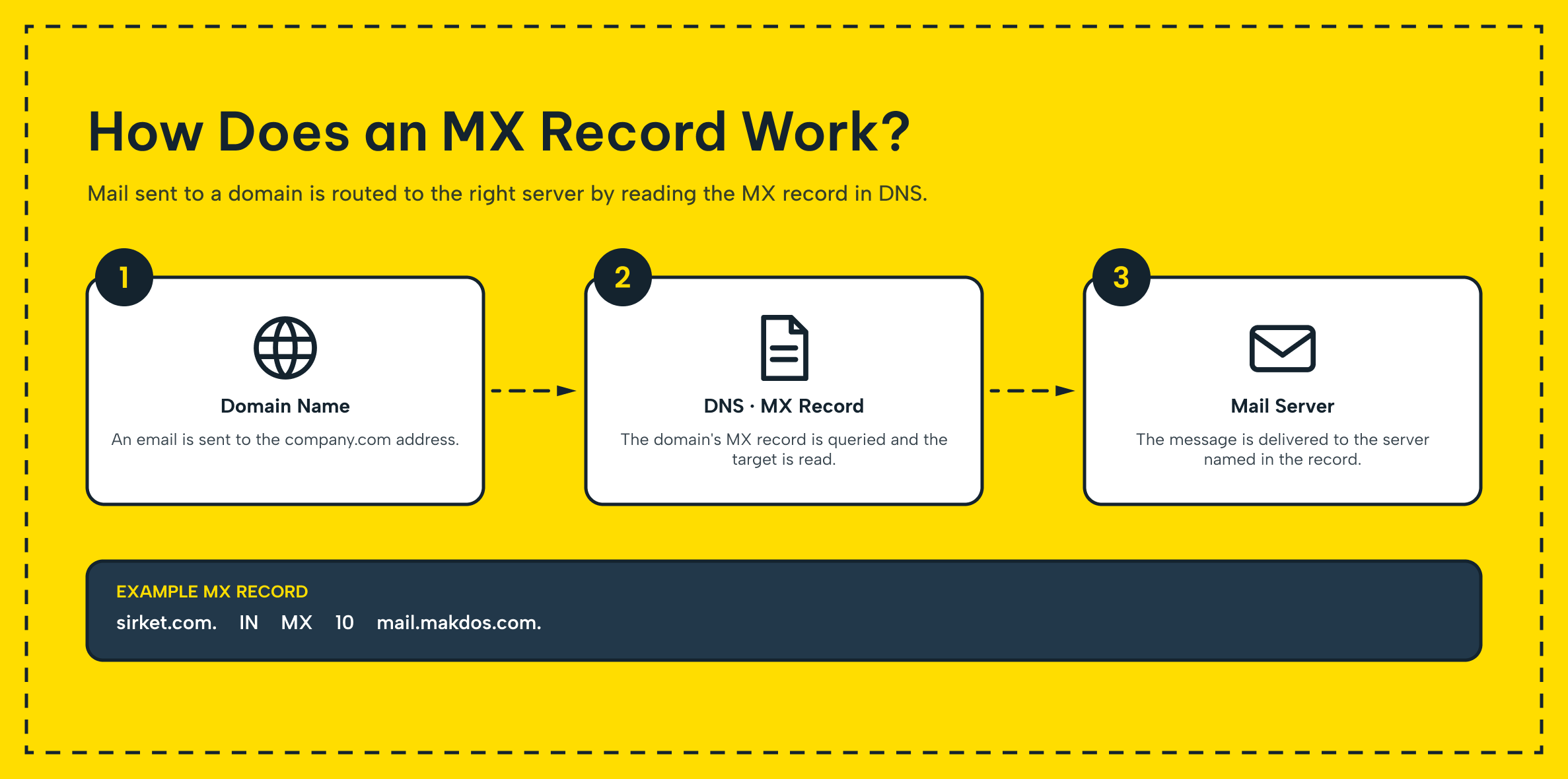
Point MX (Mail Exchange) records at the right mail server through your domain registrar's DNS panel. A misconfigured MX record is one of the most common reasons for this problem. As a result, a freshly set up business email account never receives a single message.
It's also worth separating this from web hosting, which keeps a website online rather than mail flowing; the two are related but distinct services, and understanding domain registration and web hosting as its own topic helps when you are setting up both at once.
What Should You Look for in a Business Email Service?
Check storage per mailbox, backup and archiving policy, uptime guarantee, device and protocol support, and response time. Also review included integrations and whether pricing stays predictable as team members and email accounts grow. Also confirm where the provider actually hosts your data and whether that location fits your compliance needs.
Business Email Service Checklist: What Good Looks Like
| Factor | Good sign | Red flag |
|---|---|---|
| Security | Spam filter, antivirus, TLS/SSL and two-factor authentication by default | Encryption or 2FA sold only as a paid extra |
| Storage & backup | 10 GB+ per mailbox, daily automatic backup, real archiving | Tight per-user quota, no stated backup schedule |
| Accessibility | Webmail, mobile access and IMAP/POP3/SMTP support, 99%+ uptime | No mobile access, frequent outages |
| Support & management | 24/7 support, self-service panel for accounts and email aliases | Ticket-only support, no admin panel |
| Features & integration | Shared calendar, API/SMTP integration, distribution lists | Bare-bones inbox with no integration options |
| Cost & scalability | Transparent pricing, easy seat upgrades, local-currency billing | Hidden fees, expiring intro discounts |
| Infrastructure | Clear data location, cloud or on-premise fits your compliance needs | Provider won't disclose where data is stored |
Most small businesses come out ahead with a cloud business email service from a transparent, local provider. It beats a self-managed server in nearly every cost and effort comparison. The trade-offs tip the other way once IT staff is dedicated and regulations require on-premises hosting.
How Makdos Delivers on This Checklist
Makdos Business Mail was built around exactly these seven factors rather than around a single flashy feature. Every plan includes a spam filter, antivirus scanning, daily backup, and a firewall by default. Small businesses get the same baseline protection that a large IT department would otherwise build from scratch.
The management panel lets admins create email accounts for new team members. They can reset a password, add an email alias, or adjust storage in a couple of clicks. The same mailbox keeps your emails, contacts, and calendar in sync across webmail, mobile apps, and desktop clients. It keeps all data in sync through standard IMAP and SMTP support.
Makdos runs its own Turkish infrastructure, so your business data stays local. Support is available around the clock, and Makdos handles pricing in Turkish lira. Costs stay predictable as your business grows and you add more email domains or departments.
If you are also comparing hosting setups, Makdos business email hosting plans scale from a handful of email accounts for a small business up to full multi-domain setups for a growing company, without a separate migration project every time a new tier is needed.
Conclusion: Making the Right Business Email Decision
No single factor decides a business email service on its own. Security and backup protect what you cannot afford to lose under any circumstances. Accessibility and support keep the team productive day in and day out.
Features, cost, and infrastructure determine whether the setup still fits once your business grows. Weigh all seven together, and you will land on a business email account built to last. You will not be migrating away from it within a single year.
If you are ready to move on this, talk to the Makdos team about a business email plan that fits your setup, or browse the Makdos blog for related guides on domains, hosting and IT infrastructure.