
GPU Server Hosting
Run your market-data terminals and graphics-heavy Windows applications remotely, with real NVIDIA graphics card support. Your server stays online 24/7 in our Bursa, Türkiye data center, on our own network. Once you choose your package during the GPU server rental process, we handle the setup free of charge.

Our GPU Server Packages
Every package below includes a real NVIDIA graphics card, DDoS protection and free setup. Your server is hosted in our Bursa data center. When you pay yearly, you get 12 months of service for the price of 10.
Paket 1
6 GHz
75 GB
250 Mbps
8 GB
1 GB
1 Quantity
Paket 2
8 GHz
100 GB
250 Mbps
12 GB
2 GB
1 Quantity
Paket 3
10 GHz
100 GB
250 Mbps
16 GB
4 GB
1 Quantity
Included in all packages: Standard DDoS protection · Free setup · 99.8% uptime guarantee · 24/7 technical support · Hosted in our Bursa, Türkiye data center. Backup is an additional service that we enable on your request.
The processing power listed in the packages is given in GHz. It is calculated as 1 GHz = 1 CPU core; for example, a 2 GHz package corresponds to 2 vCPU cores.


What Is a GPU Virtual Serverand When Do You Need One?
On a standard virtual server, graphics processing is handled by the CPU in software. That is enough for hosting a website, running a database or setting up a file server. Things change with applications that constantly redraw the screen: live updating charts, dozens of windows open at once, workspaces spread across several monitors. Under that kind of load the CPU cannot keep up on its own; the image stutters, windows are slow to open and a delay appears between moving the mouse and the screen responding.
On a GPU virtual server, the real NVIDIA graphics card in the physical server is assigned directly to your server through the virtualization layer. The graphics load moves to the graphics card and the CPU focuses on its own work. As a result, when you connect over remote desktop the application behaves as smoothly as it would on your own computer.
The distinction matters: some products sold as "GPU servers" do not actually contain a dedicated graphics card and use the integrated graphics unit inside the CPU instead. Makdos GPU servers contain a separate, physical NVIDIA graphics card, and the card's resources are allocated to your server.
You need a GPU server if:
- The application you use requires a dedicated (discrete) graphics card in its system requirements.
- You keep many live charts or windows open on the same screen.
- You experience stuttering, lag or slow redrawing while working over remote desktop.
- Your application needs to stay online without interruption, but you cannot keep your computer running all the time.
GPU Servers for Market Data and Finance Terminals


Market data and technical analysis applications are among the most demanding software you can run on a computer. Dozens of live charts on screen, price data updating within seconds, depth and order windows stacked on top of each other, and often a workspace spread across several monitors. That is why these applications list a dedicated graphics card in their system requirements; the integrated graphics unit inside the CPU is often not enough.
On Makdos GPU servers your application runs with real NVIDIA graphics card support. Your server stays online without interruption in our data center in Türkiye; a power cut at home, a fault at your internet provider or your computer restarting will not close your screen. Wherever you are, you connect over remote desktop and continue where you left off.
Why Do Matriks and İDEAL Require a Graphics Card?
In its published system requirements, Matriks recommends a dedicated graphics card with 2 GB and a 128-bit interface, and states that systems with a dedicated graphics card should be preferred. The reason is simple: every chart, every price cell and every indicator on the terminal screen is constantly redrawn. When that work is not handed to the graphics card, the CPU chokes and the screen lags. This is the last thing you want while following the market.
Our GPU server packages are configured to meet this need. Package 2 matches the recommended 2 GB graphics card value exactly, and Package 3 offers twice as much. If you have lighter usage in mind, Package 1 is the entry option most preferred by our customers running market terminals.
Our Customers Already Work on This Infrastructure
Our GPU servers are used today by people working in the markets and finance. We have customers running data terminals such as Matriks and İDEAL on this infrastructure; this is not an untested promise but a service already in operation. The most preferred packages are Package 1 and Package 2.
If you are not sure which package suits you, let us know which application you use and how many screens you work with, and we will determine the right package together.
Why a Server Instead of Your Own Computer?
| Your own computer | Makdos GPU Server | |
|---|---|---|
| Uptime | Only while the computer is switched on | 24/7 without interruption |
| Power / internet outage | Your screen goes dark and the data feed stops | Keeps running on redundant data center infrastructure |
| Access | Only from that one computer | From a laptop, tablet or another computer, anywhere |
| Hardware cost | Upfront investment, replaced every few years | Monthly GPU rental, upgrade from the panel as your needs grow |
| Network connection | Home or office connection | 20 Gbps redundant data center network, our own autonomous system |
| When something goes wrong | You solve it yourself | 24/7 technical support team |
Technical Specifications and Operating System
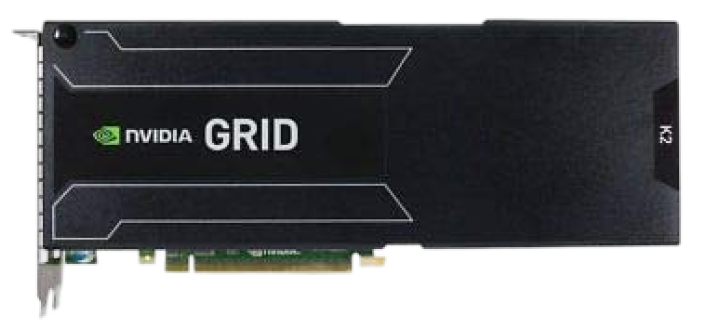
Our GPU servers run on physical servers equipped with NVIDIA GRID graphics cards. The card's resources are allocated directly to your server through the virtualization layer; you do not share the same graphics resource with another customer. On the infrastructure side we use cluster architecture, NVMe disks and a 20 Gbps redundant uplink.


Bursa Data Center
Your server is hosted in our Bursa data center, running on our own network (AS212301) with a 20 Gbps redundant uplink.
NVMe Disks
NVMe disks and a 20 Gbps redundant uplink provide uninterrupted access and low latency; the card's resources are allocated directly to your server.
Operating System Options
We use Windows 10 on our GPU servers. It is the environment that runs most reliably with market terminals and graphics-heavy applications and the one our customers choose first; we recommend it by default because it is the configuration where graphics acceleration works most smoothly. If your corporate policy requires a Windows Server edition within the current support cycle, send your request to our support team. We will determine the right option together.
If you need more graphics power, you can consider our dedicated server solutions.
Frequently Asked Questions
A Suitable Server for You
Could not find it?If you have not found a suitable server for yourself, you can fill out the form on the side to get a price and offer. Our team will help you by reaching you.
Server Request Form


SCAN, DOWNLOAD NOW
A First in Türkiye
The first hosting mobile application