
Both options put a website online, but they distribute the underlying hardware very differently. Shared hosting is the most common type of web hosting. A single server hosts multiple websites at once. It splits the cost across every account it hosts.
A dedicated server, on the other hand, gives one customer the entire physical server. Along with it, that same customer gets the processor, memory and storage. Neither approach is wrong; each one simply trades cost against control in the opposite direction.
This guide is written for small business owners choosing their first hosting option. It also targets e-commerce teams that are outgrowing a shared plan. It helps IT managers justify a cost difference to a budget holder.
By the end, you will know which one fits your traffic and budget today. You will also know what changes when you outgrow it, and how to switch without downtime.
What Is a Dedicated Server?
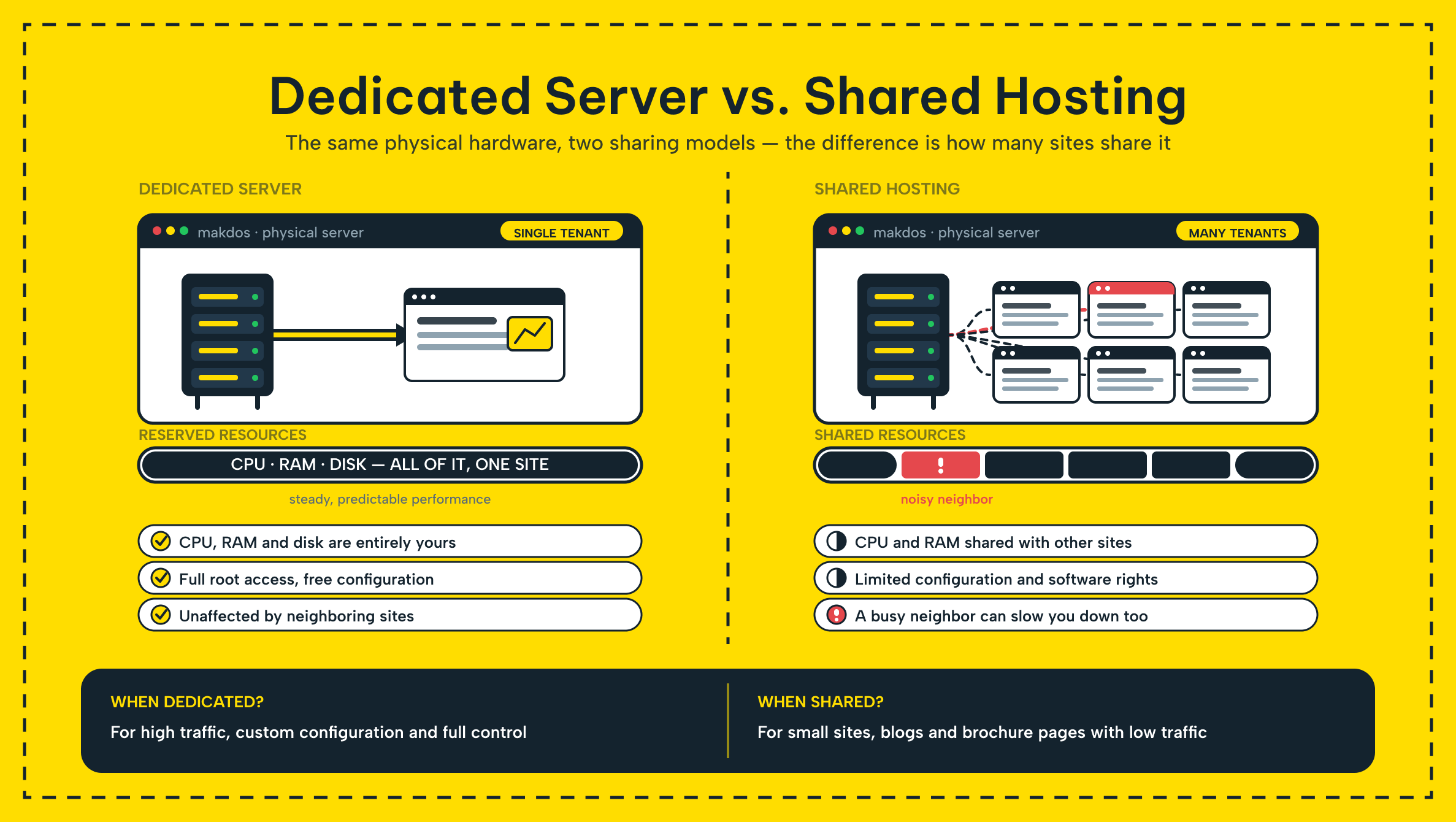
A dedicated server is a physical server that belongs to one customer only. Nobody else's website, database or application shares its CPU, RAM, storage or network port. Every cycle of processing power is reserved for your workload alone. This is exactly what makes dedicated server hosting attractive once traffic gets heavy or unpredictable.
Because the hardware is not shared, you also decide how it runs. You choose the operating system (OS) and the web server software (Apache, Nginx, IIS). You also choose the security stack and which applications get installed. That level of access suits databases with strict latency requirements and high-traffic e-commerce platforms.
It also suits any workload where "good enough" performance is not good enough. It also matters for regulated data. Some contracts require knowing exactly which physical machine holds a customer's records. A shared environment cannot guarantee that in the same way.
The trade-off is responsibility. Unless you buy a managed plan, patching, monitoring, and configuration are on you. That is why dedicated server hosting usually assumes an in-house technical team. Or it requires a provider's managed service on top of the hardware itself.
Budget for that management time the same way you budget for the hardware. An unpatched dedicated machine is a bigger target than an unpatched shared account. The shared account stays hidden among thousands of others.
What Is Shared Hosting?
Shared hosting is the most affordable type of web hosting, and the one nearly every website starts on. A single server hosts multiple websites at once. Every account on it draws from the same pool. The pool holds CPU, memory, and disk space.
Because resources are shared across every site the box hosts, the hosting provider handles the heavy lifting. Server maintenance, security patching, hardware failures, and network uptime are its job, not yours.
You manage your own site through a control panel, typically cPanel. There you install applications, manage email, and check disk usage. You never touch the underlying server resources directly. For most beginners, this is the entire appeal: a working website without learning system administration first.
This setup keeps shared web hosting cheap. A provider can spread one server's hardware cost across dozens or hundreds of shared hosting plans. That is why a shared account often costs a fraction of what a dedicated server does.
The catch is that you are also sharing the provider's judgment. How many accounts they place on one box directly decides how consistent your own performance feels.
Dedicated Server vs. Shared Hosting: Key Differences
Lay the two side by side. The trade-off becomes obvious: shared hosting optimizes for cost and simplicity. A dedicated server optimizes for performance and control.
Dedicated Server vs. Shared Hosting at a Glance
| Criterion | Dedicated Server | Shared Hosting |
|---|---|---|
| Resource allocation | Entire machine, unshared | Split across every account on the same box |
| Performance consistency | High, unaffected by other sites | Depends on how busy your "neighbors" are |
| Typical cost | Highest of the common hosting types | Lowest, often a few dollars a month |
| Day-to-day management | Mostly yours, unless managed | Handled by the provider through a control panel |
| Customization | Full root and OS-level access | Limited to what the control panel allows |
| Best fit | High-traffic sites, databases, compliance-bound workloads | Personal sites, blogs, small stores just getting started |
Choose a dedicated server when consistent, high performance matters more than price. Choose shared hosting when a low monthly bill and zero server maintenance matter more than raw horsepower.
Most businesses do not choose once and stay there forever. They start on one side of this table. They cross over when the numbers change.
Advantages and Trade-offs of a Dedicated Server
Advantages:
- Consistent, high performance. No other tenant competes for CPU, memory or disk I/O. Response times stay steady even during your own traffic spikes, not just on a quiet afternoon.
- Full customization. Pick the operating system, harden security your own way. Install any software stack the workload needs, down to kernel modules a shared box would never allow.
- Strong isolation. A security incident or traffic spike on another account can never touch your machine. There is no other account on it to begin with.
- Room to grow. Add memory, storage, or another machine as workload grows instead of migrating to a new plan under pressure.
Trade-offs:
- Usually the most expensive of the common hosting types, both in the monthly bill and in the setup time before it starts serving traffic.
- It assumes in-house technical expertise or a paid managed service, since nobody patches your OS by default.
- It can sit under-used and over-priced if traffic behind it is light and never approaches the hardware's ceiling.
- Provisioning a physical machine takes longer than spinning up a shared account. This matters if you need a site to go live within the hour.
A dedicated server is only worth its cost once your traffic, security or compliance needs actually require it. Renting one for a low-traffic brochure site is buying headroom nobody will use.
Advantages and Trade-offs of Shared Hosting
Advantages:
- Very low cost. On a shared machine, the hardware bill splits across every account. Each customer pays only a few dollars a month instead of bearing the full cost alone.
- Beginner-friendly. A control panel handles backups, email and app installs without any command-line work. So a first website does not require a systems background.
- Maintenance is not your problem. The provider manages patching, hardware failures and uptime, so you do not need server administration to launch.
- Fast to set up. Most accounts go live within minutes of signup, which suits a business that needs a working site today, not next week.
Trade-offs:
- Performance is not fully predictable. A neighboring site's traffic spike can slow your own pages down. You sit in shared environments where server resources are pooled, not reserved for you alone.
- Customization ends at the control panel; custom kernel modules or unusual software stacks are off the table.
- Security depends partly on how well the provider isolates one account from the next. You share the same physical server with strangers you never chose.
- Growth eventually forces a move to a VPS or dedicated server. Once traffic outgrows the shared tier, that migration is easier if you plan it early.
If your site loads fine on a quiet Tuesday but crawls every time a sale goes live, that pattern usually points to shared resources, not to your code.
Signs You Have Outgrown Shared Hosting
A shared plan rarely fails outright. It just gets slower in ways that are easy to blame on the website itself instead of the hosting option underneath it. Before you assume the code needs fixing, check whether any of these apply:
- Pages slow down whenever traffic rises, even though nothing on your own site changed that week.
- Your host has warned you about CPU or resource limits, or throttled your account during a busy period.
- You need software the control panel does not support, such as a specific runtime version, a custom daemon, or root-level access.
- Compliance or a client contract requires knowing exactly where your data physically sits, which a shared box cannot promise.
- Your database queries are the bottleneck, and a neighbor's noisy workload is competing with yours for the same disk.
One or two of these can often be solved with a bigger shared hosting plan or a move to a VPS. When three or more appear, especially compliance and database items together, you should price out a dedicated server.
Which Hosting Option Fits Your Business?
Personal sites and first-time website owners. Start with shared hosting. The low cost and a beginner-friendly control panel mean no server experience is required. There is plenty of room to grow before you outgrow the plan.
SMEs and growing online stores. Shared hosting is fine at launch, and most stores stay there through their first year or two. Watch load times and CPU alerts as traffic grows.
Plan the move to a VPS or a dedicated server. Do it before slow pages start costing you sales during a campaign, not after.
Agencies managing several client sites. A mid-tier VPS or a small dedicated server often beats juggling dozens of separate shared hosting plans. This one machine under your own control is easier to standardize, secure and bill consistently across clients.
Large enterprises, high-traffic platforms and regulated workloads. A dedicated server is usually the starting point, not the upgrade, because consistent performance matters from day one. Full control over where data physically sits is also a day-one requirement, not a problem to solve later.
How Makdos Helps You Choose the Right Hosting Option
Since Makdos covers both ends of this decision under one roof, you can start with shared hosting. Later, moving to a dedicated server means you keep the same provider, panel, and support contact.
Our shared hosting plans come with free SSL certificates, a free first-year domain, and full cPanel. They also carry a 99.8% uptime commitment at data centers in Bursa, Istanbul, and Ankara. If your site is just getting started, this is enough infrastructure to launch safely. You do not need extra capacity yet.
When traffic outgrows a shared account, our dedicated server hosting hands over an entire physical machine. It comes with your choice of operating system, remote KVM access, and 24/7 monitoring. The extra performance does not come with extra guesswork about what broke and why.
Everything from a shared account to a dedicated machine is managed through one control panel and mobile app. This system helped make Makdos one of the first hosting companies in Turkiye to offer app-based server management. So switching tiers does not mean learning a new system from scratch at all.
If you are not sure which side of that line you are on yet, consider a virtual server. It can give you more consistent performance than a shared hosting plan. It still costs less than you would pay for a full dedicated server.
Once your dedicated server is running, our setup guide walks you through hardware, OS, and security. It presents these choices in the order you need to make them.

Making the Right Call
Between a dedicated server and shared hosting, no option is universally better. You only need the fit that matches where your business is right now. Shared hosting gets a new site online cheaply and safely, and it does that job well for far longer than most owners expect.
A dedicated server exists for the moment your traffic, data sensitivity, or customization needs outgrow a shared account. It is not meant for earlier use.
Compare our web hosting services and dedicated server plans before you commit, since moving off an undersized plan later costs more time and more downtime than choosing correctly today. Whichever hosting option fits your business now, you can move to the other one later without switching providers, because Makdos runs both on the same infrastructure and the same support team.