

As digital operations grow, infrastructure becomes a business-critical decision. A website may perform well under normal traffic conditions. However, it can struggle during campaign launches, seasonal sales, product drops, or sudden spikes in organic traffic.
For an e-commerce company, even a short slowdown can affect checkout behavior. For an agency, poor hosting performance can damage client trust. For a corporate brand, instability can create reputational risk.
This is where a dedicated server becomes valuable. Dedicated hosting gives your project its own server resources instead of sharing them with others. It gives your team stable performance, system-level control, and a stronger security foundation.
A dedicated environment is not always the first step for every website. Smaller projects can often begin with web hosting, a virtual server, or cloud-based services. However, once traffic, database load, security expectations, or customization needs increase, dedicated server hosting becomes a more strategic option.
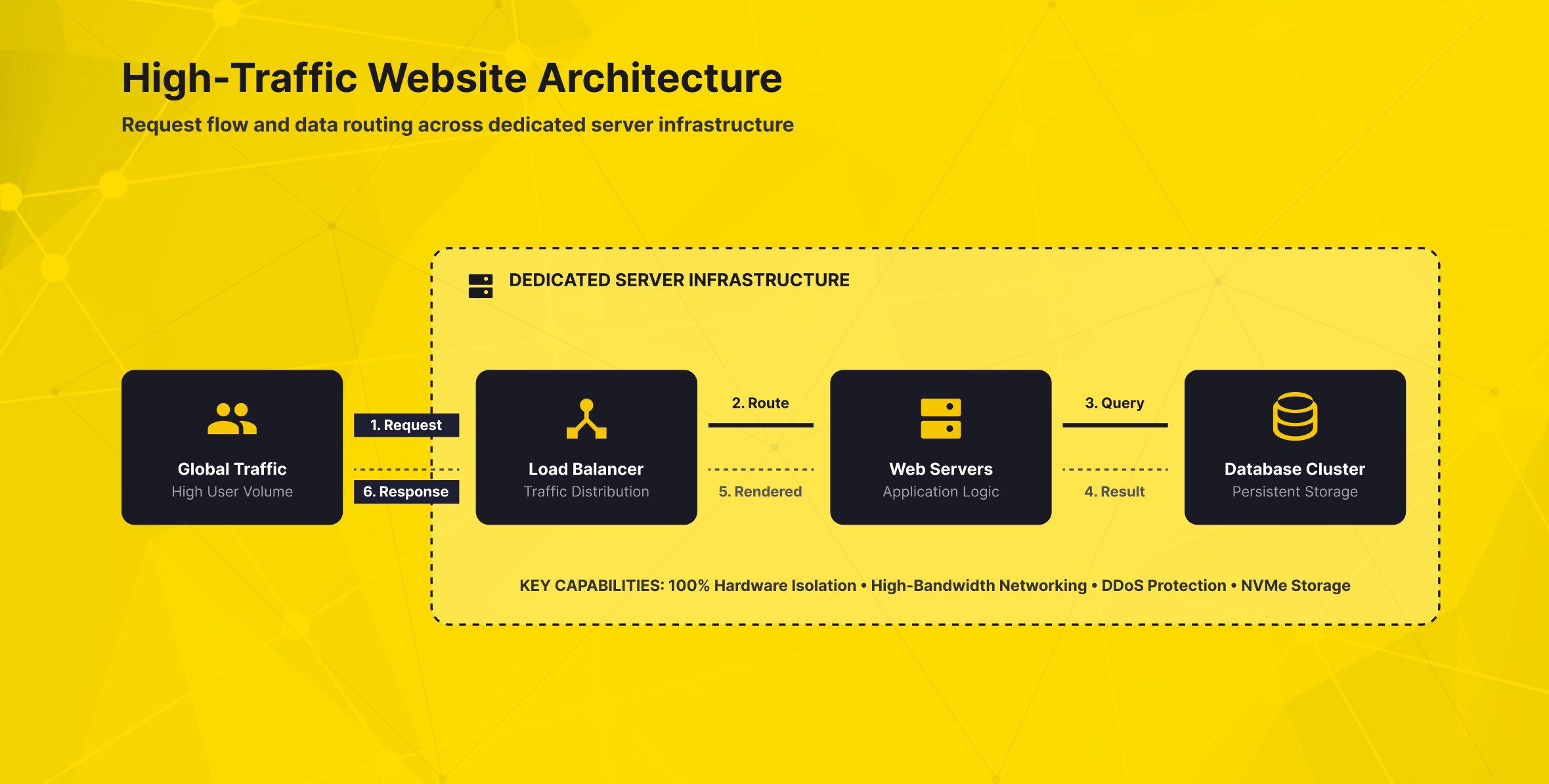
What Is a Dedicated Server and Why Does It Matter?
A dedicated server is a physical server allocated to a single customer or project. Your website or application uses dedicated CPU, RAM, storage, and network capacity without sharing them with unrelated projects. This makes dedicated hosting different from shared hosting. In shared hosting, multiple customers use the same infrastructure and can affect each other’s performance.
In shared hosting, one website’s heavy usage can affect others on the same server. This is often acceptable for small websites, early-stage projects, or low-traffic corporate pages. But when an online business depends on speed, stability, and predictable access, shared resources can become a limitation.
Dedicated hosting gives your workload access to an entire physical machine. You can configure the web server, database, firewall policies, caching rules, and system-level settings. You can adjust each part based on your technical requirements. You also gain more flexibility over the operating system, software stack, and control panel.
This level of control matters for projects such as:
- E-commerce platforms with heavy checkout activity
- Corporate websites with high visitor volume
- SaaS applications with frequent database queries
- Agencies managing demanding client environments
- Custom software that requires specific libraries or configurations
- Projects with stricter security, compliance, or access-control needs
In simple terms, a dedicated server gives your business a cleaner boundary between your workload and everyone else’s. That boundary supports performance, security, and operational independence.
How Dedicated Server Hosting Works
A dedicated server works by assigning an entire physical machine to one customer. The provider maintains the data center environment, power, cooling, network access, and hardware availability. The customer uses the server to host websites, applications, databases, APIs, mail systems, or internal business tools.
Depending on the service model, the customer may manage the server directly or receive help from the provider. In an unmanaged model, your team is responsible for setup, updates, security hardening, monitoring, and troubleshooting. With managed support, the provider helps manage the server within the agreed service scope.
A typical dedicated server setup includes several layers:
- Hardware layer: CPU, RAM, storage, network interface, and physical server components.
- Operating system layer: Linux or Windows Server, selected according to the application stack.
- Application layer: Web server software, database services, caching tools, security agents, and custom applications.
- Management layer: SSH, RDP, KVM, iDRAC, iLO, monitoring tools, and control panel software.
- Security layer: Firewall rules, DDoS protection, WAF, VPN access, backups, and patch management.
The advantage is not only raw power. It is also the ability to design the environment around your workload. For example, an e-commerce platform may prioritize database I/O and fast storage.
A media-heavy website may focus on bandwidth and caching. A corporate application may need strict access rules, private networking, and structured backup policies.
Dedicated Server Planning Checklist
Before choosing a dedicated server, define these requirements clearly:
- Expected monthly traffic and peak-hour traffic
- CPU and RAM demand for the website, database, and background jobs
- Storage type, capacity, and I/O requirements
- Preferred operating system and software stack
- Need for a control panel such as cPanel or Plesk
- Backup frequency and restore expectations
- Firewall, DDoS, WAF, VPN, and access-control requirements
- Monitoring alerts, support model, and server management responsibility
This checklist helps prevent overbuying, under-sizing, and operational surprises after migration.
When High-Traffic Websites Need a Dedicated Server
A dedicated server is usually the right choice when your website has moved beyond basic hosting needs. This does not always mean millions of visitors. Sometimes the real issue is not visitor count, but workload intensity.
Even moderate-traffic websites may need dedicated infrastructure when their backend workloads are complex. Similarly, a smaller but mission-critical application may need a dedicated environment because downtime would directly affect revenue or operations.
E-Commerce Platforms
E-commerce websites are among the strongest use cases for dedicated server hosting. Product pages, search filters, carts, checkout, payment integrations, stock updates, and customer accounts all create infrastructure load.
During campaign periods, traffic can rise quickly. If the server cannot keep up, users may experience slow pages, failed sessions, or checkout errors. A dedicated server helps reduce these risks by giving the store its own processing power, memory, and storage performance.
For growing e-commerce teams, the goal is not only speed. It is also consistency. A fast website on a quiet day is not enough. The infrastructure must remain stable when the business is under commercial pressure.
SMEs and Growing Online Businesses
For SMEs, infrastructure decisions often start with cost efficiency. Shared hosting services may be enough at the beginning because they are simple and affordable. As the business grows, however, the hidden cost of slow performance can become more important than the monthly hosting fee.
A dedicated server gives SMEs more room to grow without changing the infrastructure every time traffic increases. It gives technical teams the flexibility to customize software, security, and resources around real usage.
Corporate Brands and Internal Systems
Corporate systems often need more control than standard web hosting can offer. These systems may include sensitive data, internal users, integration points, and strict access policies.
A dedicated server allows corporate teams to separate critical workloads from shared environments. It can support private networking, restricted access, custom security policies, and more detailed monitoring. For organizations that need infrastructure transparency, this level of control is a major advantage.
Agencies Managing Client Workloads
Agencies often manage multiple websites, landing pages, campaign systems, and client applications. A dedicated server can help agencies centralize demanding workloads while keeping environments organized.
However, agencies should avoid putting every client into the same uncontrolled setup. Good server management, account separation, backup planning, and monitoring are essential. With the right structure, a dedicated server can improve performance and make operations easier to standardize.
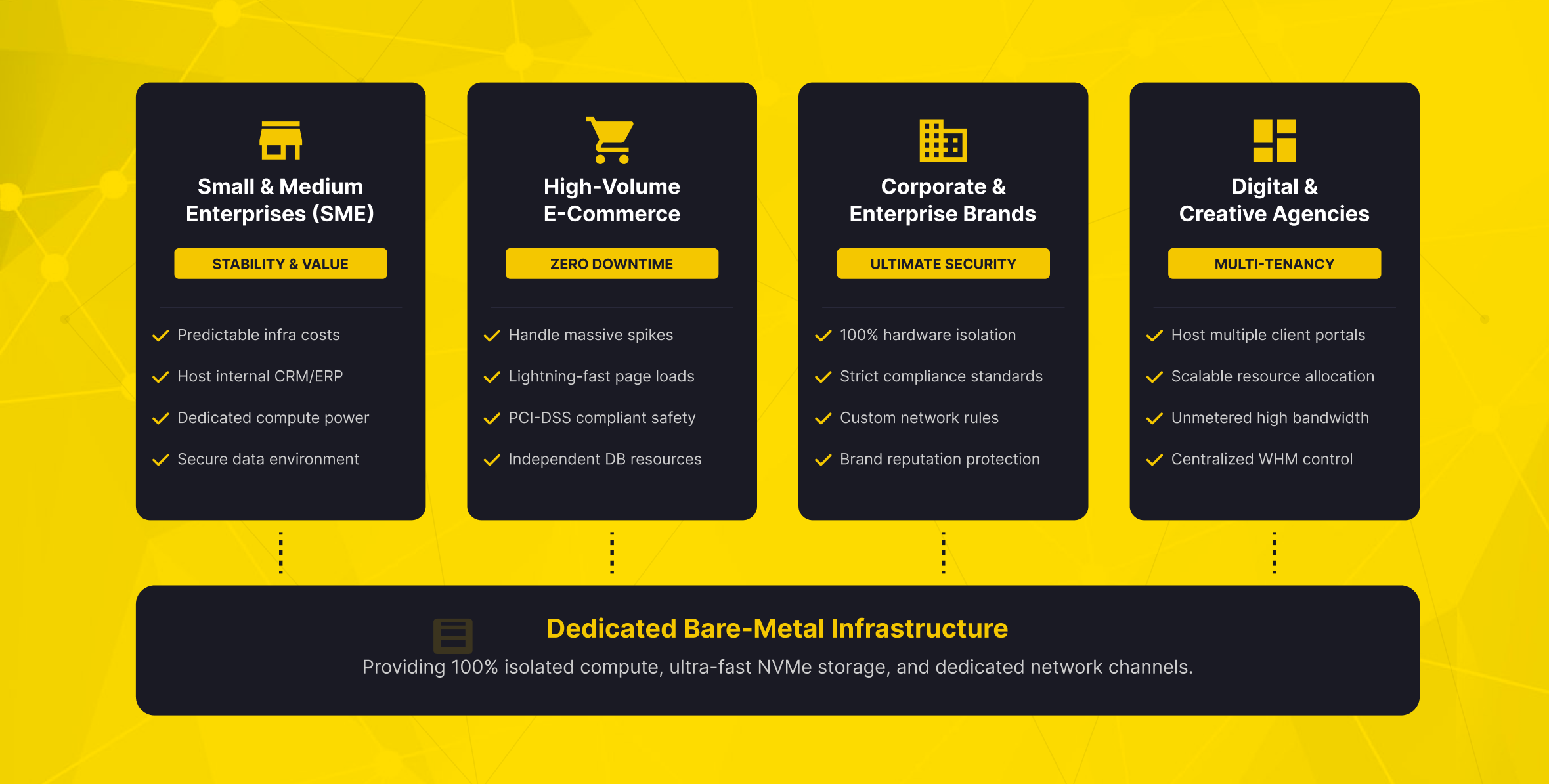
Key Benefits of Dedicated Servers for Business Websites
The main value of a dedicated server is not a single feature. It is the combination of performance, isolation, control, and long-term operational flexibility.
Predictable High Performance
Because hardware resources are reserved for your project, performance is easier to predict. Your website does not compete with unrelated users on the same machine. This is especially important for database queries, file processing, API calls, and dynamic web pages.
High performance infrastructure also gives your technical team more optimization options. You can tune the web server, database, cache layer, and background processes based on real workload behavior.
Stronger Security Isolation
Security is one of the most important reasons businesses move to dedicated environments. A dedicated server isolates your infrastructure at the hardware level. This reduces the risk that another customer’s misconfiguration, resource abuse, or compromised website will affect your infrastructure.
That does not mean the server is secure automatically. You still need firewall rules, access control, patching, monitoring, backups, and secure authentication. But a dedicated environment gives your team a stronger starting point.
Full Control Over Configuration
Dedicated infrastructure gives you deeper control over the software environment. You can choose the operating system, install the required services, configure custom modules, and adjust server-level settings.
This is valuable for custom applications, legacy systems, specialized database versions, and private APIs. It also helps with workloads that cannot run properly in a limited shared hosting environment.
Better Resource Visibility
When only your workload runs on the server, monitoring becomes clearer. CPU usage, memory consumption, disk I/O, and network traffic are easier to interpret. This helps your team identify bottlenecks and plan upgrades based on evidence rather than guesswork.
If database queries strain storage, your team can optimize indexes, caching, or storage speed. If network traffic is the issue, bandwidth and CDN planning may become the priority.
Dedicated IP and Reputation Control
A dedicated server often allows you to use dedicated IP addresses. This can be useful for SSL, application access rules, email reputation planning, and network-level policies. In shared hosting, other users can sometimes affect your IP reputation. In a dedicated setup, your business has more direct control over how it uses the server.
A dedicated server gives you more control, but it also increases responsibility. Strong hardware will not protect a poorly maintained system. Your team should plan updates, access policies, firewall configuration, monitoring, and backups from the beginning.
Limits, Responsibilities, and Alternatives
A dedicated server is powerful, but it is not the best choice for every project. If your website is small, static, or lightly visited, standard web hosting may still be more cost-effective. If your traffic changes unpredictably and you need quick vertical scaling, a cloud server may be a better fit.
You may need more control than shared hosting can provide. However, if you do not need an entire physical machine, a virtual server can be the right middle ground.
The main question is not “Which server is strongest?” The better question is “Which hosting model fits the workload, risk level, and operational capacity of the business?”
A dedicated server may be excessive when:
- The website has low traffic and simple content
- There is no technical team or managed support plan
- The workload does not require hardware-level isolation
- The project needs instant scaling more than fixed capacity
- The business does not yet have backup, monitoring, or security processes
A dedicated server becomes more attractive when your traffic is consistent and resource demands are high. It is also a stronger option when security requirements increase or performance must remain predictable during peak periods.
For many companies, the infrastructure path looks like this:
- Start with shared hosting for simple websites.
- Move to a virtual or cloud server for more control.
- Use a dedicated server when performance, isolation, or customization becomes business-critical.
- Add load balancing, backups, DDoS protection, and firewall services as the architecture matures.
This staged approach helps businesses avoid both underpowered infrastructure and unnecessary complexity.
How Makdos Supports Dedicated Server Projects
Makdos dedicated servers deliver reliable infrastructure without the burden of owning hardware. This makes the dedicated server model suitable for SMEs, e-commerce companies, corporate brands, agencies, and technical teams. It is especially useful for businesses that want stronger control over hosting performance.
With Makdos Dedicated Server Hosting, businesses can build dedicated infrastructure for demanding websites, applications, databases, and custom workloads. Makdos dedicated servers combine physical resources, flexible setup, monitoring, remote access, and optional security protection.
The business value is clear. Makdos helps reduce the complexity of moving from standard hosting services to a server environment with greater control. Companies do not need to manage hardware procurement, data center placement, network access, and physical maintenance on their own. Instead, they can focus on the workload and choose the server model that best fits their needs.
Makdos also supports a broader infrastructure path. A business may start with web hosting and later move to a virtual or cloud server. As the workload grows, dedicated hosting can become the better choice for stronger isolation and more consistent performance. This makes it easier to plan growth without treating every infrastructure decision as a one-time, irreversible choice.
For security-conscious projects, Makdos Firewall and Security Service can complement dedicated server infrastructure. Layered security options help teams protect infrastructure more effectively than a single control.
Makdos helps teams manage servers more easily, even without a large in-house IT department. This is especially useful for SMEs and agencies that need the benefits of a dedicated server. It allows them to avoid infrastructure work that could distract from their core business.
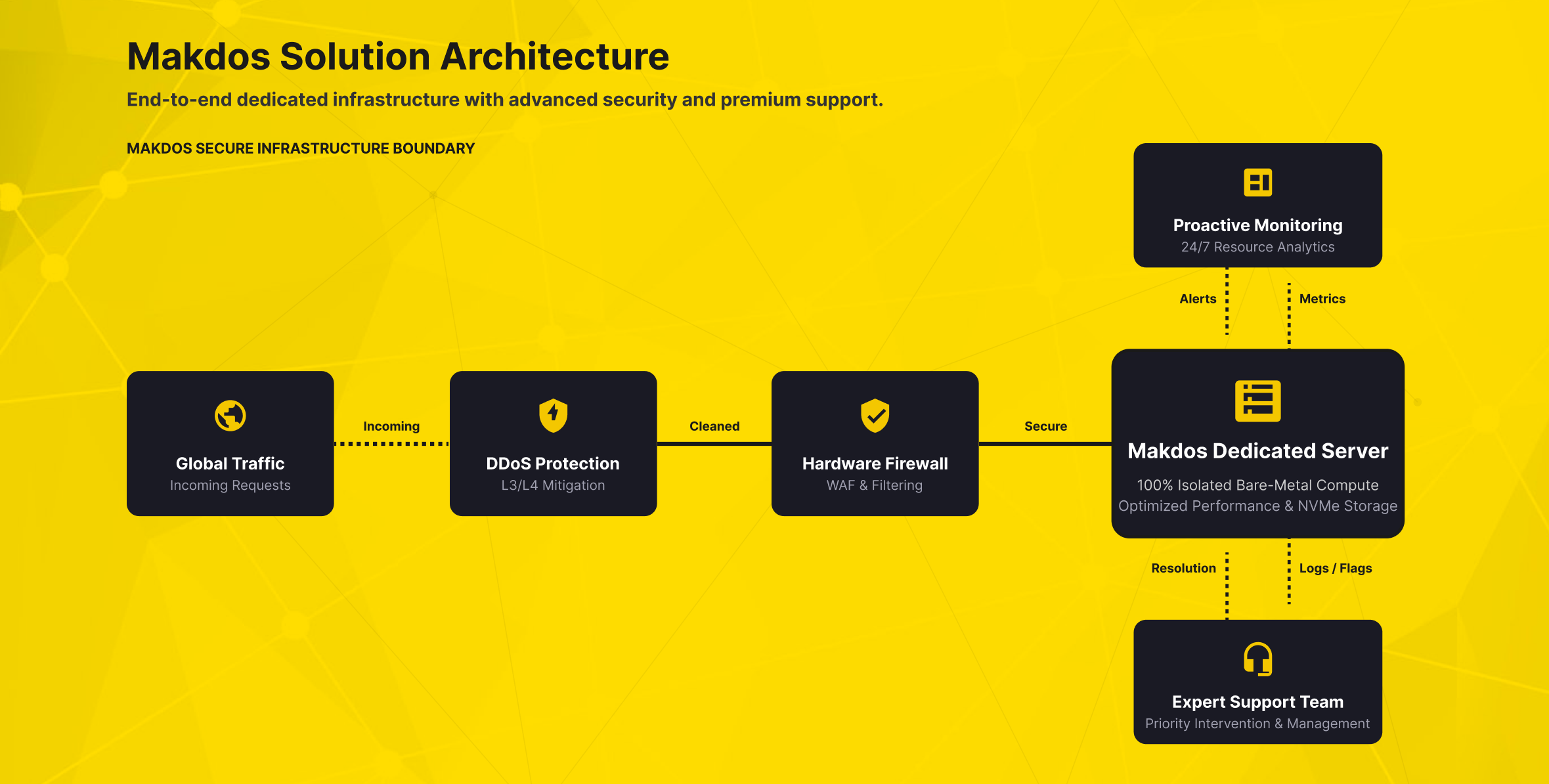
Migration Planning: Moving from Shared Hosting to Dedicated Server
A successful migration is not only a file transfer. It is a planned infrastructure change. Before migration, review your website, database, DNS, SSL, email, integrations, and backups.
Start with an audit. Identify what runs on the current hosting environment and what must move. Review all critical assets, from website files and databases to email routing, API keys, and integrations.
Next, define the target architecture. Define what the dedicated server will host before migration begins. Choose the operating system, control panel, web server software, database version, and security stack before migration begins.
Then perform testing before the final DNS switch. A staging setup helps your team test critical website functions before going live. Testing also helps detect performance issues before users reach the new server.
After migration, monitoring becomes critical. Track CPU, RAM, disk I/O, network traffic, error logs, response times, and backup success. A dedicated server gives you more visibility into performance and system behavior. However, that visibility only creates value when someone reviews the data and takes action.
A strong migration plan should include:
- Full backup before the move
- Staging environment or test deployment
- DNS TTL planning before cutover
- SSL and email configuration checks
- Security rule review
- Post-migration performance monitoring
- Rollback plan in case an issue appears
This approach reduces downtime risk and helps your business benefit from the dedicated infrastructure more quickly.
Build a Hosting Foundation That Matches Your Growth
Choose a dedicated server when shared hosting can no longer provide the performance, isolation, and control your business needs. It gives your team the ability to shape the server environment around real workload requirements. This includes the operating system, control panel, firewall rules, monitoring, backups, and application-level optimization.
For high-traffic websites, the main benefit is confidence. Your business can maintain service quality during busy periods and protect critical systems more effectively. It can also plan infrastructure growth with fewer limitations from shared resources.
The best decision starts with the workload. Review your traffic patterns, database activity, security needs, internal skills, and future growth plans. Your current hosting setup may be limiting speed, stability, or customization. If so, moving to dedicated server hosting may be the next logical step.
Makdos helps businesses evaluate that step with dedicated server solutions, complementary security services, and infrastructure options that can support different stages of growth.
Start by comparing your current workload with Makdos Dedicated Server Hosting. Then choose a server structure that gives your business the performance, control, and reliability it needs.