

Cyber threats no longer discriminate by company size. More everyday business runs through the internet. Any organization, from a two-person shop to a large enterprise, can face an attack. A firewall is the most common defense tool, and a properly configured one gives your systems extra protection.
Whether you run a corporate network or a home setup, a firewall's job stays the same. It watches traffic in and out and filters it so your data moves safely.
This guide covers what a firewall actually is, how it works, and the main types you will run into. It walks through the real advantages of running one. It also explains how Makdos builds firewall protection into its own infrastructure. Business owners, e-commerce teams, and network admins learn why this tool is essential and how to get more from it.
What Is a Firewall and How Does It Work?
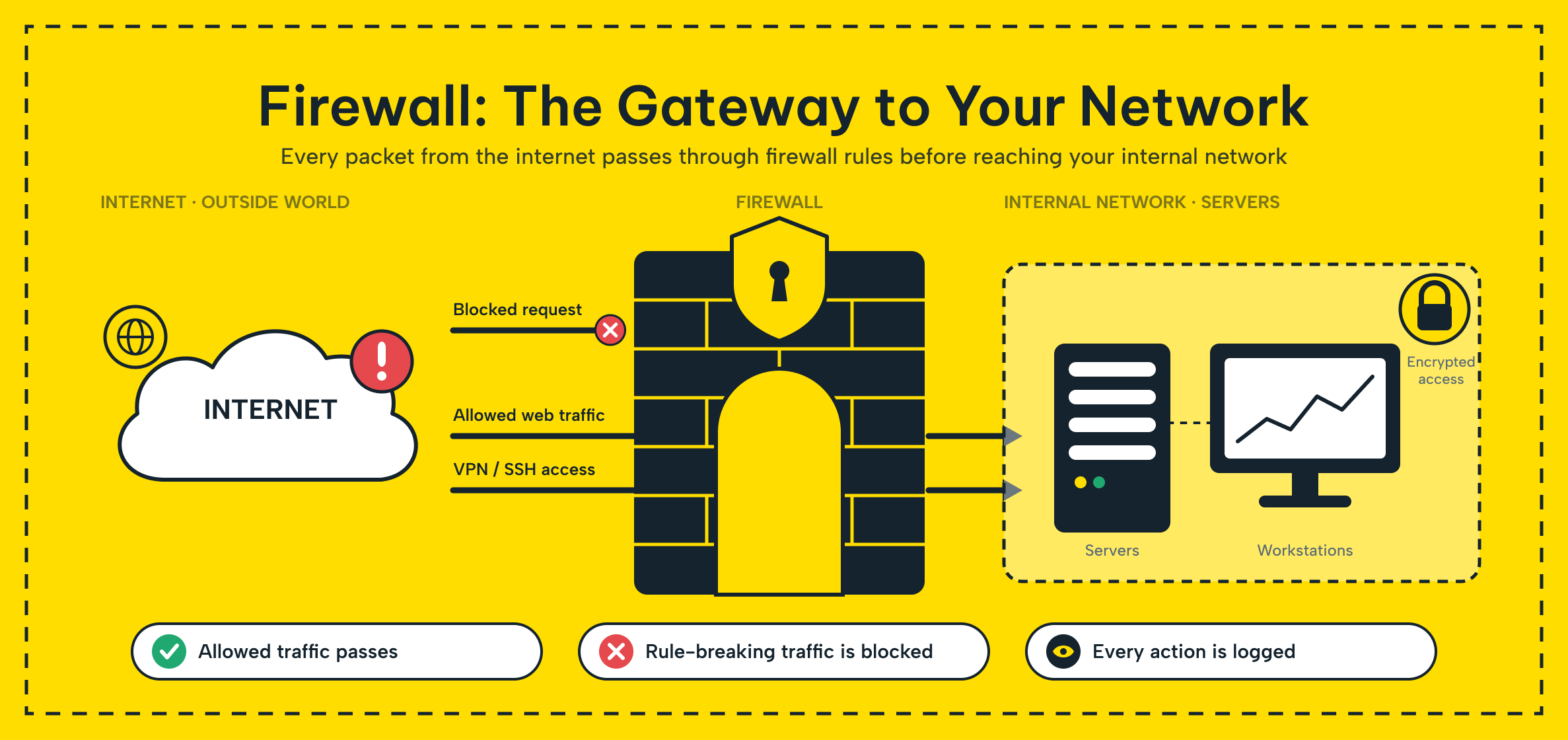
This type inspects data moving between your network and the outside world and decides what gets through. The name borrows from the physical one built into a building. That barrier stops a fire in one section from spreading to the rest.
In practice, a firewall sits at the boundary between your internal network and the internet and works like a checkpoint. It reviews incoming and outgoing connections against a set of rules defined in advance. Traffic passes only when it matches the allowed list.
The firewall waves safe traffic through and stops anything dangerous at the gate. That one function decides what can reach your systems. It keeps unauthorized access, malware, and unwanted traffic away from your network while letting your team work without interruption.
On a company network, a firewall keeps employee internet use safe while blocking attacks coming from outside. On a home network, the router or OS software does the same job at a smaller scale. It guards a household against viruses and intrusion attempts. Either way, a firewall protects every connected device and cuts exposure to the wider internet.
Access Control and Traffic Filtering in Network Security
A firewall relies on two core mechanisms: access control and traffic filtering.
Access control defines which users and devices can reach a network resource. Only recognized, authorized traffic gets through, and the firewall rejects every other connection attempt before it goes any further.
Traffic filtering works at a more granular level. It checks each data packet entering or leaving your network against your rules. It then decides for each packet whether the traffic is safe. It stops anything that looks like a threat before it reaches your systems.
A concrete example helps here. An unusual volume of requests suddenly arrives from a single IP address. A firewall treats that as suspicious, so it blocks the address automatically.
The same logic applies to specific ports or protocols. It filters out traffic that does not match the expected pattern for that port before it can cause harm. This is how a firewall keeps watch in both directions. It screens incoming attacks and catches sensitive data that should not be leaving your network in the first place.
To make these decisions, this tool evaluates criteria such as IP address, port number, protocol, and application-level data. It then grants or denies access accordingly. Modern devices combine signature-based detection with behavioral analysis.
This lets them flag threats the moment an unusual pattern shows up rather than after the fact. In short, this type works as the gateway for both company and home networks. That gateway role is what makes it central to network security.
Types of Firewalls
They generally come in one of two forms, a physical appliance or a software program, and each has its own strengths. Depending on what your network needs, you can run one type or combine both.
Software-Based Firewalls
This type is a program installed directly on a computer or server. Windows and Linux both ship with a built-in one of this kind.
This type offers flexible, granular configuration, since you can tune rules at the level of an individual device. That flexibility makes it a popular choice for individual users and small businesses. It requires no extra hardware, since it runs on equipment you already own.
A software firewall monitors network traffic and blocks harmful activity, guarding the device against viruses, worms, and ransomware. The tradeoff is resource use. It runs on the device it protects, so it consumes processor and memory, causing a small dip in performance.
Software firewalls typically ship with a user-friendly interface and a straightforward setup. This is why they show up so often in home networks and small office setups. A remote employee's personal firewall lets that person connect safely to the company network from anywhere. This plays a real role in protecting company data.
That said, a software firewall is only as good as its upkeep. It needs regular vendor updates to stay effective. Its security policies also need periodic review to stay aligned with new threats.
Hardware-Based Firewalls
This type is a physical device placed at the entry point of your network. It often looks like a router, but it uses components designed for high-speed traffic filtering.
Large businesses and data centers rely on hardware firewalls to manage heavy network traffic. This helps keep security at an enterprise level. A hardware firewall acts as an independent security checkpoint.
All traffic routes through it, and it stops threats before they reach the internal network. That design lets it deliver broad protection without slowing the rest of the network down.
Because these devices are purpose-built for security, they run on powerful processors with generous memory. This lets them handle multiple connections and security functions at once. Enterprise firewalls combine many security features into one device, so you don't need several tools.
These devices generally react faster than software-based ones, catching and blocking unauthorized access attempts in less time. The tradeoff runs the other way here: setup and ongoing management usually call for specialist expertise. Also, the hardware itself costs more upfront than a software-only approach.
| Comparison point | Software Firewall | Hardware Firewall |
|---|---|---|
| Where it runs | Installed on a device or server | Physical appliance at the network's entry point |
| Best fit | Individual users, small businesses | Large businesses, data centers |
| Setup cost | Low, no extra hardware needed | Higher upfront hardware cost |
| Performance impact | Uses the host device's CPU and memory | Runs independently, minimal impact on other devices |
| Management | Simple, user-level configuration | Usually needs specialist setup and maintenance |
| Response speed | Adequate for typical device-level threats | Faster, built for high-volume traffic |
Neither option is strictly better than the other. Most growing SMEs end up running a software firewall on individual machines. They also run a hardware one at the network edge, rather than picking just one.
Setting Up and Managing a Firewall
Getting real value out of a firewall depends on how it gets installed and managed, not just on which type you buy. The exact steps differ between a software and a hardware setup, but the underlying process looks the same either way.
Start by mapping your network's actual needs and the risks it faces. Only once you understand that picture does it make sense to decide where a firewall solution should sit.
If you are deploying a hardware appliance, you need to connect it correctly to your network first. Then you configure it with the right gateway settings before you can consider it live. A software firewall, by contrast, you install directly on the relevant server or computer. You then confirm the underlying services are running as expected.

Once the firewall is running, the real work starts: writing the rules. Those rules need to match your organization's actual security needs. They must also reflect any regulatory requirements you are subject to, and general industry practice. That means spelling out exactly which IP ranges can connect, which ports stay open, and which protocols you restrict.
Good firewall rules stay flexible without becoming loose. The goal is to let legitimate traffic through while still stopping anything that looks like a threat. That balance only holds if you review the ruleset regularly.
Update your rules whenever your network changes or a new class of threat appears. A firewall configured for last year's network will not necessarily catch this year's problems.
Ongoing monitoring matters just as much as the initial setup. Network administrators who review firewall logs regularly catch unusual activity early. This includes repeated access attempts from a single source or a pattern of violations clustered around a specific time.
Keeping firewall firmware and software current is equally critical. Vendor updates close the security gaps that a new wave of attacks would otherwise exploit.
As your infrastructure grows or you roll out new applications, your firewall rules need to grow with it. Launch a new web application, but first confirm the firewall has its ports configured correctly. That single step prevents a wide range of access issues and vulnerabilities down the line.
Finally, test the firewall itself on a regular schedule. Penetration testing and vulnerability scans surface weaknesses you would otherwise miss. They show you how effective your current setup really is and point you toward any additional safeguards worth adding.
Who Actually Needs a Firewall the Most?
Every internet-connected organization needs a firewall, but the stakes differ depending on your size. For an SME running its own email, an online store, or remote access for staff, a firewall is not a nice-to-have. It is the baseline that keeps one unpatched laptop or a single phishing email from turning into a company-wide breach.
Smaller teams often assume attackers only target large enterprises. In practice, the opposite is often true: automated scanning tools do not check company size before probing an open port, and a small business with a thin IT team can be an easier target than a company with a dedicated security staff. If your business handles customer payment data, personal information covered by data protection rules, or any system your customers rely on staying online, a properly configured firewall is one of the cheapest ways to close off that exposure.
For most SMEs, start simple: configure your router and server firewalls, then add a managed solution as your needs grow.
How Makdos Delivers Firewall Protection
At Makdos, our managed firewall solutions are built to take network security off your plate entirely. Every deployment comes with 24/7 monitoring and management, backed by a broader cybersecurity service. Your infrastructure stays covered without adding headcount to your own team.
Our firewall infrastructure goes well beyond basic packet filtering. It brings several security functions together on one platform, simplifying management and oversight. Makdos Firewall and Security blocks DDoS attacks, tracks malicious traffic through built-in IPS/IDS, applies WAF protection at the application layer, and provides secure remote access through SSL-VPN.
Together, these layers cover your network against threats from outside and within. We deliver all of this as a managed, turnkey service.
You never have to sink capital into expensive security hardware of your own. Our security team runs and monitors this infrastructure from our own data centers around the clock. This ensures there are no gaps in coverage.
For businesses with more than one location, we build custom firewall rulesets tailored to your setup. We also put the right security policy in place for your organization. We also connect your offices with secure VPN links to keep data flowing safely between sites, and route every branch's internet access through one central firewall system, so your whole organization runs under a single, consistent policy instead of a patchwork of separate ones.
Layering encryption on top of that access control closes the loop. Pairing your firewall with SSL certificates means the traffic that does get through is encrypted end to end, not just filtered at the door.
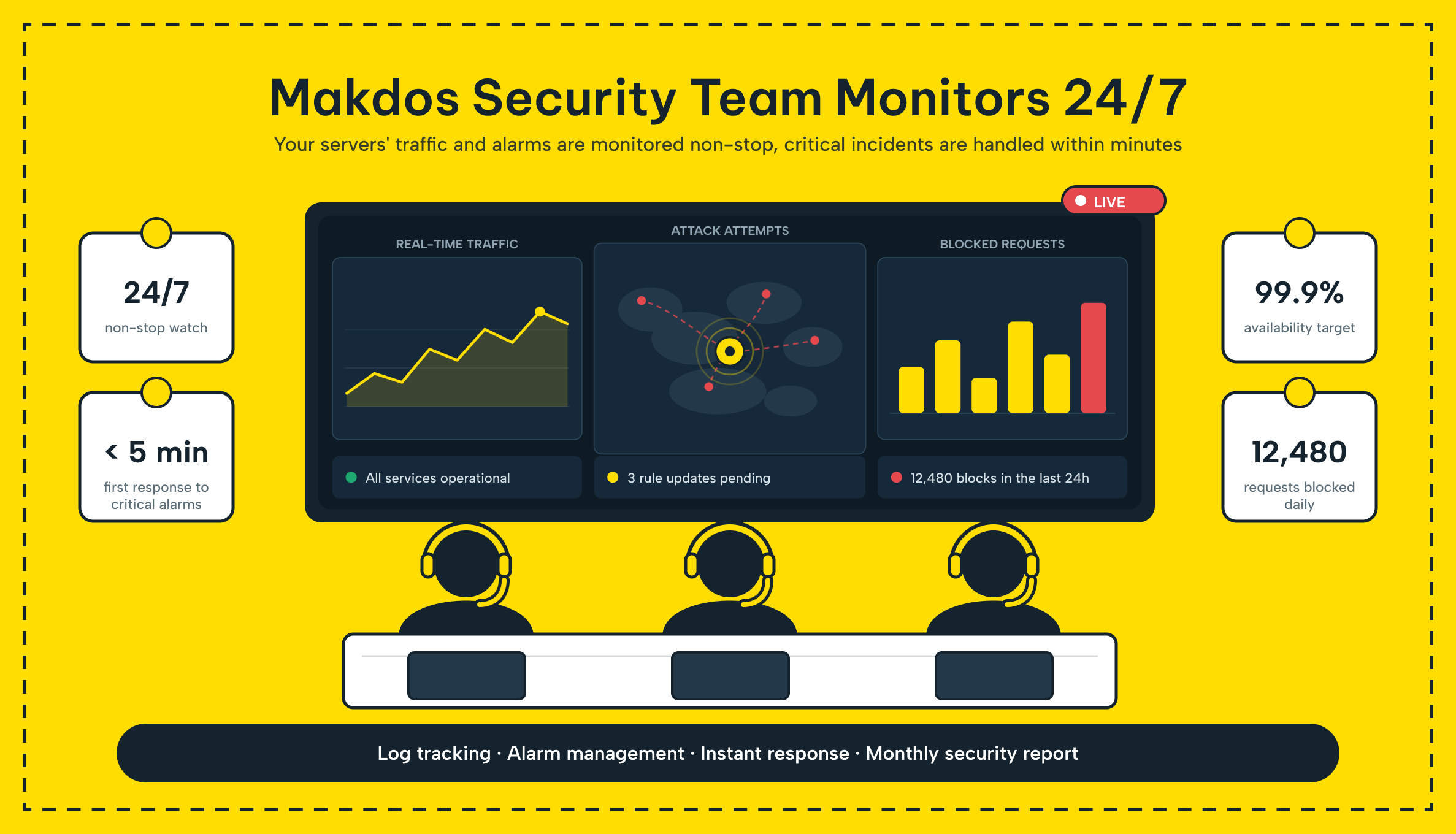
Our team watches your systems all the time, flags anything suspicious, and responds to threats right away to stop the risk. With a Makdos firewall in place, your network gains a genuine layer of defense. You can rely on it to protect both your data and your daily operations.
Conclusion: Get Your Firewall Right From the Start
A firewall filters the traffic moving in and out of your network, decides what is safe to let through, and stops the rest at the door. We have covered how it works, the difference between software and hardware firewalls, and what it takes to set one up. Keeping it running well is also part of the picture.
Company size does not change the fact: a firewall belongs in every network security strategy. This applies from a two-person shop to a large enterprise.
So what should you actually do next? If you are not certain your current setup is enough, get a professional assessment. A proper review surfaces the gaps a default configuration leaves open and gives you a clear list of what to fix first.
Cyberattacks keep getting more sophisticated, and a single unpatched gap can lead to a serious data loss event. Choosing the right firewall setup for your infrastructure is one of the most basic steps you can take. It protects what your business runs on.
Ready to strengthen your network's defenses against outside threats? Talk to the Makdos team about a firewall solution built around what your business actually needs.