
Companies rarely operate out of a single building anymore. A head office in one city might have branches in two or three others. It also has employees working from home or on the road. Every location needs access to the same file server and applications.
Most of that traffic has to travel over the internet to get there. Anyone on the path can read that traffic sent without encryption. It is open to interception by anyone between the two ends of the connection.
An IPsec VPN exists to close that gap. Instead of trusting the open internet to carry sensitive data safely, it builds an encrypted tunnel between two points. It treats everything passing through that tunnel as if it moved across a private network. Two decades ago, companies solved this problem with leased lines or MPLS circuits.
Both options work, but they come with a much higher price tag and a much longer setup time. An IPsec VPN reaches the same result over the internet connection a business already pays for. That is why it has become the default way to link offices together.
This guide covers what an IPsec VPN actually is, along with the protocols and modes it relies on. It also explains where businesses deploy it and the trade-offs worth knowing before committing. When does an IPsec VPN become the right tool? IT managers evaluating a multi-branch network will see.
Any growing business connecting a new location will too. Makdos can help set one up, and they will learn how.
What Is an IPsec VPN and Why It Matters
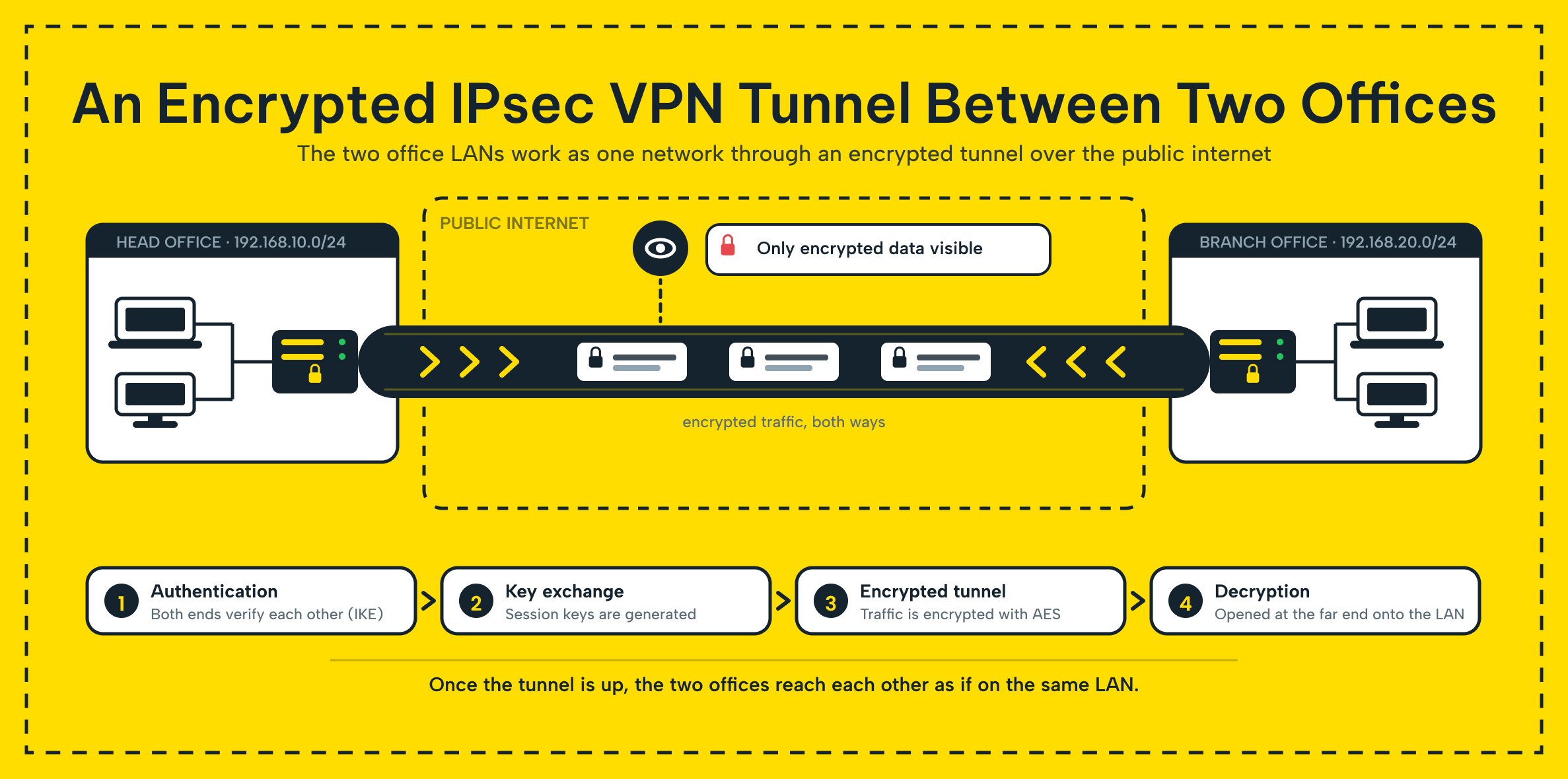
IPsec stands for Internet Protocol Security, a set of protocols that protects data as it moves across a network. An IPsec VPN uses those protocols to build a virtual tunnel between two networks. It also applies encryption and authentication to every IP packet traveling through that tunnel. The result is a connection where a branch office and a head office behave like they sit on the same local network, without either side needing to trust the public network in between.
The need for this becomes obvious once a company grows past a single site. A business with only one office keeps all of its traffic inside its own four walls. Add a second location, and every request to a shared file server, every login to an internal application, and every database query now has to leave one building, cross the internet, and arrive at another.
Without protection, that traffic is visible to anyone who can position themselves along the path. This is exactly the scenario an IPsec VPN prevents. IPsec VPN answers that need directly by giving a company secure traffic between locations. Employees keep working the same way day to day.
Because IPsec is a widely adopted standard rather than a single vendor's proprietary technology, it is supported by nearly every serious piece of networking hardware and every major server operating system, from Cisco and Fortinet appliances to Windows Server and Linux.
A branch office can build an IPsec VPN with a head office, even if they use different router brands. Both sides only need to agree on the same settings. That interoperability is why IPsec VPNs remain the standard for connecting offices. This holds even years after the technology was introduced.
Unlike VPN technologies that protect a single application's traffic, IPsec works at the network layer. One IPsec VPN can protect everything moving between two networks, including file transfers, database queries, and voice traffic. It does this without requiring any change to the applications themselves.
How IPsec VPN Works: Protocols and Modes
Setting up an IPsec VPN comes down to two steps happening in sequence. First, the two ends of the connection prove who they are, and then the data itself gets encrypted. Internet Key Exchange (IKE) handles the first part by negotiating a shared secret.
It also agrees on which encryption method both sides will use for the session. Once that handshake finishes, the two sides protect every packet that follows using the algorithm they just agreed on.
Two protocols do the actual protection work. Authentication Header (AH) verifies that no one has tampered with a packet. It also confirms the packet really came from the sender it claims to be from, without encrypting the payload.
Encapsulating Security Payload (ESP) goes further and encrypts the packet payload. This is why most real-world IPsec VPN deployments rely on ESP rather than AH alone.
IPsec VPN connections also run in one of two modes. IPsec tunnel mode encrypts the entire original IP packet, including its IP header. Then a new packet wraps it, giving it a fresh header for the trip across the internet.
Nearly every site-to-site VPN uses this mode. It protects the addressing information of two entire internal networks. It is not just for a single device.
In IPsec transport mode, the original IP header stays visible and only the payload is encrypted. This fits when a single device talks directly to another, rather than routing traffic for an entire office.
IPsec Tunnel Mode vs. Transport Mode
| Comparison point | Tunnel Mode | Transport Mode |
|---|---|---|
| What gets encrypted | Entire IP packet, including the original IP header | Only the payload; the original IP header stays visible |
| Typical use case | Site-to-site VPN between two networks | Direct connection between two individual devices |
| Where it is applied | Gateway-to-gateway (router or firewall) | Host-to-host |
| Common in | Branch office to head office connections | Administrator connecting to a single remote server |
Tunnel mode is almost always the right default for a business connecting full office networks. It protects the internal addressing scheme of both sites, not just the data inside each packet.
Where Businesses Use IPsec VPN
The most common use case for IPsec VPN is a site-to-site connection between a head office and one or more branches. Picture a company with a main office and two branches in different cities. An IPsec VPN lets employees at every location reach the same file server, the same ERP system, and the same printers.
It is as if all three buildings shared one local network. Most site-to-site VPNs of this kind stay up permanently. The connection runs in the background whenever someone at a branch needs a resource at the head office.
The second common use case is remote access. A remote access VPN lets an individual employee's laptop or phone connect into the company network. This works from anywhere, instead of connecting two office networks together.
A traveling manager installs one of the available VPN clients on their laptop. After users authenticate, the system treats them as if they were plugged directly into the office network.
A third scenario is becoming more common as companies move workloads to the cloud. It connects an office network to a server that lives outside the building entirely.
An IPsec VPN can link the office directly to a cloud provider's environment. This works when a database or application server runs there rather than in a server room. This makes the server act as if it belongs to the internal network, not sitting exposed on the open internet.
IPsec VPN for Multi-Branch Businesses and Growing Teams
Businesses that open a second or third location often assume secure connectivity between offices requires a specialized IT project. Adding a new branch to an existing IPsec VPN is mostly configuration, not construction. As long as the new location has a compatible router or firewall, connecting it takes hours, not weeks.
IPsec VPN suits companies that keep adding locations, since each new branch adds one more tunnel. It does not add a new type of infrastructure.
One detail worth planning for in advance is addressing. Every location on the same IPsec VPN needs a distinct IP range. When their networks join, two branches using the same internal range become indistinguishable.
A company opening its third or fourth branch should choose a consistent addressing scheme from the start. Otherwise, it may detect a conflict after wiring the new office.
Advantages and Challenges of IPsec VPN
The case for IPsec VPN is strong, but it comes with a few trade-offs worth planning around.
Advantages:
- Strong, standardized encryption. Modern IPsec VPN deployments use algorithms such as AES-256, keeping intercepted traffic unreadable to anyone without the key.
- Integrity, not just privacy. Because IPsec verifies the source and contents of every packet, a branch can trust data from another office. It knows that no one has altered the data along the way.
- Full network coverage. Since IPsec VPN operates below the application layer, it protects all traffic between two locations at once. It does not protect one application at a time.
- Lower cost than dedicated circuits. An IPsec VPN runs over the internet connection a business already has, avoiding the price and lead time of a leased line.
- Straightforward scaling. Adding a location generally means adding one more tunnel to an existing setup, not redesigning the network.
Challenges:
- Setup complexity. Matching encryption settings, authentication methods, and addressing on both ends takes networking knowledge. A mismatch on either side stops the tunnel from forming at all.
- Ongoing maintenance. Certificates expire, keys need rotation, and more branches mean more tunnels to keep track of.
- Hardware overhead. Encrypting and decrypting traffic constantly uses processing power. An underpowered router or firewall can become a bottleneck on a high-traffic connection.
- Interoperability quirks. Two different vendors' equipment can, in some cases, need extra tuning around settings such as NAT traversal. A tunnel comes up cleanly only after that tuning.
None of these challenges rule IPsec VPN out. They mostly argue for having someone with the right expertise handle the setup and the upkeep. You should not treat it as a one-time task.
How Makdos Supports Your IPsec VPN Deployment
Configuring an IPsec VPN correctly the first time takes networking expertise. Many growing businesses simply do not have this expertise in house. Getting it wrong usually means blocked traffic or a tunnel that is not actually encrypting what you think it is. Makdos Firewall and Security removes that risk by handling the entire setup, from choosing encryption parameters to configuring both ends of the tunnel, and keeping the resulting IPsec VPN under continuous monitoring once it is live.
This service fits naturally alongside the rest of a company's infrastructure. If a business runs a database or application server on Makdos cloud servers, an IPsec VPN can connect that environment directly to the office network, so the server stays off the open internet while remaining reachable exactly the way an on-premises machine would be. For companies opening additional branches, the same tunnel setup extends to each new location as it comes online. This keeps the network working as one system instead of a set of disconnected offices.
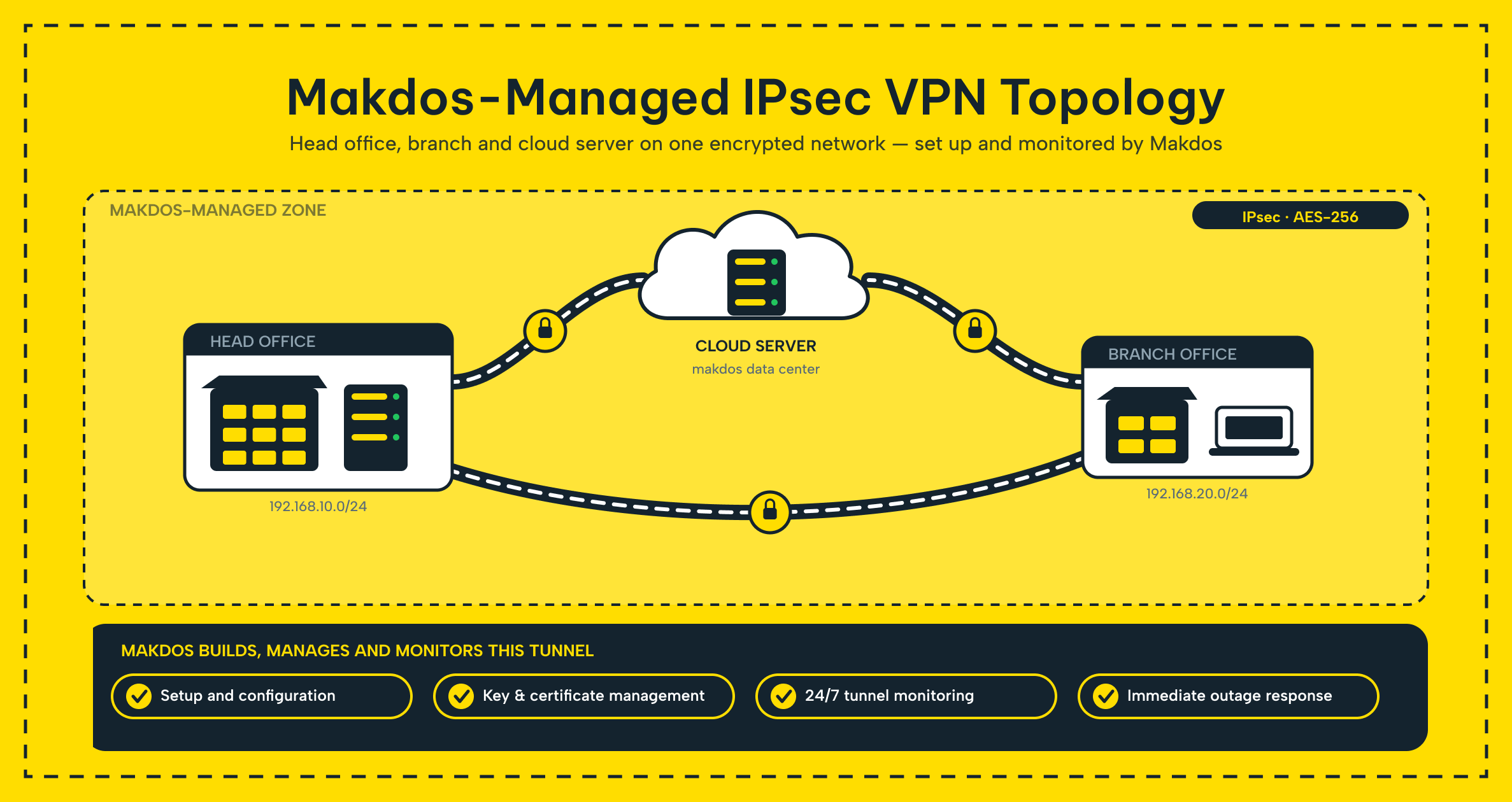
Beyond the initial configuration, our team monitors certificate expiry, key rotation, and overall tunnel health. This way, a lapsed setting does not quietly turn into a dropped connection or unencrypted fallback. That ongoing management is usually the part businesses underestimate when they set up IPsec VPN on their own. It is the part that determines whether the tunnel is still solid a year after going live.
Conclusion: A Secure Foundation for Distributed Teams
An IPsec VPN turns the public internet into something a distributed business can trust for internal traffic. It encrypts and authenticates every packet between a head office, its branches, and any remote employee outside either one. This guide covered how the technology works, the protocols and modes behind it, and where companies put it to use. It also covered the trade-offs worth weighing before committing to a setup.
If a business is planning a new branch, moving a server to the cloud, or simply ready to stop sending sensitive data across the internet unprotected, an IPsec VPN is one of the more mature, well-understood ways to close that gap. Talk to the Makdos team about setting one up for your offices; we handle the configuration and the monitoring so your locations stay connected securely from day one.