
Every company sending invoices, replying to customers or running a sales pipeline needs email. It should look and behave like a real company, not a side project. A domain-based email address such as sales@yourcompany.com signals that a real company stands behind the message.
A free account from a generic consumer provider rarely earns the same trust. The real question is not whether to use professional email addresses, but where to host them.
Two paths lead there. Cloud email services store your mailboxes on a provider's infrastructure, not on your own servers. Within minutes, they hand you a working business email account that you can use right away. On-premise servers put those same mailboxes on hardware your company owns and manages, trading convenience for control.
Both models can serve a small business or a large enterprise well, regardless of company size. The right call depends on your budget, IT capacity, and how much control you need over the data.
This guide walks through how each model works, where it saves money, and where it adds risk. It also shows how to create a business email setup that fits your team without over-engineering it.
What Is Business Email and Why Does It Matter?
A business email address is a professional mailbox built on your own domain name, for example name@yourcompany.com, instead of a free email inbox at a generic provider. Every message sent from that address carries your company's name in the sender line, which builds trust. A customer trusts an invoice from billing@yourcompany.com more readily than the same invoice from a personal Gmail account.
For an SME, an e-commerce store or an in-house IT manager, this is no longer optional. Customers, banks and partners expect a domain based email address on every invoice, contract and support ticket. Beyond appearances, a proper business email account gives an organization real operational control.
Administrators can create an inbox for each hire, enforce password policy, and revoke access when someone leaves. None of that is possible with free email accounts scattered across a dozen personal inboxes.
It is worth separating this from general web hosting, too. Web hosting keeps a website online; business email is a distinct service. It handles deliverability, spam filtering, and uptime, so it deserves its own plan, not a hosting add-on.
How Cloud-Based Business Email Works
Cloud email hosts store every mailbox, calendar and contact list on off-site servers. The provider maintains those servers around the clock, so they stay online. Microsoft 365 (Exchange Online) and Google Workspace are the best known examples.
Makdos offers a comparable business email service built on its own infrastructure. Because everything runs in the provider's data center, a company can connect its custom domain and add email. It can start sending mail the same day from any internet-connected device, with no server room.
What you gain:
- No server hardware to buy, rack or maintain
- Predictable monthly or annual subscription pricing instead of a large upfront bill
- Storage and user counts scale up in minutes as new team members join
- Built-in spam filtering, antivirus scanning, encryption and automatic backup
- Works across iOS, Android, Outlook and webmail without extra configuration
- Uptime commitments of 99.9% or higher from established email hosts
- Security patches applied continuously by the provider, not by your own staff
What you trade away:
- No internet connection means no access to the inbox
- Mail data lives on infrastructure outside the company's own walls
- Some regulated industries need extra diligence around where data physically sits
How On-Premise Email Servers Work
An on-premise server keeps the entire mail system inside the company's own infrastructure. It runs software such as Microsoft Exchange Server or open-source options like Zimbra and Postfix. Getting one running starts with domain registration, DNS configuration, MX records, and the SMTP/IMAP/POP3 protocols that move mail. Domain registrars and an internal or contracted IT specialist who knows mail routing usually split this work.
What you gain:
- Full control over where data lives, how long it is retained, and how the system is customized
- Internal mail keeps moving even if the office internet connection drops
- Large attachments move faster across the local network than over the public internet
- Easier to document data-protection compliance when nothing leaves the building
What you trade away:
- Significant upfront spending on server hardware and software licenses
- Ongoing patching, monitoring and backup responsibility sits entirely with your own team
- Requires in-house or contracted expertise that most small teams do not have on staff
- Total cost of ownership often exceeds a cloud subscription once you count labor and downtime
- Cooling, power redundancy and physical security have to be planned and paid for separately
- A breach or an outage becomes the company's direct liability, not the provider's
Some organizations pick a hybrid model: sensitive mail stays on their server, and daily traffic uses cloud email. For companies that want server-level control without buying physical hardware outright.
Makdos cloud server rental offers a middle path: rent a virtual machine and run a private mail system on it without building a data center of your own.
Cloud vs. On-Premise: Five Factors That Decide the Right Fit
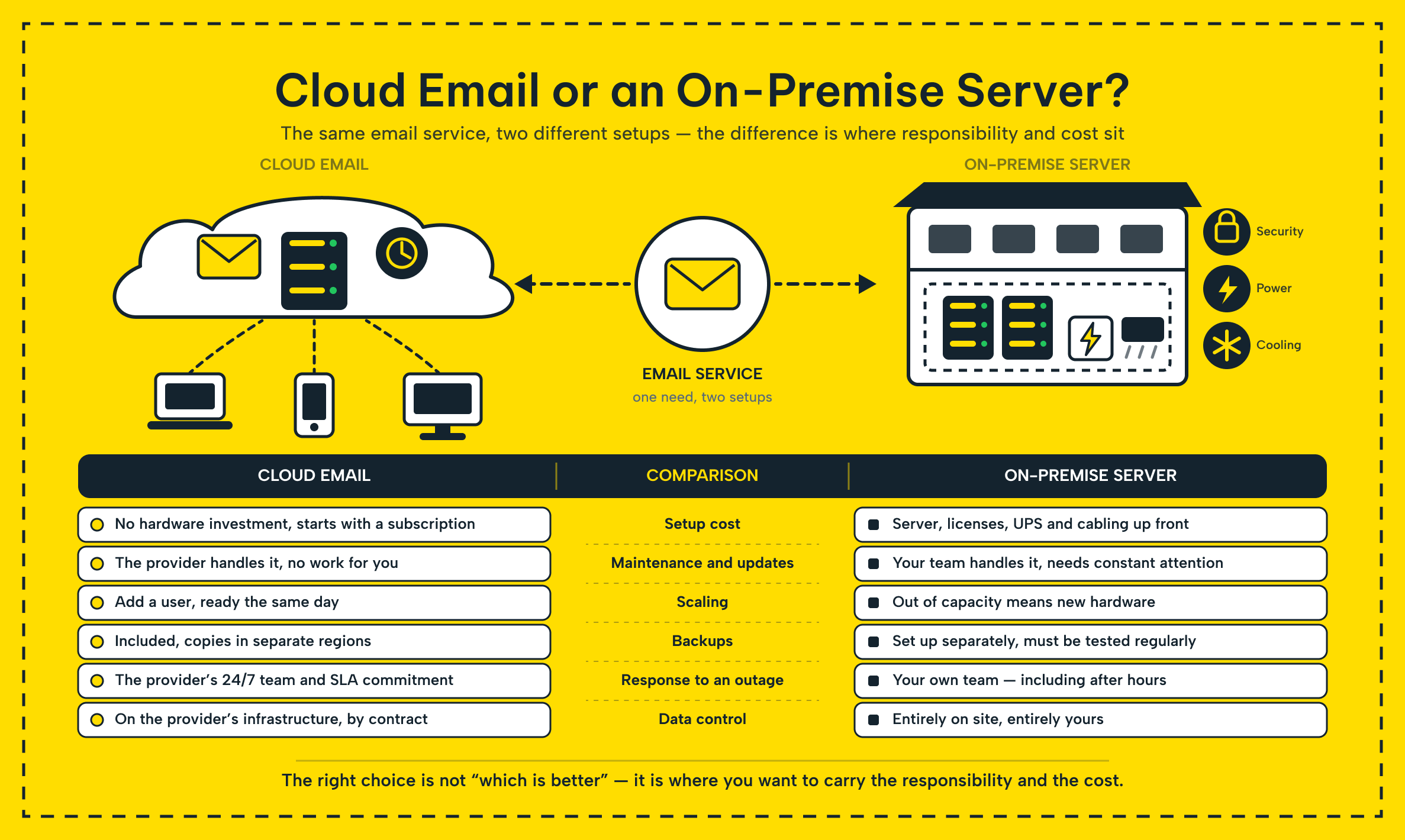
Cost, setup effort, feature velocity, security ownership and support all trade off depending on the model. The table below lines them up side by side.
Cloud vs. On-Premise Business Email at a Glance
| Factor | Cloud business email | On-premise server |
|---|---|---|
| Cost | Low upfront cost, predictable subscription | High upfront hardware and license cost, cheaper per seat at large scale |
| Setup and management | Live within minutes, minimal admin work | Full install, configuration and continuous maintenance |
| Feature updates | New tools ship automatically for everyone | Extra plugins or licenses needed to match the same features |
| Security and data control | Encryption, DDoS protection and 24/7 monitoring, data stored off-site | Data stays in-house, but your team owns every patch and firewall rule |
| Uptime and support | SLA-backed uptime with 24/7 vendor support | Uptime depends entirely on your own hardware and staff |
For most small and mid-sized teams, a cloud business email service is usually the better choice. On-premise pays off once a company has enough IT staff and mailbox volume to justify the hardware.
Which Business Email Service Fits a Small Business?
A small business with no IT staff can look professional with a cloud email account, without hiring anyone. Setup usually takes an afternoon: you register a domain through a standard registrar. Then verify the DNS records the provider gives you, and create an email inbox for each team member.
Set up SPF, DKIM, and DMARC so mail lands in the inbox.dmarc.org is a useful technical reference if your provider does not walk you through it), and turn on two-factor authentication for every account before you hand out the first login.
As the company grows, storage and user seats scale without a second hardware purchase. Email management stays a five-minute task in a web panel rather than a server room job.
Common setup mistakes worth avoiding:
- Skipping two-factor authentication because "we're too small to be a target"
- Leaving SPF/DKIM/DMARC unconfigured, which pushes legitimate mail into recipients' spam folders
- Mixing personal and business email accounts in one inbox, which breaks handover when someone leaves
- Buying more storage or seats than the team needs instead of starting small and scaling up
How Makdos Solves This
Makdos runs its own Turkish infrastructure and a fully in-house software control panel. It packages both into a business email service built for exactly this handoff between cost and control.
Makdos business email hosting connects to any custom domain in minutes without manual DNS. You just copy the records the panel generates and add them to your domain. Every one of the Makdos business email plans includes spam filtering, antivirus, daily automated backup, and encrypted delivery. A small business gets the same baseline protection a much larger IT department would otherwise need to build.
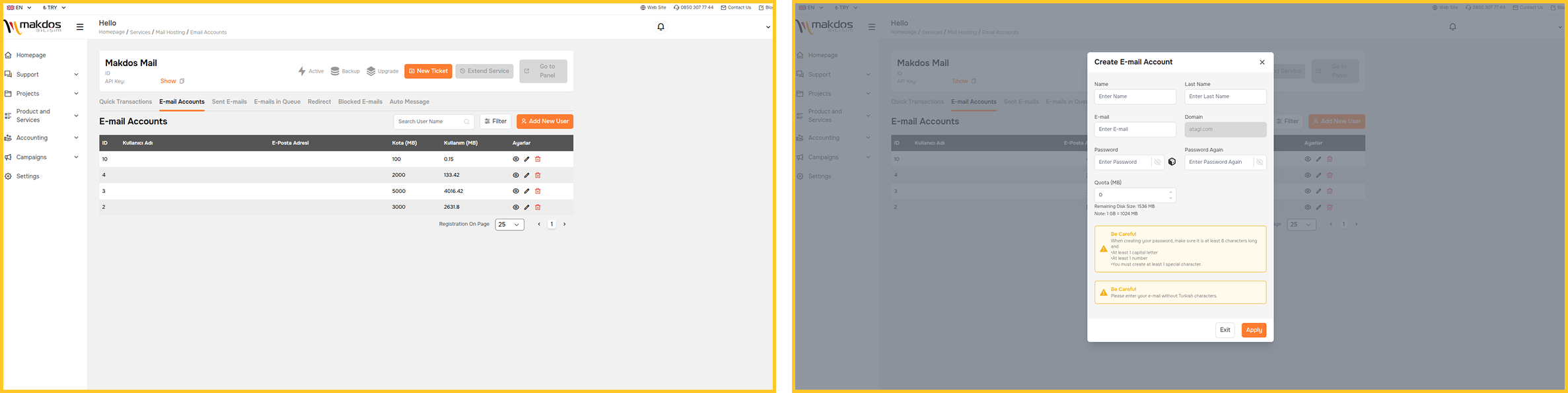
The control panel lets an administrator create an email account for a new hire, reset a forgotten password, adjust a mailbox quota or group departments together in a couple of clicks, and the same mailbox stays in sync across webmail, mobile apps and desktop clients like Outlook. For companies that outgrow a shared mailbox setup or want to run their own mail server without buying hardware.
Makdos virtual server plans provide the on-premise-style control described earlier in this guide. The provider hosts it on its infrastructure rather than a server room down the hall. Migration support covers moving existing mail, contacts and calendars from a legacy setup. Your history remains intact, and you keep all old messages, contacts and calendar entries.
Conclusion: Choosing the Right Business Email Service
Cloud business email wins in three areas: speed, cost predictability, and painless scaling. An on-premise server wins on data control and customization, but it requires upfront spending and ongoing maintenance. The right choice depends on company size, industry rules, in-house IT capacity, and budget. It does not depend at all on which option sounds more impressive on paper.
A small business usually gets more value from a cloud email plan than from owning a server outright. A heavily regulated firm may prefer a hybrid setup: sensitive data stays in-house; routine mail uses the cloud.
Whichever direction fits, the underlying goal for every business email setup stays the same. This setup must stay online, protect company data, and grow with the team instead of holding it back. If you would rather not manage that infrastructure yourself.
Makdos team can review your current setup and recommend the right business email plan. The Makdos blog has more comparisons like this one if you want to keep researching before you switch.