

For many businesses, email is still the default communication channel. Businesses use email for quotes, invoices, support requests, internal approvals, legal notices, and customer communication. When businesses rely on free personal inboxes or poorly managed mail systems, they take unnecessary risks. These risks include weak brand perception, limited control, poor account ownership, and inconsistent security.
A professional email setup gives your company a structured communication layer. It connects your domain name to branded mailboxes and centralizes user management. It also supports authentication records and helps your team work consistently across webmail, Outlook, mobile devices, and internal workflows.
This guide explains how business email hosting works and why choosing a local provider can matter. It also covers the key technical settings you should understand. It also shows how Makdos helps companies build a stable and professional mail environment.
What Is Email Hosting?
Email hosting lets your business create professional email accounts on its own domain name. It also gives you a managed structure for handling those accounts.
Instead of using a generic address such as companyname@gmail.com, you can use branded addresses such as info@company.com, sales@company.com, or name@company.com.
This matters because every email your team sends represents your brand. A custom domain email address looks more professional and builds trust with customers. It also gives the company better control over employee accounts, access permissions, mailbox continuity, and data ownership.
A good email hosting service usually includes:
- Mailbox creation and user management
- Webmail access
- IMAP, POP3, and SMTP support
- Spam and malware filtering
- DNS guidance for MX, SPF, DKIM, and DMARC records
- Backup and recovery options
- Centralized administrative controls
- Support for desktop and mobile email clients
In practical terms, email hosting turns email from a personal tool into a business system. It allows your company to manage communication in a predictable, scalable, and secure way.
Why Local Email Hosting Can Be Important for Businesses
Many companies start with global email platforms or free inboxes because they are familiar and easy to access. However, as the business grows, communication requirements become more complex. Teams need better control, faster support, branded email addresses, predictable costs, and stronger operational ownership.
Local email hosting can be valuable when your business needs a provider that understands regional expectations. It also helps when you need support in the right language and time zone, with infrastructure built for business continuity.
For companies operating in Turkey, local hosting may also support data residency expectations and internal policies related to KVKK-focused data handling. This content is for informational purposes only and does not constitute legal advice.
Better Brand Trust
A professional mailbox connected to your own domain sends a clear signal. Customers are more likely to trust messages sent from your company’s domain. This includes offers, invoices, and support responses.
This is especially important for e-commerce teams, agencies, financial departments, and B2B sales teams. A branded email address does not only look better; it also reinforces ownership and accountability.
More Control Over Business Communication
When employees use personal inboxes for company communication, the business may lose control over critical correspondence. If an employee leaves, important messages, contacts, or customer history may remain outside company systems.
With business email hosting, administrators can create, suspend, forward, archive, or reassign mailboxes. This supports continuity when roles change and helps keep customer communication inside the company.
More Practical Support
Email problems are often urgent. If quotes, order notifications, or support emails stop working, the business feels the impact immediately.
A local provider with accessible technical support can help with daily email operations. This includes DNS settings, mailbox configuration, webmail access, Outlook setup, password resets, spam filtering, and migration questions. For SMEs without a dedicated IT department, this can significantly reduce operational friction.
How Email Hosting Works
Email hosting connects your domain name to mail infrastructure. Your domain is your business identity. The email hosting provider manages the systems that send, receive, filter, and store your messages.
The basic flow is simple:
- Your business owns or registers a domain name.
- The email hosting provider creates mailboxes for that domain.
- DNS records route your email.
- Authentication records help receiving servers verify your messages.
- Users access mail through webmail, Outlook, mobile apps, or other clients.
Businesses do not need deep technical knowledge to choose reliable email hosting and avoid setup mistakes.
Domain Name and Mailboxes
Your domain is the foundation of your business email identity. Once the domain is ready, you can create mailboxes for people, departments, and functions.
Common examples include:
- info@company.com
- sales@company.com
- support@company.com
- billing@company.com
- firstname.lastname@company.com
You can also use aliases and forwarding rules. For example, hello@company.com and contact@company.com may both forward to the same shared inbox. This keeps communication organized without creating unnecessary extra mailboxes.
DNS Records: MX, SPF, DKIM, and DMARC
DNS records are a critical part of email hosting. They route email and verify your domain as a trusted sender.
The most important records are:
- MX records: Define which mail server receives email for your domain.
- SPF records: Verify your approved email senders.
- DKIM records: Add a cryptographic signature that helps verify message integrity.
- DMARC records: Tell receiving servers how to handle messages that fail SPF or DKIM checks.
Correct DNS setup improves deliverability and helps reduce spoofing risk. Incorrect setup can cause messages to land in spam, fail authentication, or stop reaching customers.
Email Hosting DNS Checklist
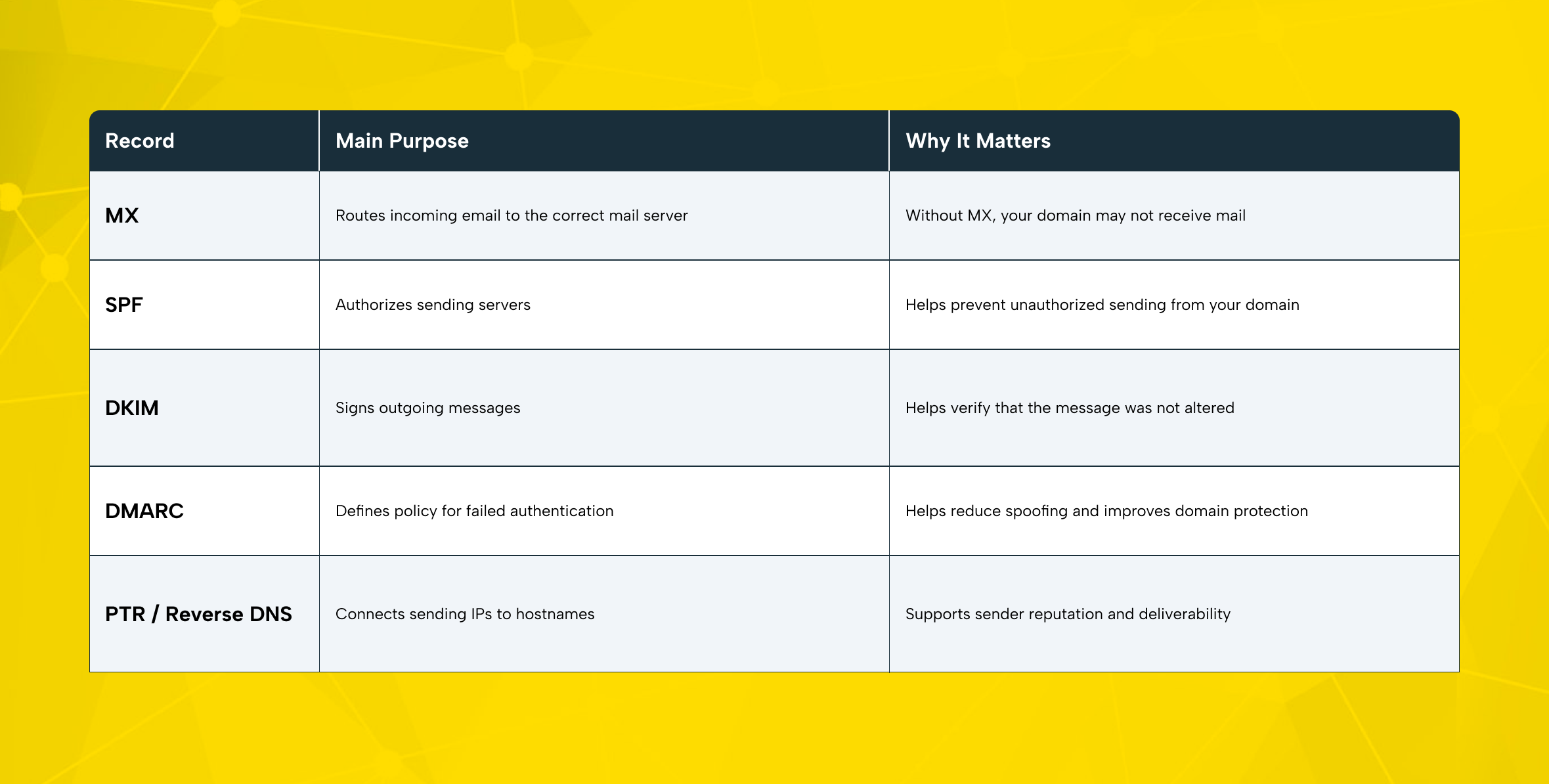
Before launching a new email hosting setup, confirm these records with your provider. A small DNS mistake can create large communication problems.
Webmail and Email Client Access
Once mailboxes are active, users need a way to access them. Most business email hosting services support two access models.
The first is webmail, which allows users to log in through a browser. This is useful for remote access, quick checks, shared workstations, and employees who do not want to configure software.
The second is an email client such as Outlook, Apple Mail, Thunderbird, or a mobile mail app. These tools usually connect through IMAP and SMTP. IMAP keeps messages synchronized across devices. SMTP handles outgoing email.
Most teams benefit from using webmail for easy access and email clients for daily work.
Security and Privacy: What Businesses Should Look For
A secure email environment requires more than a password. Business email is one of the most common channels for phishing, impersonation, invoice fraud, and malware distribution. That is why a reliable email hosting service should combine authentication, filtering, encryption, and administrative control.
A strong setup should include:
- Spam filtering
- Virus and malware scanning
- SSL/TLS support
- SPF, DKIM, and DMARC guidance
- Secure password practices
- Backup and recovery options
- Account-level management
- Support for access control and mailbox changes
A secure email strategy should also include user awareness. Strong infrastructure cannot fix weak security habits.
Email security is not a one-time setup. DNS records, user access, forwarding rules, old mailboxes, password hygiene, and spam filter behavior need regular review. These checks help keep the email environment secure and reliable. Businesses often secure the initial setup but forget to maintain the system as the team changes.
Free Email vs. Business Email Hosting
Free email services can be useful for personal communication. However, they are not enough for full business communication. They usually provide limited control over branding, access management, account ownership, and internal governance.
Business email hosting is designed for companies that need:
- A custom email identity on their own domain
- Centralized mailbox control
- Department-based email addresses
- Better security options
- Backup and recovery support
- More predictable continuity
- Technical support when configuration issues occur
A free inbox may be enough for an individual. A free email service is rarely enough for a growing company. Businesses need stronger control to protect their brand, manage communication properly, and reduce dependency on personal accounts.
Business email hosting also helps keep operational responsibilities clear. Business email gives companies control over domains, users, and message routing.
Common Email Hosting Mistakes to Avoid
Many email issues are caused by setup or management mistakes rather than the hosting service itself. Avoiding these mistakes can improve reliability from the start.
Using Personal Inboxes for Business Operations
This is one of the most common problems. Personal inboxes create ownership risk, weaken brand perception, and make it harder to manage communication when team members leave.
Skipping Authentication Records
SPF, DKIM, and DMARC are essential for domain protection and deliverability. Without them, your domain may be easier to spoof, and your legitimate messages may be more likely to land in spam.
Creating Too Many Shared Passwords
Shared mailboxes can be useful, but shared passwords create risk. Avoid giving the same password to multiple users. Where possible, use structured access, aliases, forwarding, and clear ownership rules instead.
Forgetting Old Accounts
Former employees, unused aliases, outdated forwarding rules, and abandoned mailboxes can become security and operational risks. Review them regularly.
Ignoring Backups
Email often contains contracts, invoices, customer history, and internal decisions. A reliable backup and recovery plan helps reduce the impact of accidental deletion, account misuse, or unexpected incidents.
How Makdos Helps Businesses Build Reliable Email Hosting
Makdos provides business email solutions for businesses that want professional communication infrastructure without managing mail systems manually. The service focuses on reliable mail hosting and easy management. It also supports backup, secure webmail access, and technical support.
With Makdos Business E-Mail, businesses can create professional email addresses on their own domain. They can also manage those accounts through a user-friendly mail panel. This helps teams add users, update accounts, configure forwarding, manage automatic replies, and control mailbox settings more easily.
Makdos is especially suitable for companies that want:
- Branded business email addresses
- A practical management panel
- Spam protection and security-focused configuration
- Backup-supported mail infrastructure
- Webmail access for flexible use
- IMAP, POP3, and SMTP compatibility
- Support for mobile and desktop email clients
- Technical assistance during setup and daily operation
For SMEs, this reduces the need to handle technical details alone. For e-commerce teams, it supports more stable customer communication. For agencies and corporate teams, it provides a more structured way to manage multiple users and department addresses.
Makdos can also support businesses that need complementary infrastructure services. Companies that manage their website and email environment together may need additional infrastructure services. Depending on their operational needs, they can also review Makdos Web Hosting, Cloud Server, Firewall, or Backup services.
Why Makdos Fits Business Email Hosting Needs
The main advantage is not only mailbox creation. The value comes from combining email infrastructure with practical management and support.
A business can create email addresses and connect them to its own domain. It can also access mail through webmail or email clients and receive support for technical configuration. This is useful for teams that need professional email. It also helps them avoid managing mail servers, DNS troubleshooting, and security settings on their own.
Makdos also helps companies approach email as part of a wider infrastructure strategy. Email, domains, hosting, security, backup, and support work together in daily operations. Keeping these services under a provider that understands infrastructure can simplify troubleshooting and reduce fragmented vendor management.
What to Check Before Choosing an Email Hosting Provider
Before choosing an email hosting provider, evaluate your real business needs. The best option is not always the largest platform or the cheapest package. The right option is the one that fits your team size, security expectations, support needs, and growth plan.
Review these points before making a decision:
- How many mailboxes do you need now?
- Will you need more users as the company grows?
- Do you need department addresses such as sales@ or support@?
- Will users access mail through Outlook, mobile apps, or webmail?
- Does the provider support SPF, DKIM, and DMARC configuration?
- Are spam filtering and malware protection included?
- What backup and recovery options are available?
- How quickly can you reach technical support?
- Can the provider help with migration from your current service?
- Are costs predictable for your team?
If your business depends heavily on email, treat email hosting as infrastructure, not as a minor software choice.
Conclusion: Build Email Infrastructure That Supports the Business
Email hosting gives businesses a professional, secure, and manageable foundation for daily communication. It allows your team to use branded email addresses and manage accounts from one place. It also helps configure authentication records and reduce the risks of personal inboxes or unmanaged systems.
For SMEs, e-commerce companies, agencies, and corporate brands, the right email hosting provider can make a real difference. It can improve trust, continuity, support quality, and operational control. Local provider choice can also matter. It helps when your team needs accessible support, regional infrastructure awareness, and practical guidance during setup.
Makdos helps businesses move from scattered communication to a more professional email environment. Makdos helps teams manage business email without unnecessary complexity. It combines business email hosting, secure webmail access, management panel features, backup-supported infrastructure, and technical support.
To strengthen your company’s communication infrastructure, review your current email setup first. Then compare your mailbox needs, DNS configuration, security expectations, and support requirements with Makdos Business E-Mail services.