

Makdos help SMEs, e-commerce teams, agencies, and corporate brands keep their websites recoverable and stable. It also supports them in building a stronger foundation for growth.
Plugin errors, deleted files, database issues, or attacks can quickly break a website. Without a clean backup, even a small technical issue can turn into hours of downtime and lost trust. With a clear backup plan, the same incident becomes a controlled recovery task.
For growing businesses, backups are also part of operational discipline. They protect marketing work, product pages, order histories, form submissions, email records, and customer-facing services. This article explains how website backups work and when your business may need stronger hosting infrastructure.
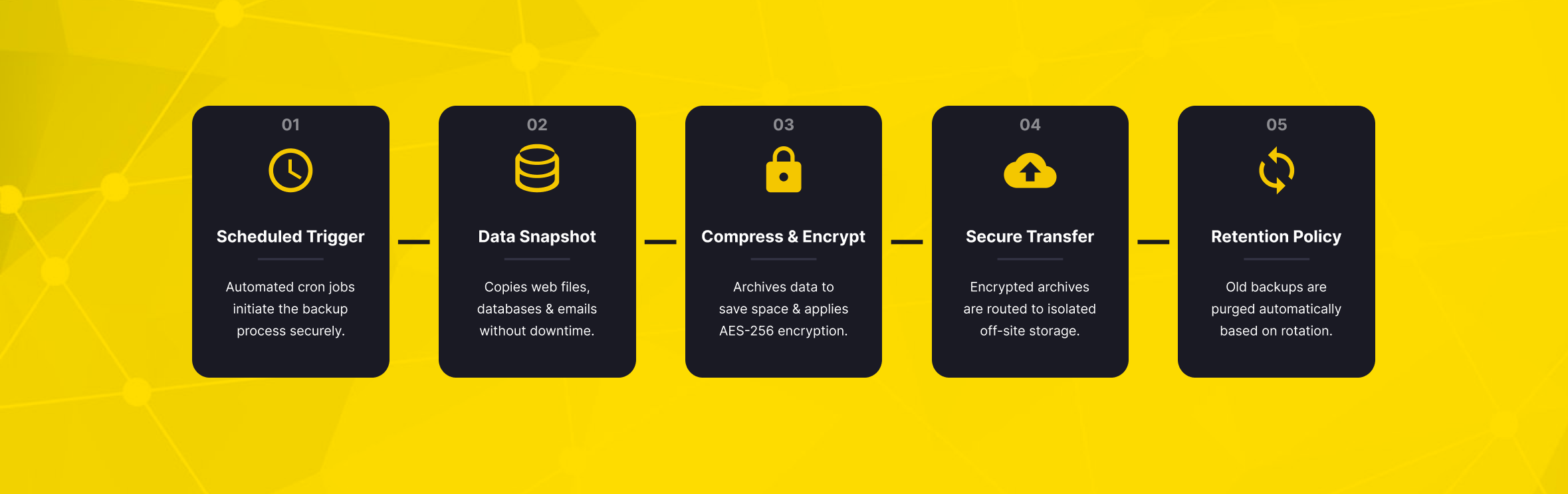
What Is Backup in Web Hosting and Why Does It Matter?
In web hosting, a backup is a secure copy of your website files, databases, emails, and key settings. A backup helps you restore your data after an incident. In practice, it is the difference between “we lost the website” and “we restored the website to a previous clean version.”
A web hosting service does more than keep a site online. It should also support continuity, data protection, and recovery. Your hosting provider directly affects website stability, storage, uptime, and recovery.
Backup quality matters. You should evaluate it together with performance, security, support, and scalability.
Backups matter because data loss rarely happens at a convenient time. It can occur during a campaign launch, a checkout peak, a CMS update, or a routine content change. If your last usable backup is several weeks old, restoring the site may not be enough. You could still lose orders, leads, updated pages, and customer records.
Common Causes of Website Data Loss
The most common causes of website data loss are usually simple, but their impact can be severe. Human error is one of the biggest risks. A wrong file deletion, database import, or theme change can make a live website unusable in minutes.
Cyberattacks are another major risk. Malware, unauthorized access, ransomware, and malicious code injection can damage or replace website files. Even if your security tools block many threats, a clean backup gives you a recovery path when prevention fails.
Hardware and infrastructure problems can also affect websites. Disk failures, power issues, network problems, or a data center incident may interrupt access to the host server. A backup stored in a separate location adds an extra layer of protection. It reduces the risk of one failure affecting both your live website and your recovery copy.
Software updates can create problems as well, especially for WordPress websites. A plugin, theme, PHP version, or CMS update may conflict with existing code. With a recent backup, you can test, roll back, and apply the update again with less operational risk.
A backup is valuable only if it can be restored. Businesses should not only create backups; they should also test restore workflows before an emergency happens.
Backup Types and Techniques Used for Websites
Different websites need different backup methods. A small brochure site may be safe with weekly backups and manual snapshots before major changes. A busy e-commerce store may need more frequent database backups. Orders, payments, and customer activity can change throughout the day.
Automatic Backups and Manual Backups
Automatic backups run on a schedule. They may be daily, weekly, or based on another defined interval. Their main advantage is consistency. Once configured properly, automatic backups reduce the risk of forgetting to protect the site before something goes wrong.
The website owner, developer, or system administrator starts manual backups. Users create manual backups when they need a specific restore point. They are especially useful before high-risk actions.
These include CMS upgrades, plugin installations, design changes, database imports, and migration work. A good backup strategy usually combines both: scheduled automatic backups for routine protection and manual backups before planned changes.
Full, Incremental, and Differential Backups
A full backup copies the entire website environment, including files and databases. It is easier to understand and often easier to restore, but it can take more storage and more time.
An incremental backup copies only the data that changed since the last backup. This approach saves storage and can run faster. However, restoring the latest version may require several backup points.
A differential backup copies everything that changed since the last full backup. It often offers a practical balance between speed and restore simplicity.
Cloud Backup and Off-Site Storage
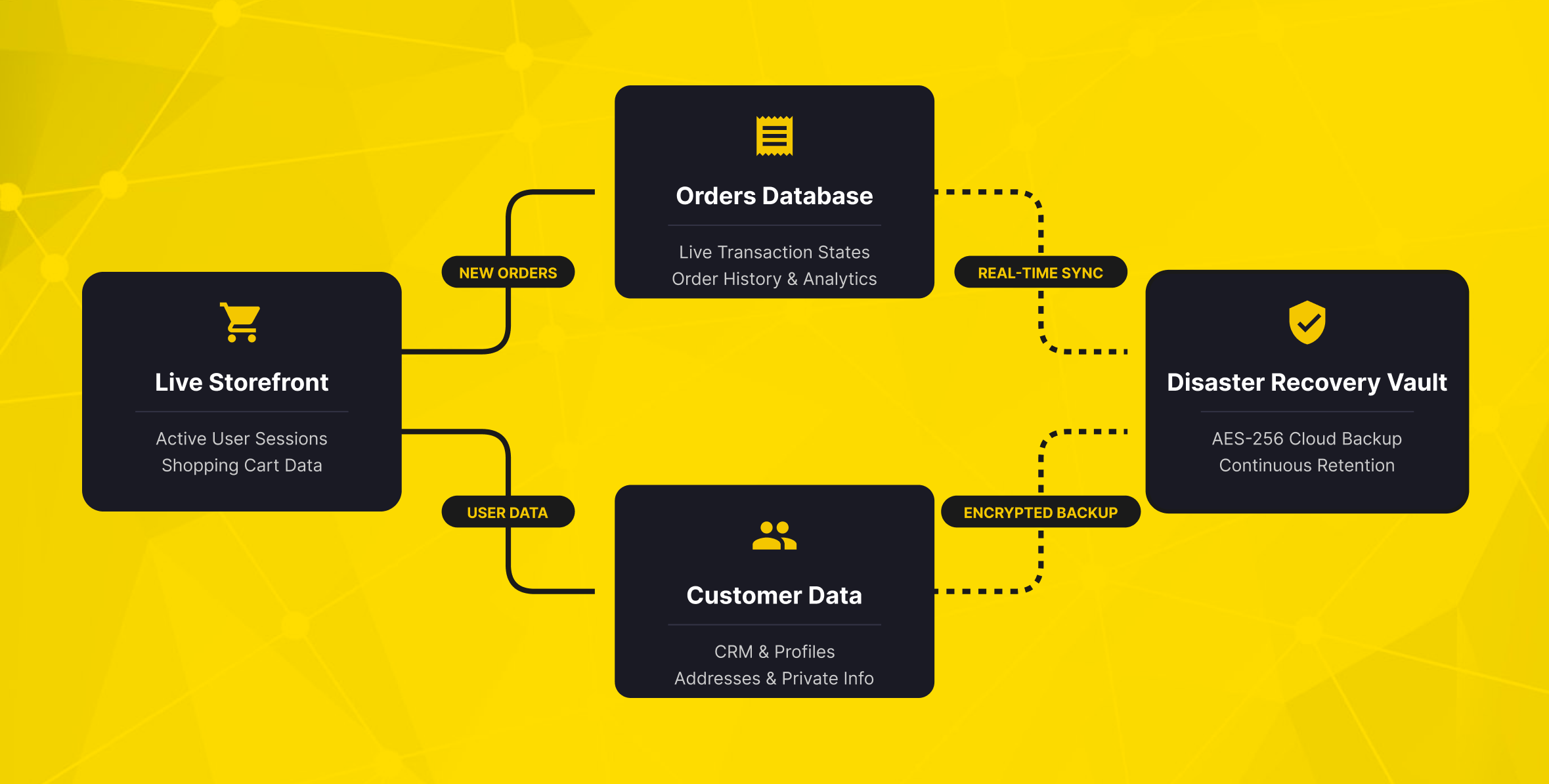
Cloud backup stores copies outside the main production environment. This is important for backup safety. A backup stored on the same server can face the same risks as the live website. A server failure, security breach, or accidental deletion could affect both the live site and the backup.
For many companies, cloud hosting and off-site backups work together. Cloud hosting provides flexible infrastructure, while off-site backups help keep websites recoverable.
For business-critical websites, the safest approach is to avoid a single point of failure. Keep production data, backup data, and restore access separated as much as possible. This is especially important for online stores, agencies managing multiple client sites, and corporate brands with active digital operations.
RPO and RTO for Website Backups
Two backup terms help teams choose the right plan:
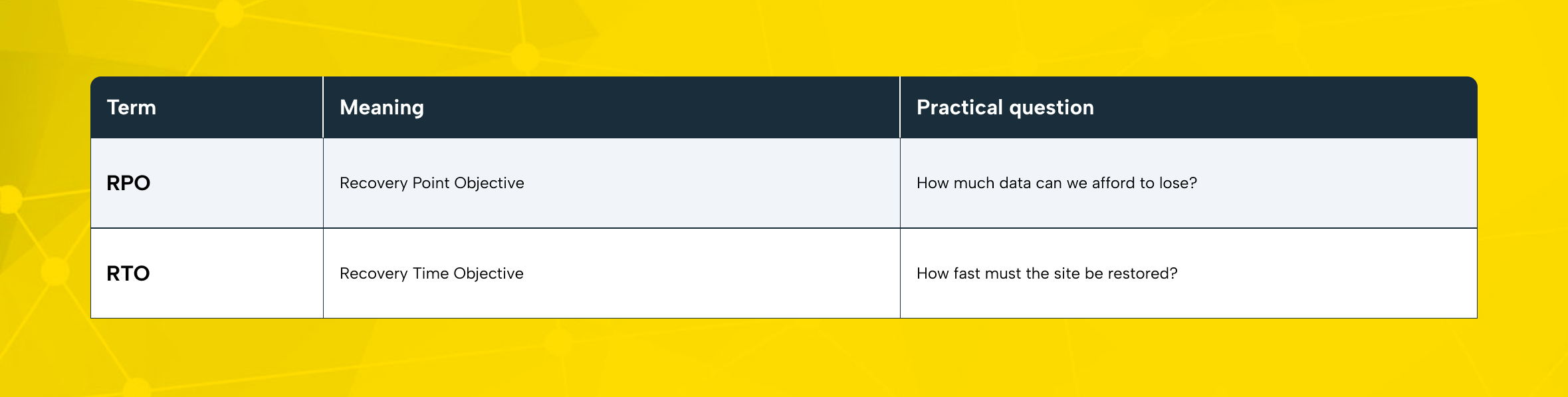
For a small blog, losing a few hours of content may be acceptable. For an e-commerce checkout, even a short gap can mean missing orders. Before choosing web hosting plans, define the maximum acceptable data loss and downtime for your business.
What Should a Reliable Web Hosting Plan Include?
A reliable plan should make backup policy visible before purchase. Do not evaluate website hosting only by disk space, traffic limits, or monthly price. The best plans offer clear answers about backup frequency, retention, restore method, security, uptime guarantee, and support response.
Backup Frequency and Retention
Backup frequency tells you how often a new copy is created. Backup retention shows how long older backup copies remain available for recovery.
Daily backups are useful, but retention matters. Keeping only one backup version can be risky. It may not protect against older issues.
A weekly backup with multiple restore points may be enough for some scenarios. However, high-transaction websites may need more frequent database backups.
When comparing shared hosting plans, ask these questions:
- Are backups included in the plan?
- Are they daily, weekly, or manually triggered?
- How many restore points are available?
- Are files, databases, and email data included?
- Can the customer restore from the panel, or is support required?
- Where are backups stored?
Control Panel Restore Options
A hosting control panel should make backup and restore workflows understandable. For many users, cPanel remains a practical option. It brings file management, database access, email accounts, SSL, and other website operations into one place.
A clear panel is valuable during an incident. The user does not need to search through technical commands. Instead, they can choose the right restore point, check the backup date, and return the site to a clean state. For SMEs and marketing teams, that usability can reduce dependency on developers for basic recovery actions.
Security Features Around Backups
Backups should be protected from unauthorized access. If an attacker can delete both your live site and your backup files, the backup strategy fails. Strong hosting options should combine access control, account isolation, SSL, malware-aware operations, and secure storage.
It is also worth checking whether the provider supports secure email, domain-linked mailboxes, and site-level SSL. A free domain or money-back guarantee can make a hosting package look attractive. However, these offers should not distract you from security, backup, and recovery details. These commercial benefits are useful only when the underlying service is strong.
How Backups Protect SEO, Revenue, and Customer Trust
Backups do not boost rankings directly, but they protect the stability SEO depends on. If a site is unavailable for days, users and search engines may lose trust in it. Broken links or malware can also damage organic visibility.
For content-heavy websites, backups protect articles, landing pages, images, metadata, redirects, and internal linking structures. Losing these elements can damage months or years of SEO work. For agencies, this risk multiplies across client projects.
For online stores, the impact is even more direct. Product catalogs, payment flows, customer accounts, order records, stock data, and campaign pages must remain recoverable. If a store loses recent orders or cannot restore checkout quickly, the impact can be serious. The business may lose revenue, face more support requests, and suffer reputational damage.
Backups also protect advertising investments. A broken website wastes ad spend and weakens conversion data. A fast restore process helps keep campaigns, analytics, and sales journeys stable after technical incidents.
Choosing the Right Hosting Options as Your Website Grows
Not every project needs the same infrastructure. A small business website, a content blog, a marketplace, and a custom application have different performance and recovery requirements. The goal is to choose hosting options that match today’s needs without blocking tomorrow’s growth.
A basic website builder may be enough for a simple landing page. However, it may not offer the same flexibility for custom integrations, advanced backup rules, or database recovery. Traditional website hosting is often a better fit when you need more control. It gives you more flexibility over files, CMS structure, email accounts, and SSL.
Shared hosting plans are usually suitable for small websites, portfolio pages, and early-stage business sites. They are cost-effective and easy to manage. However, as traffic, transactions, and customization increase, a business may need more control than shared resources can provide.
VPS hosting is a practical next step when a website needs more power and control. It provides dedicated virtual resources, stronger configuration options, and better performance isolation. Cloud hosting can help teams that need flexible scaling and infrastructure resilience.
A dedicated server or physical server may be suitable for websites and applications with higher demands. This includes high-traffic websites, heavy applications, strict compliance needs, and workloads that require full hardware control.
The key is to make backup planning part of the upgrade path. Moving to a more powerful server can improve performance. However, without better backups, monitoring, and restore procedures, it can create a false sense of security.
Backup Priorities for SMEs, E-Commerce Teams, Agencies, and Corporate Brands
Different organizations should evaluate backups through different operational lenses.
SMEs: Keep Recovery Simple
SMEs often need practical, low-maintenance protection. Their priority should be a web hosting plan with clear backup terms, SSL support, and basic security controls. Accessible support should also be part of the package. The backup process should not require advanced system administration for routine recovery.
E-Commerce Teams: Protect Transactions First
E-commerce teams should focus on database recovery, order continuity, and checkout stability. A backup that restores design files but misses recent order activity is not enough. Transaction-heavy stores should review backup frequency, restore testing, and how the provider handles urgent incidents.
Agencies: Standardize Client Operations
Agencies manage multiple websites, often with different CMS versions, plugins, user roles, and update cycles. Standardized backup procedures help reduce chaos. Before updating client websites, agencies should create manual restore points and document what changed.
Corporate Brands: Align Backup with Risk Management
Corporate brands need a more formal approach. Backup policies should connect with access control, incident response, compliance expectations, and business continuity planning. For larger organizations, backup is not only an IT task; it is part of operational risk management.
How Makdos Supports Safer Web Hosting and Recovery
Makdos helps businesses approach hosting as a continuity-focused service, not just a place to publish files. Makdos Web Hosting is a strong starting point for companies that need practical management, security, and easy recovery. It is suitable for business websites, WordPress websites, campaign pages, and online stores.
Makdos cPanel Hosting gives users a familiar control panel. They can use it to manage files, databases, email accounts, SSL, and website settings. This is important for backup planning. The same environment used to manage the website also supports daily operational control.
Makdos cPanel Hosting also provides weekly backups, helping customers reduce data loss risk when unexpected incidents occur.
Makdos also supports secure hosting operations with features such as AutoSSL, DDoS protection, account isolation, and technical support. These layers do not replace backup discipline, but they reduce the probability and impact of common hosting incidents. A stronger hosting foundation means fewer emergencies and clearer recovery paths when an incident does occur.
As websites grow, Makdos can also support migration from standard hosting to cloud servers, virtual servers, or dedicated infrastructure. This helps businesses start with the right-size web hosting service. As traffic, applications, or business requirements grow, they can scale toward stronger resources.
For agencies and growing businesses, the main value is continuity. They can work with one provider for hosting, server resources, security layers, and operational support. Strong hosting connects backups, SSL, performance, and support. Makdos brings them together as part of one consistent service experience.
Practical Backup Checklist Before You Buy Hosting
Before selecting a provider, use this checklist to compare the real value behind hosting packages:
- Backup frequency: Are backups automatic, manual, or both?
- Retention: Retention: How many earlier backup versions remain available?
- Restore control: Can you restore from the panel, or must support do it?
- Backup scope: Are files, databases, and email included?
- Storage location: Are backups separated from the live environment?
- Security: Are SSL, account isolation, and DDoS protection available?
- Scalability: Can you move from shared hosting to VPS, cloud, or dedicated resources?
- Support: Is technical help available when a restore becomes urgent?
- Transparency: Are limits, exclusions, and recovery terms clearly explained?
Do not buy hosting only by comparing price. A slightly cheaper plan can become expensive if it lacks usable backups, clear support, or a practical restore path.
Conclusion: Backups Turn Hosting Risk into Managed Recovery
Web hosting backups are essential for protecting website files, databases, customer records, SEO assets, and business continuity. They help you recover from human error, failed updates, malware, infrastructure problems, and unexpected downtime.
The right strategy combines automatic backups, manual restore points before major changes, secure storage, and tested recovery workflows. It also requires a hosting provider that understands business continuity. As your website grows, your backup plan should grow with it, from shared hosting to cloud, VPS, or dedicated resources when needed.
Makdos helps businesses run safer website operations. It brings together hosting, SSL, security, backup-aware management, and scalable server solutions. If your website supports sales, customer communication, lead generation, or brand reputation, reliability matters. Reviewing Makdos Web Hosting is a logical next step toward a more recoverable and stable infrastructure.