Whether you plan infrastructure for personal projects or for enterprise systems, one thing stays the same. You need a stable environment that fits the job. Understanding how these two popular distributions differ helps you make a sound choice.
In the rest of this article, we look at the core features of Ubuntu and CentOS and the use cases where each one shines.
We also cover performance, security, community support, and which one to pick in which situation on Makdos infrastructure. At the end, you will find practical advice and clear steps to help you make the choice that suits you best.
What Are Ubuntu and CentOS?
Ubuntu and CentOS are two separate operating system families built on the Linux kernel. Both are open source solutions that run on servers as powerful, reliable and free options. Their origins and the ecosystems around them, however, differ from each other.
Features of Ubuntu
Canonical develops Ubuntu, a Linux distribution based on Debian. Ubuntu stands out for its user-friendly interface and regular release cycles.
Thanks to strong community support, people widely use it on both desktops and servers. The server edition usually ships without a graphical interface and focuses on a minimal installation. It also targets server workloads.
Ubuntu's LTS (Long Term Support) releases come with extended support. These releases receive security updates for up to 5 years and give long term projects a stable foundation. At the same time, Canonical publishes a new interim release every six months. This model gives you faster access to the latest software packages.
One of Ubuntu's standout features is its large software repository. With the apt package manager, you can reach tens of thousands of software packages and install the applications you need in no time. Ubuntu has a large community and comprehensive documentation behind it. As a result, the system feels accessible and easy to learn for new users.
Canonical also offers paid support options, so you can get enterprise-grade technical support when you need it. In short, Ubuntu is an operating system that meets the need for up-to-date software. You can learn it fairly quickly, and its ecosystem is broad.
Features of CentOS
The CentOS project built its system from the source code of Red Hat Enterprise Linux (RHEL). CentOS aims to deliver long-term stability in enterprise environments. The name comes from "Community Enterprise Operating System," and the system is completely free.
CentOS has a structure that is one-to-one compatible with RHEL. As a result, software that runs on RHEL also runs smoothly on CentOS. This smooth fit with other systems made CentOS a top pick for companies and data centers. CentOS delivered enterprise-grade stability and long-term support without any license fee.
One of the greatest strengths of CentOS is stability and reliability. Package updates arrive less often than on Ubuntu. This approach keeps the system built on well-tested, stable versions. Administrators preferred this approach especially on mission-critical servers, where everything has to run predictably.
As its default security policy, CentOS uses the SELinux (Security-Enhanced Linux) module inherited from RHEL. This module lets you manage system security centrally and effectively. SELinux enforces strict security rules on the processes that can run on the system. In this way, it protects the server against malicious activity.
Community support plays an important role for CentOS. Its user base, however, is narrower than Ubuntu's. Documentation and forum content therefore tend to be more technical.
A high share of experienced system administrators is an important trait of the CentOS community. Thanks to them, answers to questions are usually thorough and in-depth. No company offers direct commercial support for CentOS. Because it works with RHEL, you can use the docs and guides that come from the Red Hat ecosystem.
The CentOS project has gone through a major change in recent years. The classic releases known as CentOS Linux came to an end starting in 2021. CentOS Stream took their place and now prepares the ground for future RHEL releases.
CentOS 7 also reached the end of its official support on June 30, 2024. That is why new projects should aim for long-term stability from the start. Options such as AlmaLinux, Rocky Linux and Ubuntu LTS meet this need.
Which Operating System for Which Server Scenario?
The right operating system for your server depends on what you plan to use it for. Ubuntu and CentOS offer different advantages in different scenarios, such as web hosting, custom application servers or development environments.
Choosing for Web Hosting
If you plan to set up a web hosting environment or host your own websites, your choice matters. The right operating system makes a real difference. Both options run on Linux, so both cover your basic needs.
In the past, many shared web hosting services ran on CentOS with control panels such as cPanel. The reason was the stable structure of CentOS. Hosting control panels also supported only RHEL-based systems for a long time.
For example, the widely used cPanel control panel ran only on CentOS (and RHEL derivatives) for years. That is why traditional hosting companies delivered their Linux web hosting services on CentOS.
Today, however, the balance is shifting. Ubuntu has become very popular as a web server too, especially in cloud server and VPS environments. Many cloud service providers, on platforms such as AWS and DigitalOcean, offer Ubuntu Server images by default. This makes setup fast and practical.
You can easily install popular web components such as Apache, Nginx, MySQL and PHP on Ubuntu. Thanks to the large online community, you can quickly find answers when problems come up.
cPanel has also added Ubuntu support, starting with Ubuntu 20.04 LTS. Current cPanel releases now run on Ubuntu 24.04 LTS. So users who prefer Ubuntu can install cPanel on it as well.
When you use reseller hosting, the provider usually does not leave the operating system choice to you. The provider offers either Linux or Windows hosting. For example, Makdos Web Hosting packages are Linux-based by default and come with the user-friendly cPanel interface. Behind the scenes, this usually means an operating system such as CloudLinux.
If you plan to rent your own server to host websites, the operating system choice is yours. When quick access to new web solutions and broad community support are your priority, Ubuntu is a good option.
Maybe you aim for a hosting infrastructure with few changes that will run in the same setup for a long time. Then stability should come first. In such scenarios, CentOS or the RHEL-compatible Linux distributions that carry its legacy forward are a better fit.
Application Servers and Development Environments
Another scenario is setting up custom application servers or building software development and test environments.
For example, you might be planning a Node.js-based application server, an API service written in Python or a container infrastructure. Teams often choose solutions such as Docker or Kubernetes in these scenarios.
In such cases, Ubuntu is usually the leading choice. Why? Thanks to its fresh package sources, Ubuntu lets you easily install the newest versions of popular programming languages and tools.
Ubuntu's popularity among developers means Ubuntu examples show up more often in documentation and tutorials. So when you run into a problem, you are likely to find an article that explains the fix on Ubuntu. This is especially true for English-language sources.
On the other hand, CentOS remained a preferred choice for enterprise application servers. Many commercial applications and databases in sectors such as banking and telecom require RHEL certification. For this reason, CentOS stood out as a natural choice in these areas for a long time.
If the application you plan to use requires Red Hat certified software, the operating system choice becomes critical. In such scenarios, CentOS would have been the better choice.
At this point, you should consider the current state of CentOS. CentOS Stream replaced the classic releases, and that pushed enterprise users toward solutions such as AlmaLinux. Still, these alternatives carry on the traditional structure once known under the CentOS name. Technical RHEL compatibility therefore continues.
When you choose a server operating system for development environments, your team's expertise is also an important criterion. With a team of junior developers, getting set up quickly matters. Setting up your environment on Ubuntu Server and starting work can be more efficient.
Your team may include experienced Linux system administrators. The company may also have worked with the RHEL ecosystem for years. In that case, keeping the existing path makes sense. Staying on the CentOS line or using RHEL directly keeps your infrastructure consistent.
In short, in application and development scenarios, Ubuntu offers flexibility and up-to-date software, while CentOS offers consistency and enterprise compatibility.
Performance, Stability and Security Comparison
When you choose a server operating system, performance, efficient use of system resources, stability and security come first. Ubuntu and CentOS largely share the same foundation in these areas, but some differences remain.
System Resource Usage
On the performance side, Ubuntu and CentOS build on the same Linux kernel. On the same hardware, you usually will not notice a speed difference for similar workloads. Installing an application on Ubuntu or on CentOS does not decide performance on its own. Hardware resources and the optimizations you make have the real impact.
That said, small differences in system resource usage can exist. Even in a minimal Ubuntu Server installation, some extra services may run by default. Canonical's cloud-init and snapd see heavy use, especially on cloud servers.
A minimal CentOS installation, on the other hand, comes quite bare, and fewer unnecessary services may start at boot. On Ubuntu, those extra services can add a few hundred MB of memory use. In most real-world scenarios, however, this difference is negligible.
By design, CentOS ships older but proven package versions. In some scenarios, this approach can lead to more efficient resource usage. A server running CentOS 7 works with an older kernel and older libraries. As a result, it can keep doing its job without the extra memory that new features consume.
Ubuntu, in turn, delivers new features through its regularly updated kernel. Rarely, though, some releases may bring extra hardware requirements or missing optimizations. These differences usually show up only in specific scenarios. Overall, Ubuntu and CentOS are very close in terms of performance.
On the stability side, CentOS focuses on long-term stability, so it uses system resources in a predictable way. A CentOS server that runs for a long time without updates keeps its stable structure. As a result, its performance profile stays very close to the day you first installed it.
On Ubuntu, frequent version upgrades can change how the system behaves. This is especially true if you use the non-LTS interim releases. For many system administrators, Ubuntu LTS releases are a safe choice. During the five years of support, the system stays stable and receives only security patches.
Security and Updates
In terms of security, both systems benefit from the core advantages of Linux. Strong file permissions, regular security patches and a large security community form the basis of this structure. CentOS closely followed RHEL's security patches, so people saw it as a secure distribution. Critical security holes fixed in RHEL soon reached CentOS packages as well.
One important point deserves attention here. RHEL patches did not always reach CentOS right away, and delays sometimes happened. In urgent security cases, CentOS users received patches a little later.
Compared with RHEL users, the update window could stretch by a few days. In most scenarios, this did not cause serious problems. Companies usually ran CentOS in enterprise environments that they isolated from the internet or protected with strong firewalls.
Ubuntu, on the other hand, does well at delivering security patches quickly and automatically. For many packages, Canonical offers automatic security updates through unattended-upgrades. So when someone finds a critical flaw, an Ubuntu server can update itself on its own. With the feature turned on, the system administrator does not need to step in manually.
Ubuntu also comes with a security framework called AppArmor. This framework works much like SELinux and runs by default on Ubuntu. AppArmor is not as strict as SELinux, but it lets you restrict application access through profile definitions.
Ubuntu and CentOS take different approaches to update frequency. Ubuntu refreshes its non-LTS releases every six months. It supports each interim release for only about 9 months. You get new features and patches quickly this way, but you need to keep a constant eye on them.
Ubuntu LTS releases receive 5 years of standard support. During this time, you can keep the system stable by applying only security updates. In the classic CentOS Linux era, major releases enjoyed long support periods. These usually ranged from 7 to 10 years.
For example, CentOS 7 came out in 2014 and received support until 2024. You could set up a server and run it for ten years without major changes, with security patches only. This long term support model was one of the things that made CentOS attractive.
Remember, though, that the CentOS Stream model no longer offers a classic LTS CentOS release. CentOS Stream serves as a development and testing platform that comes before RHEL.
Its ongoing updates raise some questions about how predictable it is in production environments. When you look at security and update management together, choosing the right distribution matters. From this angle, Ubuntu LTS releases offer a safer option, especially for critical systems. Ubuntu LTS receives regular security updates and keeps its stability at the same time.
Teams that do not want to leave a RHEL-based infrastructure have a clear decision to make. You can opt for the continuous update model of CentOS Stream. Alternatively, you can choose 100% compatible solutions such as RHEL or AlmaLinux through Makdos.
In short, CentOS stands out in security with SELinux support and its enterprise approach. Ubuntu gains the edge with fast updates and broad community support. Both systems can give you a secure infrastructure when you apply updates regularly. Following security principles keeps the server environment solid.
Differences in Support, Documentation and Community
Another important factor in your operating system choice is the support you will get. Also consider the available documentation and the size of the user community. Ubuntu and CentOS come from very different backgrounds in terms of the support structure behind them.
Relationship with Red Hat Enterprise Linux
To fully understand CentOS, you need to know its relationship with Red Hat Enterprise Linux (RHEL). Red Hat sells RHEL through a paid subscription model that includes enterprise support. This model has made RHEL a long-standing choice in critical areas. These include banks, large companies and public institutions.
RHEL's source code was open, so the CentOS project built on that code. The team removed the brand and commercial elements and rebuilt the code. They then offered the result as a community-driven project.
In other words, CentOS was roughly a free derivative, or clone, of RHEL. That is why guides and documents written for RHEL also applied to CentOS. Most applications ran smoothly on it as well. In fact, many system administrators running CentOS used RHEL's official documentation as their reference.
The one-to-one compatibility between CentOS and RHEL brought an important advantage. Red Hat, however, gave official support only to RHEL subscribers. Support on the CentOS side came mainly from the community.
Say you ran into a problem you could not solve. You could not call Red Hat and ask for support (unless you had bought a subscription). In that case, CentOS users usually turned to forums, mailing lists or paid third-party support companies.
Community support for CentOS used to be quite strong. Experienced users answered questions, especially on the CentOS forums and platforms such as Stack Overflow. Compared with the size of the Ubuntu community, however, it remained more of a niche. CentOS users were mostly system administrators and professionals, while Ubuntu appeals to users of every level.
The relationship between CentOS and RHEL went through a major change at the end of 2020. Red Hat's announcement marked the start of a new era for the project. CentOS would no longer be a one-to-one clone of RHEL. Instead, it would continue as RHEL's development branch (upstream) under the name CentOS Stream.
This change pushed many users who relied on the classic CentOS releases to look for alternatives.
As a result, the community created fully RHEL-compatible alternatives. Gregory Kurtzer launched Rocky Linux, and the company CloudLinux launched AlmaLinux. These alternatives set out to fill the gap left by the earlier-than-expected end of CentOS 8. They won strong backing from the enterprise community.
Today, CentOS 7 has reached the end of its life as a legacy release, with support ending on June 30, 2024. CentOS Stream 9 and CentOS Stream 10 now represent the current development streams just ahead of RHEL 9 and RHEL 10. Meanwhile, many former CentOS users have moved to alternatives such as Rocky Linux or AlmaLinux.
To sum up, you cannot get official commercial support for CentOS directly (because you get the product for free). Instead, you can buy a RHEL subscription and keep using the same system, or you can get help from community forums.
Key information sources for CentOS users include Red Hat documentation. In addition, the CentOS Wiki and platforms such as Stack Exchange offer important support. The good news is that the RHEL world has existed for many years. This kind of documentation is therefore very comprehensive and detailed.
Canonical Support for Ubuntu
Ubuntu has an entirely different support ecosystem. Canonical, the commercial force behind Ubuntu, runs a planned program to support every new release.
For Ubuntu LTS releases, you can buy enterprise support from Canonical through Ubuntu Pro. The company formerly called that service Ubuntu Advantage.
This means that when you run into a problem, you get help directly from Canonical engineers. Canonical has a strong presence, especially in cloud infrastructure. There, it provides consulting and support to companies that use Ubuntu.
From a community perspective, Ubuntu probably has the largest Linux user community in the world. You can find a large number of resources in both English and Turkish. These include forums, Facebook groups, Stack Overflow and Stack Exchange threads, and YouTube tutorial channels. The size of this community is a big advantage, especially for beginners.
For example, a search like "how to install program X on Ubuntu" easily brings up detailed content. More often than not, the first page includes a blog post with step-by-step instructions. You can also find answers to similar questions on the CentOS side. Even so, those resources are fewer than Ubuntu's, and the explanations tend to focus on technical details.
Ubuntu's official documentation is also very user-friendly. With the Ubuntu Wiki, official documents and community guides, you can find a resource on almost any topic. Canonical also runs an official Discourse-based forum, where developers answer user questions too.
Another point is that Ubuntu's release cycle and package system may feel more familiar to new users. Thanks to its Debian base, you install packages with the apt-get and apt commands. When errors occur, these tools usually give clear output that points you in the right direction.
On CentOS, yum/dnf is just as easy to use, but package names and the repository structure differ a little. For example, on CentOS you may need to add repositories such as EPEL manually for extra software. On Ubuntu, you can usually find many packages with a single command.
In conclusion, when you use Ubuntu, you become part of a large community. When you need it, you can also benefit from enterprise support from Canonical. With CentOS, you can get a similar level of enterprise support only through a RHEL license. On the community side, you get a smaller but technically experienced user base.
Weighing support channels is a critical step during selection. At the end of the day, how fast you solve problems depends on the platform's community and support structure.
Ease of Installation and Management
Installing and managing an operating system day to day can matter a lot, especially for new users. Ubuntu and CentOS differ in package management, tools and overall ease of use.
Package Managers and Interfaces
One of the most fundamental differences between Ubuntu and CentOS is the package management system they use.
Ubuntu comes from Debian, so it uses the APT (Advanced Package Tool) package manager and supports the .deb package format.
CentOS is a RHEL-based distribution, so it uses the YUM package manager, or DNF in newer releases. You manage software through the .rpm package format.
What does this mean in practice? Both package managers work on a similar basic logic. They download packages from software repositories and manage installations and updates centrally. The command syntax and some default settings, however, differ.
To install software on Ubuntu, you usually follow these steps:
sudo apt update
sudo apt install <package-name>
The equivalent on CentOS is:
sudo yum check-update
sudo yum install <package-name>
As both examples show, apt and yum commands differ, but they do the same job. For beginners, the command differences may call for a short learning period at first. Even so, package management is simple, powerful and practical on both distributions.
Now to the interface. Server operating systems usually run without a graphical user interface (GUI). You manage both Ubuntu Server and a minimal CentOS installation through the command line.
If needed, you can later install a desktop environment on Ubuntu. Alternatively, you can add a web-based management panel such as Webmin.
Similarly, on CentOS you can use the GNOME interface or panels such as cPanel and DirectAdmin. From this angle, the two systems show no major difference in interface management after installation. What really decides it is which ecosystem you know better.
Ubuntu users usually feel at home with apt commands and the Debian-style system logic. CentOS users, on the other hand, know yum/dnf and RHEL-style configuration files.
On Ubuntu, you usually add a third-party software repository with the add-apt-repository command. On CentOS, you need to create a .repo file and add the repository address manually, or use the yum-config-manager tool.
Small differences like these shape how an administrator works over the long run. So if your team has more experience on one side, sticking with that package manager may be faster.
Another topic is the installation process and ISO sizes. The Ubuntu Server installation ISO is usually quite minimal and provides a fast installation. The installer asks only basic questions, and you handle everything else with the package manager.
Distributions such as CentOS and AlmaLinux offer more detailed options through the Anaconda installer. They give the user more control in steps such as disk partitioning and package selection. This gives experienced users flexibility, but it can confuse beginners. In both cases, though, sticking with the "default" settings usually leads to a trouble-free server installation.
Difficulty Level for Beginners
New Linux users and people new to server administration usually find Ubuntu easier to learn. Several reasons explain this.
- Plenty of community content and documentation. When beginners run into problems, they can reach more resources about Ubuntu. The wealth of Turkish and English content shortens the time to a fix. For example, a search like "ftp server setup" makes it easier to find detailed Ubuntu guides. On the CentOS side, similar content is usually more limited.
- A familiar experience. Many users get their first taste of Linux with Ubuntu Desktop. If you know Ubuntu on the desktop, the server edition shows the same file structure and similar commands. CentOS offers an environment most new users have never met before. The lack of a widely used desktop edition makes it feel less familiar.
- Consistent package names and versions. In Ubuntu's repositories, software usually appears under its current name (for example, nodejs or python3). CentOS, by contrast, puts new users in surroundings they rarely know. Its desktop edition also sees little use, so the system feels less familiar. That can confuse a beginner who does not yet know what to install and how.
Still, calling CentOS completely unsuitable for beginners would be unfair. Users who manage servers with panels such as cPanel and Plesk do not deal with infrastructure details directly. So whether CentOS or Ubuntu runs underneath makes little difference in daily use.
The control panel handles many tasks automatically, and the user only has to work through the interface. In this case, the learning curve comes down to the panel software's interface. Many new users can easily put their website online thanks to shared hosting control panels. They do not need to face the complex structure of Linux directly along the way.
When you manage the server directly from the terminal, the quality of information sources matters more. At this point, the official CentOS documentation and community answers usually use more technical language. The Ubuntu community tends to use simpler language and offers plenty of beginner-friendly guides.
In conclusion, if you are just starting out, your learning curve may be gentler with Ubuntu. Ubuntu has lots of community content that teaches you server management step by step. CentOS, on the other hand, may put you in a more "serious" environment. You will be learning an enterprise-level setup right away.
If you aim to specialize in the RHEL ecosystem over the long term, choosing the right distribution matters. The learning process may be harder at first, but continuing with CentOS can be a sensible choice from this angle.
In general, though, Ubuntu is the right choice for a first server experience. It helps anyone get through that start successfully and with minimal stress.
Which Operating System Fits Where with Makdos?
At Makdos, we offer both virtual server and dedicated server solutions in our hosting infrastructure. With these services, customers get flexible use with a choice of operating systems. So which operating system should you choose in which case, and how do the Makdos panel and support fit in?
Choices for Virtual and Dedicated Servers
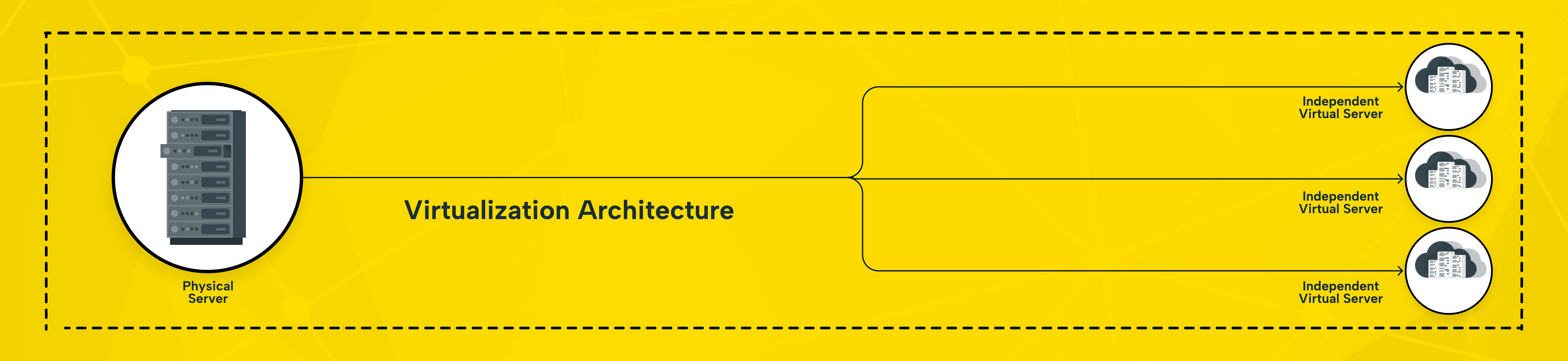
Some practical differences may apply to operating system choice between virtual servers (VPS/Cloud) and physical servers (dedicated). In the Makdos Virtual Server Hosting service, you manage the installation through a user-friendly panel. You can install Linux distributions such as Ubuntu, CentOS and Debian, or Windows Server versions, with a single click.
Virtual servers usually serve scalable applications or trial and development environments. In such dynamic environments, users often prefer an up-to-date, practical system like Ubuntu.
For example, setting up the environment quickly on Ubuntu is a common approach when you develop a cloud application. Setting up a separate virtual server for testing is also a natural part of the process.
Companies usually choose physical servers for long term projects. They stand out in systems that need high performance and serve a specific purpose. For example, busy database servers and large web applications usually run on physical servers. Workloads that need access to special hardware such as GPUs also favor this setup.
In such cases, the company's current IT rules and skills play a part when choosing the operating system. With Makdos Dedicated Server Hosting, you can also install Ubuntu or CentOS as your Linux distribution. The latter also has its own derivatives.
Out of habit, our enterprise customers have usually preferred releases such as CentOS 7, which stayed stable for years. The end of CentOS 7 support, however, pushed businesses to look for new options. In this process, many companies are moving to Ubuntu LTS releases. Others choose alternatives such as AlmaLinux instead of CentOS.
You can easily manage virtual and dedicated servers through the Makdos panel. Reinstalling the operating system or switching to a different one takes just a few steps. After a trial, you can choose Ubuntu instead of CentOS. Our customer panel lets you reset your server and reinstall it with Ubuntu LTS within minutes.
You can use Ubuntu during development and testing and then move to a RHEL-compatible system in production. On Makdos infrastructure, these transitions are fast and give you flexible freedom of use.
Support and Panel Compatibility
The experienced Makdos technical support team specializes in various Linux distributions, especially Ubuntu and CentOS. This gives customers broad technical support coverage. Whichever operating system you choose, our 24/7 support team is ready to help you with any issues. What matters here is which management tool or control panel you choose.
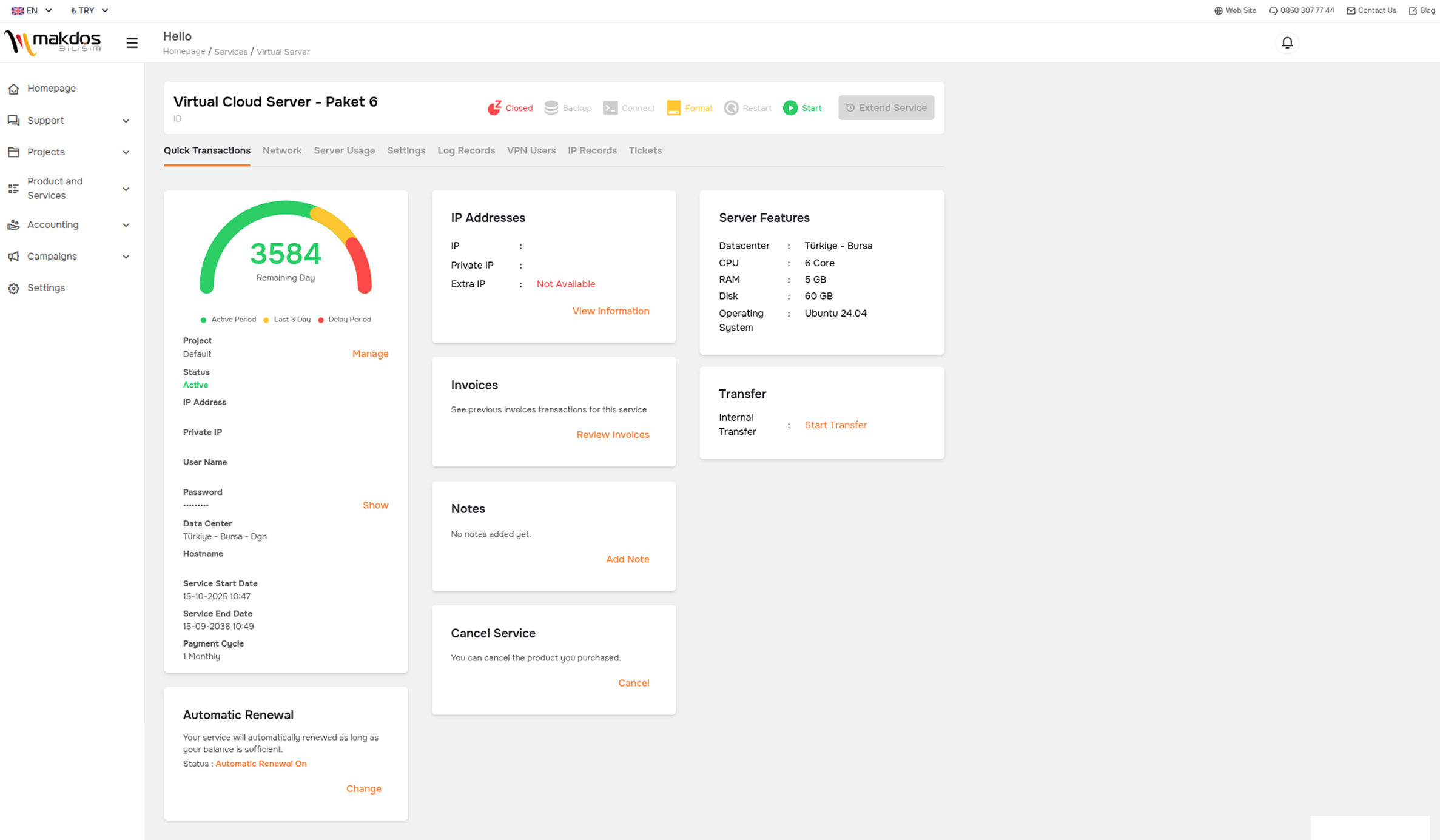
You can manage your server directly from the command line without a control panel. In that case, the Makdos panel offers practical tools for basic server management. You can easily restart the server, open console access and monitor resources.
These tools work on their own, so it does not matter which operating system you use. So whether you use Ubuntu or CentOS, you get full compatibility with the Makdos panel.
For example, the Makdos customer panel shows the server's status information and resource usage on a single screen. You can track CPU, RAM and management tools in real time for all Linux distributions. You can also reinstall the operating system with one click or boot the server in rescue mode from the panel.
From the control panel software perspective, some panels may have specific operating system requirements. cPanel/WHM supported only CentOS for a long time, and that was an important factor. When a team planned to use a panel, CentOS stood out as the only option in most scenarios. Since cPanel added Ubuntu support, starting with Ubuntu 20.04 LTS, its range of use has grown.
Today, you can run cPanel on an Ubuntu-based server on Makdos infrastructure.
The Plesk control panel, on the other hand, works with many different Linux environments by design. You can use the same panel whether you run Ubuntu, Debian, CentOS or RHEL. Other popular panels such as DirectAdmin also support multiple distributions in a similar way.
At Makdos, we give customers the flexibility to get the right panel and operating system together. For example, we provide a CloudLinux and cPanel infrastructure behind the scenes for our Web Hosting customers. For Cloud Server services, we deliver servers with the operating system the customer prefers.
What matters for you is that your chosen operating system works with the software stacks and tools you plan to use. Ubuntu is a good option for anyone who wants to work with up-to-date software and familiar commands.
Long-term stability and the wish to stay in the RHEL world, on the other hand, bring CentOS-like solutions to the front. Either way, the Makdos panel and technical team will support you whatever you choose.
The Decision Process: Which One to Choose and When?
In light of all this information, you need to assess your own use case and priorities when you reach the decision stage. Below, we share some recommendations for different user profiles.
Recommendation for SMEs
Small and medium-sized enterprises (SMEs) often operate with a limited IT team. Deep technical expertise in server management may not always be available. That is why simplicity and reliability should come first for SMEs that manage their own infrastructure.
In this context, Ubuntu Server offers fast access to security patches. With broad community support and easy-to-use tools, it stands out as a strong option. Ubuntu LTS releases, with 5 years of support, fit the long term plans of SMEs.
Say you plan to set up a server to host your CRM or e-commerce site in-house. By following Ubuntu installation guides step by step, you can complete the process more easily. Agencies and freelancers all over the world use Ubuntu. This popularity makes communication and problem-solving easier when you get outside support.
Some SMEs take a different approach instead of managing their server infrastructure directly. These businesses usually prefer managed services or servers with a control panel.
If you plan to manage your websites with a control panel such as cPanel, infrastructure details stay in the background. In this scenario, the operating system underneath matters less. You can then choose the platform that Makdos recommends as part of its managed server services.
In the past, most cPanel servers ran CentOS 7. This wide use made CentOS stand out as a safe option for SMEs.
Keep in mind, however, that CentOS 7 reached the end of its life in June 2024. New cPanel servers now usually run on AlmaLinux or Rocky Linux. Behind this change, once again, lies the transformation of the CentOS project.
In conclusion, if an SME's priority is stable operation and running things easily, Ubuntu LTS is a good choice. If your existing CentOS setup meets your needs, you do not have to change direction. You can carry on the same setup without trouble on an equivalent alternative such as AlmaLinux.
Makdos has the tools and support to help you in both scenarios. What matters is that you can manage your servers without disrupting your business. You also need to keep the system up to date so that security flaws do not leave it exposed.
Recommendation for Technical Experts
For technical experts and system administrators, the Ubuntu or CentOS question has no single answer. In most cases, the requirements of the job determine the right choice.
An experienced Linux user can easily handle core administration tasks regardless of the distribution. Someone who knows one system well adapts to the other quickly. Here, the decision rests more on what your expert specializes in and the features you need.
For a Linux system administrator who has long worked with RHEL-based systems, a familiar environment matters. Here, CentOS or AlmaLinux offers a natural comfort zone.
You may have experience with systemd service management, SELinux policies and dnf package management. Putting that expertise to use matters a lot. In most scenarios, keeping that know-how inside the RHEL ecosystem is a sensible choice.
Your enterprise environment may also use tools built for Red Hat-compatible systems. Solutions such as Satellite Server make staying on the CentOS or AlmaLinux line even more sensible.
As a software developer, you usually want to move fast when you need to set up a server. Making sure installation and configuration do not slow you down becomes a priority. Here, Ubuntu's simplicity and package variety can save you time.
Take an expert working in machine learning, for example. Ubuntu has more guides and ready-made PPA repositories for NVIDIA drivers and CUDA libraries. For web development teams, a LEMP stack (Linux + Nginx + MySQL + PHP) is a common need. On Ubuntu, richer and more accessible documentation supports this stack.
Another topic technical experts should weigh is the freshness vs. stability dilemma. Some experts may want the newest kernel, the latest container technology and the latest libraries. In this scenario, Ubuntu's current releases or interim releases become more attractive. Alternatives such as Debian Testing or Arch Linux are also worth a look, but they are more niche options on the server side.
Another expert may say, "Set the system up, let it run rock-solid for 5 years, and I will just apply security patches." In this case, a slowly changing RHEL/CentOS-style environment fits better.
At Makdos, we suggest a clear approach to our technical customers. Use innovative platforms such as Ubuntu in test and development environments, and use mature LTS releases in production. This lets you get the best of both worlds.
Makdos cloud servers come with cloning and fast installation features. With them, you can test the same system side by side on Ubuntu and on CentOS derivatives. Give both distributions a chance to broaden your expertise, and you will be more flexible in future projects.
Conclusion and Recommended Next Step
In short, the Ubuntu vs CentOS debate has no absolute right answer. The right choice depends entirely on your needs and use case. In this article, we covered the comparison between the two systems in detail.
We saw that Ubuntu stands out with its up-to-date structure, large community and ease of use. CentOS, in turn, appeals to a specific user base with its stability, RHEL compatibility and enterprise track record. In terms of performance and security, both systems offer a strong foundation. They follow different strategies, however, for update management and support periods.
So what have you learned? We answered the core questions people ask about Ubuntu and CentOS. We compared the situations where each distribution fits better. You learned what to watch for in scenarios such as web hosting, application development and enterprise use.
We also explained how Makdos infrastructure supports both options and the flexibility we offer you.
So what should you do now? If you are still undecided, the best method is a small trial. You can easily set up two separate virtual servers on Makdos cloud servers, one with Ubuntu and one with CentOS. Use both systems and test which one suits you better.
You can convert your server from CentOS to Ubuntu or the other way around. After you back up your important data, you can run the installation easily from the Makdos panel.
Whatever you choose, the Makdos team is here for you. You may want to try the latest technologies or build a highly stable production environment. Either way, we can provide the server solutions that fit your needs.
You can put a virtual server that fits your needs to work within minutes. Visit our Virtual Server Hosting page on the Makdos website to get started.